
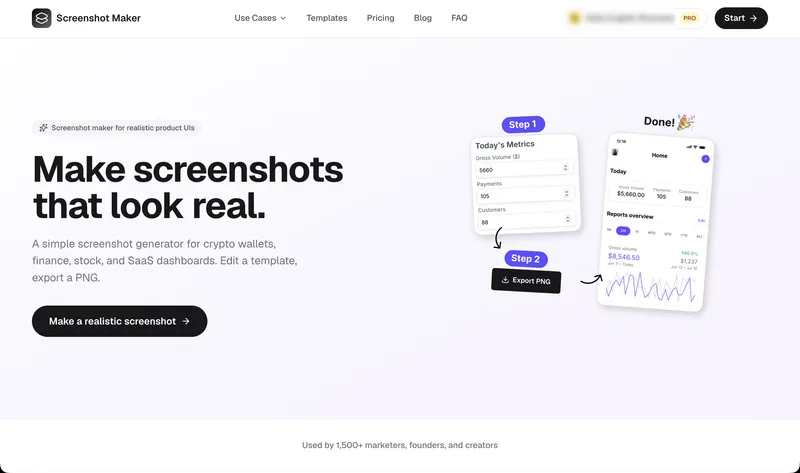
Screenshot Maker is a browser-based screenshot generator that turns editable UI templates for crypto wallets, finance, stock and SaaS dashboards into realistic-looking product screenshots exported as PNG files.
What is Screenshot Maker?
Screenshot Maker is a web app for producing realistic product screenshots without opening a design tool such as Figma or Photoshop. You pick a template modeled on a live app interface, edit its text, numbers, and icons in an instant live preview, then export the finished frame as a full-resolution PNG. Template families include SaaS storefront dashboards, payment/revenue report screens, stock portfolio summaries, crypto wallets, and messaging layouts for WhatsApp, iMessage, Instagram DM, and X DM. The site states it is used by more than 1,500 marketers, founders, and creators.
What makes Screenshot Maker stand out?
- App-accurate template library — layouts built to resemble real product screens, including a Digital Products Store dashboard with leads, store views and order rows, and a Stripe-style Business Payments report with gross volume and net volume figures.
- Live editing of what viewers notice — swap text, numbers, and icons such as total revenue, account balance, portfolio value, or chat messages, with the preview updating instantly.
- PNG export — download the finished screenshot at full resolution for ads, decks, and landing pages, with no design source file to maintain.
- Crypto-specific templates and data — wallet screens show assets with icons fetched from the site's crypto icon endpoint, including Bitcoin (BTC) and Ethereum (ETH) rows with price and percentage change.
- Messaging templates — WhatsApp, iMessage, Instagram DM, and X DM conversation layouts for building believable chat screenshots.
- Per-template editor URLs — each template opens its own editor page, so you can start editing a specific layout directly.
- Free starting point — a selection of popular templates can be used and downloaded without a credit card.
Who should use Screenshot Maker?
- Growth marketers: build ad creatives and social proof that look like live product screens, without waiting on a design team.
- Startup founders: produce App Store and landing page screenshots that feel native to their own product instead of generic mockups.
- Content creators: create crypto wallet, finance, and stock screenshots for posts and videos.
- Agencies: deliver client-ready UI screenshots quickly across multiple accounts.
What can you do with Screenshot Maker?
- Crypto content: generate wallet and portfolio screens with BTC/ETH holdings and balances for posts or explainer videos.
- SaaS launch pages: fill in a storefront or analytics dashboard template with your own revenue, leads, and order numbers for a landing page hero.
- Ads and social creatives: export PNG frames sized for feed and story placements, including DM-style conversation screenshots.
- Investor and pitch decks: drop in a stock portfolio summary or revenue report screenshot to illustrate traction visually.
How does Screenshot Maker work?
- Pick a template from categories such as dashboards, finance, stock, crypto wallets, and messaging.
- Edit the text, numbers, and icons in the template with a live preview showing the result.
- Export the frame as a full-resolution PNG ready for ads, decks, and landing pages.
Pricing
Screenshot Maker uses a freemium model with two tiers. Free gives access to a selection of popular templates with no credit card required. Pro unlocks every template, including new ones as they are added, plus full-resolution PNG export. The site also runs a promotion offering one month of Pro free.
FAQ
What is a screenshot maker?
A screenshot maker or screenshot generator creates realistic product screenshots without Figma or Photoshop. You choose a template that already looks like a real app UI, edit the text, numbers, and icons, then export a PNG.
Can I use Screenshot Maker for free?
Yes. The Free tier lets you use and download a selection of popular templates without a credit card. Full access to every template and full-resolution PNG export requires the Pro plan.
What kinds of screenshots can I make?
Templates cover SaaS dashboards, finance and payment reports, stock portfolio summaries, crypto wallets, and messaging apps including WhatsApp, iMessage, Instagram DM, and X DM.
Do I need design software to use it?
No. Editing happens in the browser with a live preview, and the output is a finished PNG, so no Figma or Photoshop file is involved.


