ImageToSTL.pro is an online AI Image to STL Converter that turns 2D images (JPG, PNG, JPEG, WEBP) into 3D printable STL models for 3D printing, prototyping, and creative design.
What is ImageToSTL.pro?
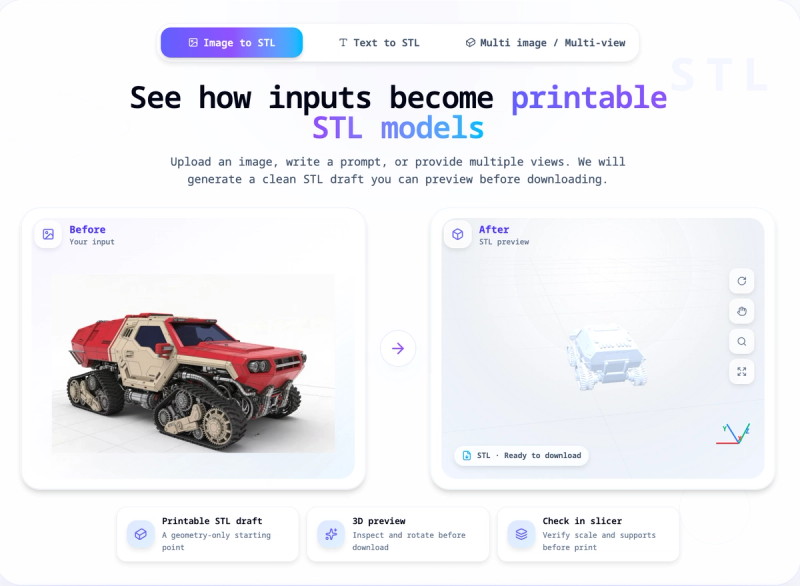
ImageToSTL.pro is a web-based AI conversion tool that generates STL geometry from a single uploaded image. It accepts JPG, JPEG, PNG, and WEBP files up to 8 MB, and produces a download-ready STL file that can be opened in any standard slicer. The service runs entirely in the browser and includes a 3D preview so you can inspect the model before downloading.
Key Features
- Input formats — JPG, JPEG, PNG, and WEBP images up to 8 MB are supported as the source for STL generation.
- Generation modes — Three speed/quality tiers: Fast (2 credits, about 30 seconds), Standard (3 credits, about 60 seconds), and Advanced (4 credits, about 90 seconds).
- 3D preview — After generation, you can rotate and inspect the model directly in the browser before deciding to download the STL.
- Advanced options — PBR textures, custom face count, and smart decimation are available as add-ons for more refined results.
- Multi-image workflow — A separate mode accepts multiple images of the same subject to improve shape reconstruction.
- Text to 3D — For cases without a source image, the site also offers text-to-3D generation.
- Format conversion — Existing 3D files such as OBJ, GLB, or FBX can be converted to STL through dedicated converter pages.
- Auto refund on failure — If a generation task fails, the credits used are automatically returned to your account.
Who is it for?
- 3D printing enthusiasts and makers — turn reference photos or concept art into printable STL drafts in less than two minutes.
- Etsy sellers and product designers — quickly prototype charms, ornaments, reliefs, and keepsakes to test demand before refining the model.
- Teachers and students — demonstrate how a flat image becomes a physical object in classroom or STEM activities.
- Hobbyists — experiment with silhouettes, icons, and product shapes without installing a full 3D modeling suite.
What can you do with ImageToSTL.pro?
- Custom gifts: Convert a pet photo or drawing into a printable 3D model for a personalized keepsake.
- Product testing: Generate a rough STL to check the viability of an Etsy idea before investing time in detailed CAD work.
- Classroom demos: Show the complete 2D-to-3D workflow, from image upload to STL download, in a single web browser.
- Rapid prototyping: Use the Fast mode to get a low-cost geometry draft within 30 seconds for quick iteration.
How does ImageToSTL.pro work?
The site outlines a four-step workflow: upload a clear image with a visible subject, generate STL geometry with AI, inspect the result in the 3D preview, and print the STL after checking scale and supports in your slicer. Generation typically completes in 30–90 seconds depending on the selected mode.
Pricing
ImageToSTL.pro uses a credit system. Each generation costs 2, 3, or 4 credits based on the chosen mode. New users receive 2 free credits for their first image-to-STL generation, and no credit card is required to start. Credits are refunded automatically if a generation fails.
FAQ
How do I convert an image to STL?
Upload one JPG, PNG, JPEG, or WEBP image, choose a generation mode, click generate, preview the 3D result, then download the STL file. Open the STL in your slicer to check scale, orientation, and supports before printing.
What images give the best results?
Images with a single clear subject, visible edges, and a simple background produce the most useful STL drafts. Crop away clutter and avoid blurry or low-light photos before uploading.
Is the generated STL ready for 3D printing?
It is a printable starting point, but you should review the model in your slicer. Check for manifold geometry, wall thickness, orientation, and supports before sending it to the printer.
What happens if generation fails?
If a generation task fails, the credits used for that task are automatically returned to your account, so you can try again with a different image or mode.
Can I convert existing 3D files to STL?
Yes, the site includes format-conversion pages that support workflows such as OBJ, GLB, or FBX to STL, depending on the converter page you open.