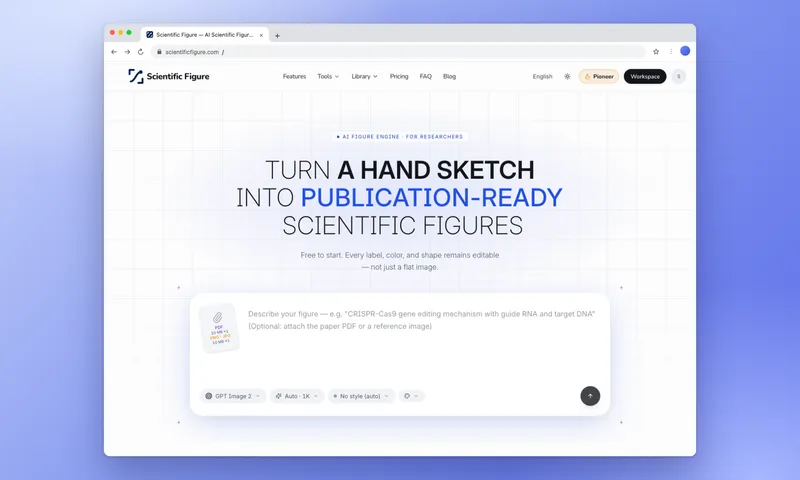
Scientific Figure is a web-based AI figure engine for researchers that converts a text prompt, a hand sketch, an abstract, or a full paper PDF into a publication-ready scientific figure in roughly 30 seconds, with every label, arrow, and shape left editable rather than flattened into pixels.
What is Scientific Figure?
Scientific Figure is an AI scientific figure generator that accepts four input types — a sentence, a hand-drawn sketch, a paper abstract, or a full manuscript uploaded as a PDF (up to 20 MB) — and outputs a finished figure drawn to scientific illustration conventions. Outputs can be exported as PNG or JPG at 300 or 600 DPI, as a layered SVG, or as an editable PPTX slide, at sizes up to 8K. It runs in the browser with no install, and the site reports use by researchers from 142 universities and research institutes across 48 countries.
Key Features
- Live, editable output — labels stay as live text and arrows, colors, and shapes stay as movable objects, so fixing a gene name or redrawing one panel is an edit rather than a regeneration.
- Four input routes — a text sentence, a photo of a notebook sketch, an abstract, or a whole paper as PDF (20 MB limit) or DOCX.
- Journal palettes — one-click recoloring of a finished figure to Nature, Science, NEJM, The Lancet, JAMA, or the colorblind-safe Okabe-Ito palette.
- Nine illustration styles — pick a single look (flat vector, 3D render, ink line art, and others) so every figure in a paper is drawn in the same hand.
- Export formats and resolution — PNG and JPG at 300 or 600 DPI, layered SVG, and fully editable PPTX slides, up to 8K and 600+ DPI at single-column width.
- Publication license certificate — on paid plans each figure can carry a numbered PDF certificate proving commercial and journal-publication rights, verifiable online at a public verify URL.
- Model selection — the free plan runs GPT; paid tiers add FLUX, Seedream, GPT, and Nano Banana.
- Dedicated tool pages — more than 40 single-purpose makers, including a graphical abstract maker, scientific poster maker, PRISMA flow diagram generator, phylogenetic tree maker, box plot maker, heatmap generator, and pathway diagrams such as PI3K/AKT, Notch, and TGF-beta.
Who is it for?
- PhD students facing a revise-and-resubmit — redraw a mechanism figure that a reviewer questioned, without learning Illustrator on the deadline.
- Labs with no design budget — produce a figure or two per paper across several papers a year without hiring a scientific illustrator.
- Educators building lectures — generate a labelled diagram such as a neuron or synapse, then export it as a PPTX slide that still edits in PowerPoint.
- PIs writing grants and science communicators — produce a clean schematic for a proposal or turn a published result into a visual a non-specialist grasps on first pass.
What can you do with Scientific Figure?
- Mechanism illustration: describe how a CD19 CAR-T cell kills a tumor cell and get a flat vector figure showing the scFv receptor, perforin and granzyme B release, and apoptosis.
- Pathway diagrams: generate a PI3K/AKT signaling diagram from receptor to downstream targets with nodes in the correct order.
- Plot generation: draw bar graphs, box plots, and heatmaps from your own numbers with journal-style axes, error bars, and individual data points.
- Paper figures with legends: turn a multi-panel result, such as drought effects on wheat root hair density, into a figure with an accompanying legend.
How does Scientific Figure work?
Start from any input — a sentence, a sketch photo, an abstract, or a PDF — then generate the figure, which takes about 30 seconds. After generation, edit anything in the Canvas workspace: fix a gene name with text edit, redraw a single panel, recolor to a journal palette, or strip the background. The final step is export as PNG, JPG, SVG, or PPTX at up to 600 DPI.
Pricing
A freemium model starting with 100 free credits and no card, plus 30 credits per daily check-in (up to 120 credits a month on free accounts). Free exports are watermarked and capped below 2K, with no publication license. Paid tiers are Lite (1,200 credits a month, up to 4K export, layered SVG and PPTX), Pro (3,000 credits, up to 8K export, highest-priority queue), and Plus (7,000 credits a month), with yearly billing saving up to 45 percent. Payments run through Stripe, and credits on the pay-as-you-go monthly option never expire.
Alternatives
- BioRender — assembles figures from a fixed icon library rather than generating from a prompt, and offers PPTX export only on select paid plans.
- General AI image tools — produce flat pixel output that cannot be edited afterward.
- Adobe Illustrator — full vector control but requires substantial design skill.
- Inkscape — a free vector editor that likewise assumes the user knows scientific drawing conventions.
FAQ
Is Scientific Figure free?
Yes to start: sign-up grants 100 credits with no credit card, and a daily check-in adds 30 credits, up to 120 a month on free accounts. Free-plan exports are watermarked, are not available at 2K, 4K, or 8K, use the standard generation queue, and do not include a publication license certificate.
Can I edit a figure after it is generated?
Yes. Generated figures keep live text labels and remain composed of movable arrows, colors, and shapes, so a wrong gene name is a text edit rather than a regeneration. Paid plans add layered SVG export and fully editable PPTX export for further work outside the browser.
Can I use the figures in journal submissions?
Paid plans issue a numbered PDF publication license certificate covering commercial use and journal publication rights, which an editor can verify online. The free tier does not include this certificate.
How is Scientific Figure different from BioRender or raw AI image tools?
Scientific Figure generates a figure from your text, sketch, or PDF instead of assembling it from a premade icon set, and unlike general image models its output stays editable as vector objects and editable slides. It also applies scientific drawing conventions automatically without requiring design experience.
What export formats and resolutions are supported?
Figures export as PNG and JPG at 300 or 600 DPI, as layered SVG, and as editable PPTX slides, at sizes up to 8K. Resolution ceilings depend on plan: free accounts are capped below 2K, Lite reaches 4K, and Pro and Plus reach 8K.