GPT Image 2, available through ImgEditor, is a free online AI image generator and editor that creates and edits product visuals from text prompts and up to 8 reference images, with 1K/2K output and text rendering in 48+ languages.
What is GPT Image 2?
GPT Image 2 is the OpenAI image model offered inside the ImgEditor web app, where it powers a browser-based generator and editor for product visuals. You input text prompts, optional reference images (up to 8), or an existing photo, and the tool outputs generated or edited images that can be upscaled. It runs entirely at imgeditor.app, and new accounts receive 30 free starter credits without requiring a credit card.
Key Features
- 30 free starter credits — New ImgEditor accounts get 30 free credits (enough for roughly 2 standard images) with no credit card; paid credits are available for higher-volume work.
- Text-to-image generation — Generate visuals from natural-language prompts, with model selection, aspect ratio options, and a Fast Mode for quicker results.
- Reference-image editing — Upload up to 8 product shots, faces, or environment references to guide composition, style, or edits while preserving product shape, packaging, and brand colors.
- Image editing — Replace backgrounds, adjust lighting, change colors, and refine product photos with text commands; the site's before/after examples show realistic recomposites.
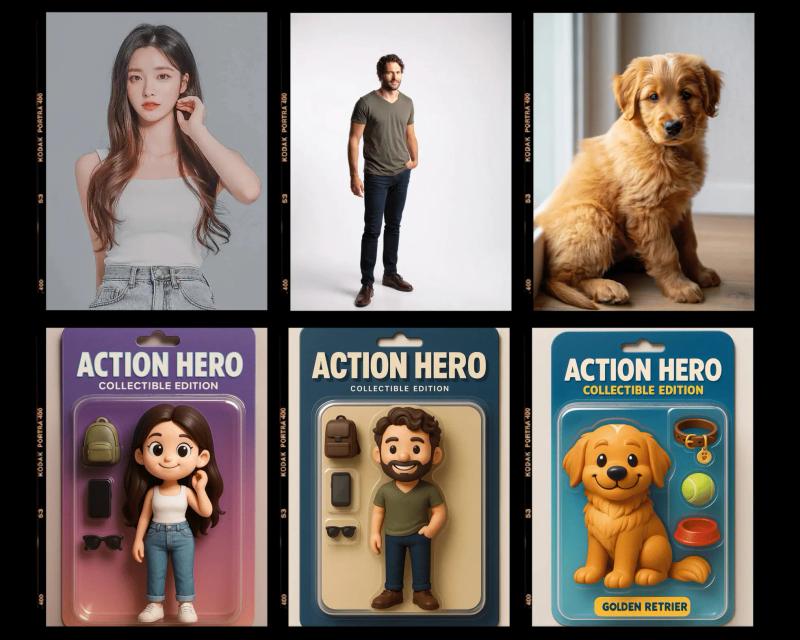
- Character consistency — Reference images preserve the same face across multiple generated shots, as demonstrated by the 1980s polaroid prompt example.
- Style conversion — The workbench includes a Style control (with a style-transfer example) so you can shift an image's visual direction without rebuilding the scene.
- Image upscaling — Enhance details and clarity after generation or editing; upscaling and higher-quality exports may require additional credits.
- High-resolution output — Generate at 1K or 2K resolution; 2K is recommended for hero visuals, product images, and social assets.
- Accurate text rendering — Pixel-accurate headlines, labels, and short copy in 48+ languages for posters, ads, and packaging mockups.
- Product-focused tools — Packaging mockups, product showcase sheets, background replacement, and storyboard creation from product references.
Who should use GPT Image 2?
- Ecommerce teams — Turn product reference images into lifecycle scenes, hero shots, and advertising visuals while keeping packaging and brand identity recognizable.
- Marketers and creative directors — Explore campaign directions quickly using prompt examples for luxury ads, natural product photography, and posters.
- Freelance designers — Generate a concept, refine lighting, and adjust backgrounds in the same ImgEditor workflow, then export without visible watermarks.
- Content creators — Produce social graphics, thumbnails, and storyboards with consistent subjects and readable embedded text.
What can you do with GPT Image 2?
- Product photography: Turn a single product reference into a professional showcase sheet, water-mirror scene, miniature diorama, or luxury ad background using the site's ready-made prompts.
- Background replacement: Swap a product photo's location with a natural-language prompt; the tool preserves depth, reflections, and shadows for believable composites.
- Marketing graphics: Generate posters, social media images, and packaging mockups with accurate multilingual text and headline space.
- Photo editing: Edit an existing photo's lighting, color, or style by text prompt (for example, changing ice cream flavor or making a product's background premium).
How does GPT Image 2 work?
The workflow has three steps: upload up to 8 reference images, type a natural-language brief describing the look, mood, or edit, then generate and download. After generation, you can refine with the editor or upscale the result, and credits are charged only for successful outputs.
Pros and cons
Pros — Runs entirely in the browser without installation; supports up to 8 reference images; includes prompt examples for quick starts; default exports have no visible watermarks.
Cons — Free access is limited to 30 starter credits, and each generation, edit, or upscale consumes credits; creating an image requires a free ImgEditor account so credits and history can be attached to you.
Pricing
ImgEditor uses a freemium model: new accounts get 30 free starter credits, no credit card required, and paid credits can be purchased when you need more image generations, faster output, or higher-resolution downloads. Eligible paid plans are intended for commercial workflows such as product visuals, ads, posters, and campaign assets.
FAQ
Is GPT Image 2 free online?
Yes. New ImgEditor accounts receive 30 free starter credits to try the model online. Generation and editing use credits, so free access is limited rather than unlimited. Creating an image requires a free ImgEditor account, but no credit card is needed.
Can I try GPT Image 2 without signing up?
You can browse the examples and prompt ideas without signing up, but creating an image requires a free ImgEditor account so credits, generation history, and results can be attached to you. No credit card is required for the free credits.
What resolution can ImgEditor generate?
ImgEditor supports 1K and 2K image generation. Use 2K for sharper hero visuals, product images, and social assets that need extra detail. Upscaling after generation may require additional credits.
Are my uploads private?
ImgEditor states that images and prompts are used only to process requests and deliver results in your account, and that it does not sell data or use content to train its own models without explicit consent. For details on retention periods and infrastructure provider logs, refer to the ImgEditor Privacy Policy.
Do you add watermarks or AI tags?
By default, images exported from ImgEditor do not include visible watermarks, so you can use them directly in layouts. However, some platforms may still detect that assets are AI-generated. If you need explicit AI labels or watermarks for compliance, you can add them manually or contact ImgEditor to discuss custom settings.