
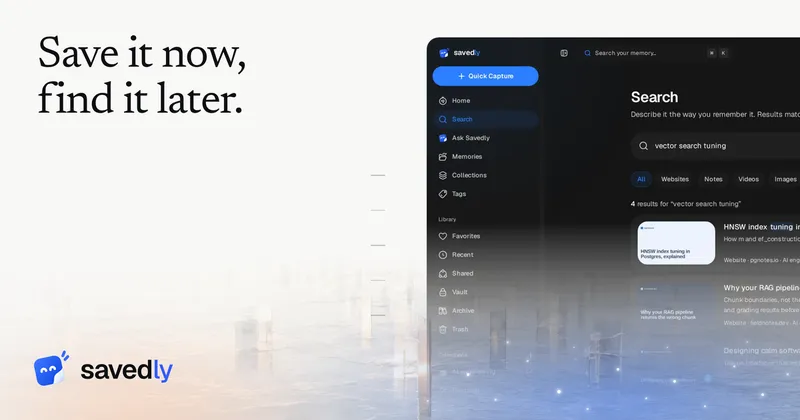
Savedly is an open-source, self-hostable bookmark manager that reads every link, note, screenshot, PDF, or video you save, writes a summary, assigns tags, files it into a collection, and lets you find it again by describing it roughly. It runs as a web app with a Chrome extension and an installable mobile web app, made by the team behind savedly.app and published under AGPL-3.0.
What is Savedly?
Savedly is a save-and-retrieve tool for links, notes, screenshots, PDFs, videos, and voice memos. You paste a link, drop a file, or type a note; Savedly's AI reads the content, generates a summary and tags, and files the item into a collection. You then retrieve it either by meaning-based search, keyword search, or by asking a question in plain language. It runs in the browser, with a Chrome extension, a command palette, and installable mobile access, and its code is public under AGPL-3.0.
Key Features
- Meaning-based search — describe a half-remembered idea in your own words and get ranked results; exact-phrase matches are ranked in the same list, and results can be narrowed by type, tag, collection, or favorites.
- Ask your library — pose a plain-language question and get an answer drawn only from your own saves, with the source memories listed so you can open the original.
- OCR inside images and PDFs — text inside screenshots and documents is read on save, so it becomes searchable.
- Self-filing collections — the AI files each save by subject into collections such as Recipes, Travel, Health, or Reading, which you can rename or replace.
- Date-to-calendar detection — a date spotted in a note is offered as a calendar event in your time zone, kept in Savedly or synced with Google Calendar.
- Browser highlighting — select text on any page, pick one of five colors, add a note, or press Alt+H for an instant yellow highlight; highlights are searchable.
- Import paths — bring in bookmarks.html exported from Chrome, Firefox, Safari, or Edge, a pasted list of one-URL-per-line links, or your GitHub stars.
- Vault and sharing — a PIN-protected vault keeps items out of search, Ask, and the graph; shared links can be public, password-protected, or invite-only.
Who is it for?
- Researchers and readers — accumulate PDFs, articles, and notes over months and retrieve them by fuzzy recollection instead of folder names.
- Home cooks and hobbyists — save recipes and how-to guides, then ask questions like how much water goes into bread dough and get the saved guide plus personal notes back.
- People with years of bookmarks — import a bookmarks.html file and have every link read, summarized, and filed automatically.
- Privacy-conscious self-hosters — run their own copy with a personal OpenAI, Anthropic, Gemini, Groq, or OpenRouter key, with free self-hosting and no feature limits.
What can you do with Savedly?
- Trip planning: save flight checklists and city guides, let dates become calendar events, and share the whole collection with travel companions via a link.
- Study and research: highlight passages in five colors while reading, then ask Savedly what you saved about a topic and get an answer citing the specific memories.
- Personal knowledge upkeep: review the Explore graph for connections between saves, and Insights for what you saved and when.
- Keep private notes private: move sensitive items to the PIN vault, where they stay out of search, Ask, and the graph.
How does Savedly work?
Capture comes first: paste a link, drop a file or screenshot, or type a note. Savedly then sends the text to its AI provider, which returns a summary, tags, and a suggested collection; you can search or ask about it at any time. Setup is three steps: create an account with Google, GitHub, or email, save a first item, then search or ask for it later.
Pricing
The model is freemium, with three tiers. Free costs $0 forever and includes 500 memories, 250 MB storage, 50 AI-read saves and 20 Ask questions per month, and a 25 MB per-file limit. Lite is $5 per month with unlimited memories, 5 GB storage, 500 AI reads, 250 questions, 50 MB files, and the PIN vault. Pro is $10 per month with 15 GB storage, 2,000 AI reads, 1,000 questions, 100 MB files, and share invites with viewer tracking. Self-hosting is free with every feature and no limits.
FAQ
Is Savedly open source?
Yes. The code is public under AGPL-3.0, and the privacy and security claims can be checked against it. Self-hosting runs with one command, lets you bring your own AI key from OpenAI, Anthropic, Gemini, Groq, or OpenRouter, and includes backups and update notices in the admin area.
Is the vault encrypted?
No. Savedly states plainly that the vault is a lock, not encryption. On Lite and Pro it keeps chosen items out of search, Ask, and the graph until the PIN is entered, blurs when you switch away, and locks when you leave.
Does Savedly train AI on my saves?
Savedly says what you save and what you ask are never used to train a model, ours or anyone else's. There are no ads and content is not sold. The text of a save is sent to the AI provider to produce summaries, tags, and answers.
Is there a mobile app or browser extension?
There is a Chrome extension and an installable mobile web app that needs no app store. Native mobile apps are not listed. Integrations live today for Google Calendar, GitHub stars, and the Chrome extension; Notion, Raindrop.io, Slack, YouTube, Reddit, X, Instagram, and LinkedIn are marked planned.
Can I export or delete my data?
Export everything from Settings as JSON or as a folder of Markdown files. Trash empties after 15 days, and deleting your account removes your profile and everything you saved.


