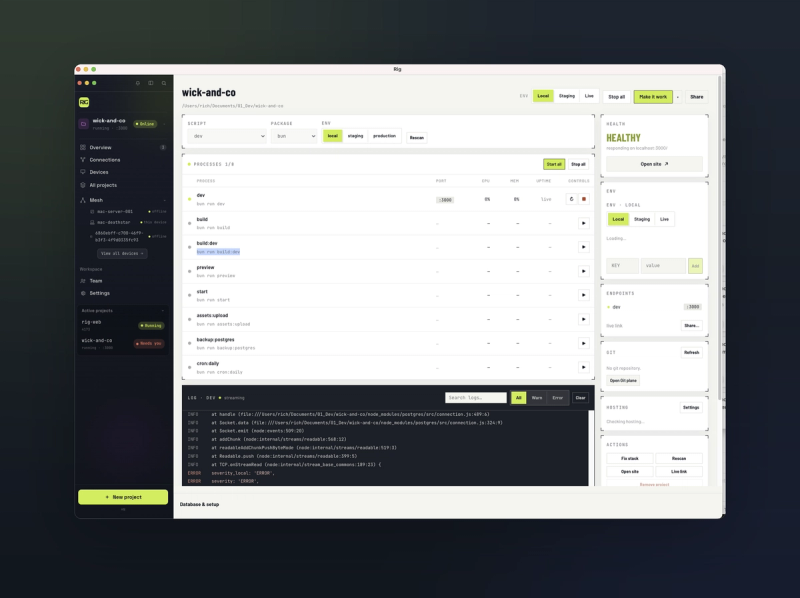
Rig runs everything your code needs, in one window.
Websites, apps and APIs, with their servers, databases and logs, started together on your Mac. When something breaks, you see why, and so does your AI assistant.
The problem
Building anything for the web means running a dozen things at once: a dev server, a database, a queue worker, a cache, maybe a second API. Most developers juggle that across six terminal tabs, hunting for which one crashed and which process stole port 3000.
Rig replaces the tabs with one window.
What Rig does
- Finds your project's processes. Scripts, Procfiles, Laravel artisan workers and managed databases, grouped and started in the right order.
- Runs the whole stack in one click. Start, stop and restart everything together, or one service at a time.
- Merges every log into one stream. Filterable, searchable, and kept across restarts, so the error doesn't scroll away.
- Owns your ports. Rig knows which service holds which port and frees them when they're stuck. No more
lsof. - Handles the fiddly bits. Local databases, SSL certificates and local domains, managed for you.
Cool features
- Your AI can see your running app. Rig's built in MCP hub connects Claude, Cursor, Codex, Windsurf and VS Code to your live environment. Your assistant can check what's running, read the logs, see the ports and restart a service, and you confirm before anything changes. It stops being blind to the thing it's writing code for.
- Crashes come with a suggested fix. When a service falls over, Rig reads the error and tells you what probably went wrong.
- ⌘K to reach anything. Jump to any project, service, log or setting from the keyboard.
rig upfrom the terminal. A CLI ships with the app, for people who live in the terminal.- Wake your Mac from anywhere. Mesh gives your Macs a private network you set up yourself. Wake a sleeping machine, view its screen, or reach its services by name, from anywhere.
- Teleport a project between Macs. Move a live project from your laptop to your desktop mid task and carry on.
- Gauge, free. A companion app that shows what's eating your Mac's memory and CPU.
What Rig isn't
It isn't a cloud IDE, a remote coding VM or a PHP runtime. It works alongside tools you already use, like Laravel Herd and Valet. Your source code never leaves your Mac.
Price
Everything on your Mac is free, forever: process control, databases, SSL, local domains, the MCP hub and Gauge.
Mesh is the paid part, because running a network costs money:
- Hobby: free, 1 machine, 5GB of relay a month
- Pro: $15 a month or $144 a year, 5 machines, 25GB of relay, Wake, Screen and Teleport
- Team: $25 per seat a month or $240 a year, 10 machines and 75GB of relay per seat, pooled, with admin controls
- Enterprise: SSO and a SOC2 pack, priced on request
Direct traffic between your own machines is never metered.
Requirements
macOS 13 or later, on Apple Silicon or Intel. A Linux version is in development.
Built by Rich Copestake, one developer with 22 years in the industry, in evenings and weekends. userig.app