Newsletter
Join the Community
Subscribe to our newsletter for the latest news and updates
Remove backgrounds and clean up images online with AI. Use the background remover, then clean up watermarks, text, or blur and preview the result before downloading.
Submit your own product to reach creators and founders looking for the next tool to try.
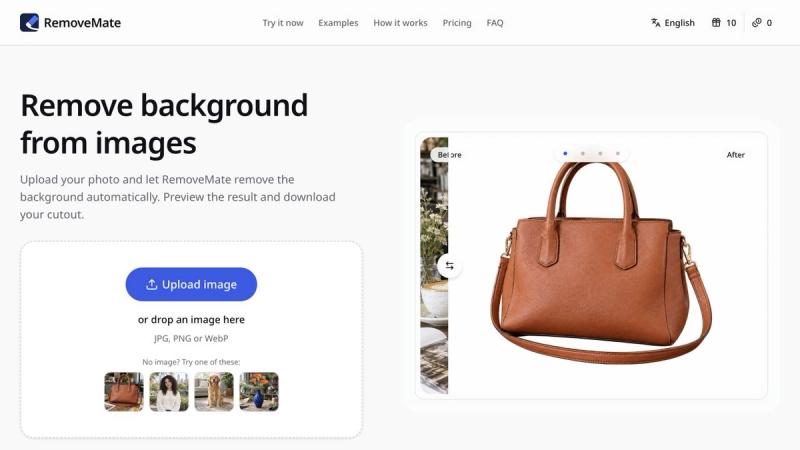
RemoveMate is an online image editing toolkit for people who want to prepare a photo without opening a full desktop editor. Start at removemate.com and choose the task that matches your image. To remove a background, upload a photo, run the background remover, and inspect the preview before downloading the cutout. The before-and-after preview makes it easier to check whether the subject is separated cleanly and whether the result fits your design. This workflow can be useful for product photos, profile pictures, marketplace listings, presentations, and social graphics.
RemoveMate also includes image cleanup tools for common problems. Use watermark or text cleanup when an overlay distracts from the rest of a picture, or try the unblur tool when a photo looks soft. Upload the image, select the appropriate tool, review the generated preview, and download only after checking the result. Photos with complicated edges, overlapping details, or large overlays can need extra attention, so previewing matters. A quick review helps you decide if the edit is ready to use or if you should try another image or make a manual adjustment elsewhere.
The service runs in a web browser and is available in English and Chinese. The workflow stays simple: open a tool, add an image, choose the edit, compare the preview, and save the result. RemoveMate is built for focused image tasks such as background removal, watermark and text cleanup, and blur reduction. Visit https://removemate.com/ to try the image tools online.