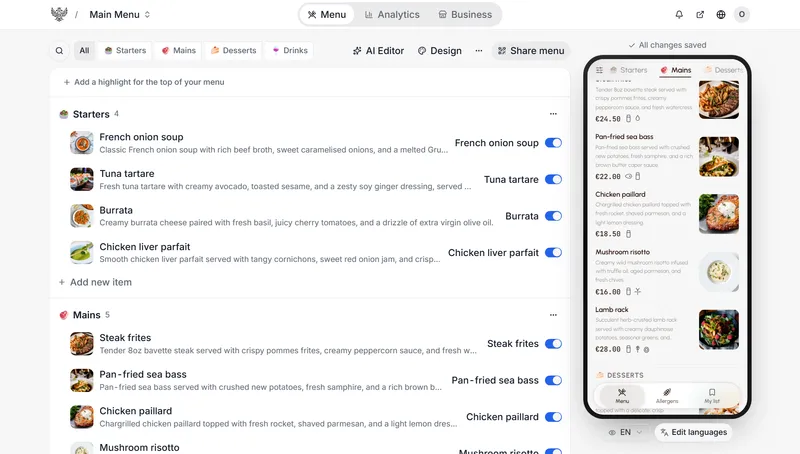
QRDERS is a browser-based QR menu builder that turns a photo or PDF of a paper menu into a translated digital menu guests read on their own phones by scanning one code.
What is QRDERS?
QRDERS is a QR-code menu service for businesses people visit in person. You upload a photo or PDF of the menu you already have, QRDERS reads the items, prices and descriptions, and you publish them as a phone-sized page behind a QR code and a link shaped like yourname.qrders.com. The menu opens in whatever language the guest's phone is set to — 82 languages on the free plan, 242 with Plus. It is a web app: nothing is installed on the counter and guests install no app.
What makes QRDERS stand out?
- Automatic translation into 82 languages — the guest's phone language decides what they read; no language picker and no separate printed versions. Plus raises the count to 242.
- Dynamic QR codes — each code points at QRDERS rather than at a fixed menu version, so changing a price or swapping a seasonal menu never means reprinting stickers. Codes are generated per "position" (the product deliberately avoids "table"), and you can make as many as you need.
- AI Editor — one sentence such as "raise every drink price by five percent" proposes a batch of changes across matching items; each change is displayed and must be approved before it is saved.
- Photo or PDF import — items, prices and descriptions are extracted in under a minute, and nothing is added until you untick what you don't want.
- TV menu board — the same data casts to any TV, tablet or projector in portrait or landscape, and several screens can run the identical board.
- Generated website — menu, opening hours, contact details and reviews become a public page Google can index, in every language.
- Offline reading — after the first scan the menu is cached on the guest's phone and opens with no signal.
- Guest tools — allergen filtering, a saved "My list", and an info panel for Wi-Fi password, phone number and address.
Media limits differ by plan: free keeps photos sharp up to 1280 pixels on the longest side and videos at 720p without sound, 10 seconds each. Plus raises photos to 1920 pixels and video to 1080p at 60 frames a second with audio.
Who should use QRDERS?
- Restaurant and café owners: publish a menu that tourists read in their own language and edit prices once instead of across printed cards.
- Hotels: run separate codes for breakfast, room service and the minibar so a guest in a room sees the right list.
- Barbershops, spas and nail salons: list services with prices, add-on options and "book ahead" notes, and keep the list current without reprinting.
- Food trucks, stadiums, nightclubs, car washes and clinics: the product is built for 14 named physical business types, which is why positions rather than tables are the unit.
What can you do with QRDERS?
- Tourist-heavy venues: one code gives a French, Chinese, Hindi or Arabic version of the same menu without producing separate documents.
- Multi-room venues: give each position its own code so a poolside guest and a lobby guest land on the correct list.
- Frequently repriced menus: change a price in the dashboard and the phone menu, TV board and own website all show the new number from the same edit.
How does QRDERS work?
- Photograph the paper menu or upload the PDF.
- QRDERS extracts items, prices and descriptions; you untick anything you want to leave out.
- Publish — you receive a QR code, a shareable link and a generated website.
- Edit later in the dashboard or with the AI Editor; the printed code and stickers keep working.
Pricing
QRDERS is freemium. The free plan covers import, allergen filtering, unlimited edits, the AI Editor, 82-language translation, unlimited QR scans, a web page, analytics, TV board analytics, unlimited photos and videos, and no QRDERS watermark. Plus is a flat $12 a year and adds 242 languages, HD images and video with audio, AI Editor access at busy times, your logo in link previews, first placement on the map and in search, and unlimited menus. There is no commission, no setup fee and no contract; guests scan for free.
FAQ
Is QRDERS really free?
Yes. The menu, the QR codes, the translations, the analytics and the dashboard cost $0.00 a month with nothing expiring, and Plus is the only paid tier. Guests never pay or create an account to read a menu.
Do guests need an app or account?
No. A guest scans the code and the menu opens in the browser they already have. Every menu also gets a direct link, so a venue can share it by message or social post for people who will not scan.
Do I need a POS, terminal or new hardware?
No. QRDERS is a menu, not a point-of-sale: no terminal to rent, no POS to buy. It runs on the phone, tablet or computer you already own, and guests use their own devices.
Do I have to reprint QR codes when the menu changes?
No. The printed code points at QRDERS rather than at a specific menu, so price changes, a new seasonal list or moving a code to another room all keep the same sticker working.
What are the limits of the free plan?
Photos stay sharp up to 1280 pixels on the longest side, videos are 10 seconds at 720p with no sound, and translation covers 82 languages rather than the 242 on Plus. Plus also removes the shared ranking so your business is featured first on the map and in search.