
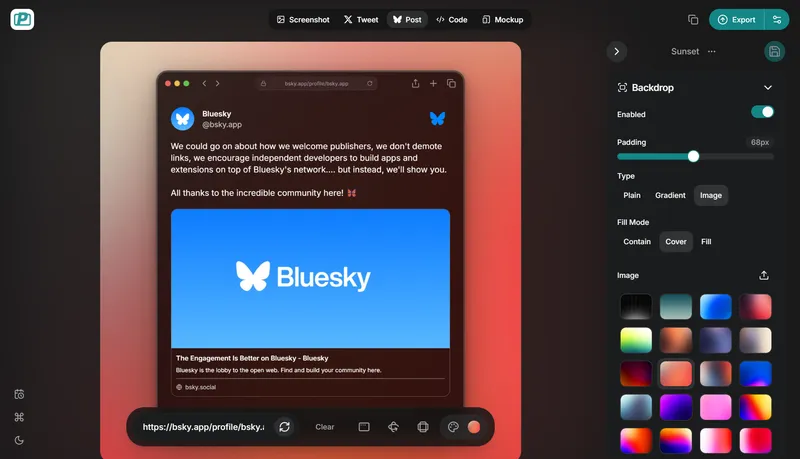
PostSpark is a web-based screenshot editor and device mockup generator that lets you capture, customize, and export professional visuals for marketing and social media.
What is PostSpark?
PostSpark is a web-based tool for creating polished screenshots and device mockups. It takes a URL or uploaded image as input and produces customizable visuals with backgrounds, annotations, browser frames, and shadow overlays. The platform runs entirely in the browser and is developed by the team behind PostSpark (postspark.app).
Key Features
- URL Screenshot Capture — Enter any URL and PostSpark captures a full-page screenshot instantly, ready for editing with automated full-page rendering.
- Device Mockups — Choose from over 16 layouts including iPhone, iPad Pro, iMac, Android, and responsive design frames, each with customizable shadows and angles.
- Background Customization — Apply solid colors, gradients, built-in images (e.g., Tahoe light/dark, beach scenes, abstract distortions), or upload your own; also integrates Unsplash for on-demand image search.
- Annotations & Effects — Add text, stickers, annotations, shadows, border styles (sharp, smooth, round) with adjustable radius, and light source effects for depth.
- Export Formats — Download your creation as PNG, JPEG, or WebP with optimized sizing for social media platforms; supports keyboard shortcuts for faster export.
- Templates — Start from a gallery of pre-designed templates for screenshots, browser frames, and device mockups (screenshot-shadow, browser-light, browser-dark, iPad UI Showcase, etc.).
Who is it for?
- Social media managers — Create eye-catching screenshots of their product or website to share on X, Bluesky, or Reddit, enhancing engagement with polished visuals.
- Developers — Generate clean code screenshots or app interface mockups for documentation, portfolios, or bug reports with browser frames and annotations.
- Marketers — Design promotional visuals with brand-consistent backgrounds and device frames for landing pages, ads, or presentation decks.
What can you do with PostSpark?
- Capture and enhance website screenshots — Get a screenshot of any URL, then add a browser frame, shadow, and custom background to make it presentation-ready.
- Create device mockups — Showcase your app or website inside realistic iPhone, iPad, iMac, or Android frames with multiple angles and shadow styles.
- Design social media graphics — Quickly produce polished images with annotations, effects, and optimized dimensions for posting on X, Bluesky, or Reddit.
How does PostSpark work?
The workflow is simple: upload an image or paste a URL, customize the design using the editor's tools (background, frame, border, shadow, annotations), then export in your preferred format. The editor provides a live preview and allows you to adjust every element in real time.
FAQ
Is PostSpark free?
Yes, PostSpark is currently free to use with no watermarks on exports. You can create and export unlimited screenshots and mockups without an account.
What export formats are available?
You can export your designs in PNG, JPEG, or WebP format directly from the editor, with options for custom sizing.
Can I use my own images as backgrounds?
Yes, you can upload your own images or use the built-in Unsplash integration to find and apply background images instantly.
Does PostSpark support device mockups?
Yes, it offers over 16 device mockup templates including iPhone, iPad Pro, iMac, and Android, with adjustable shadows and perspectives.


