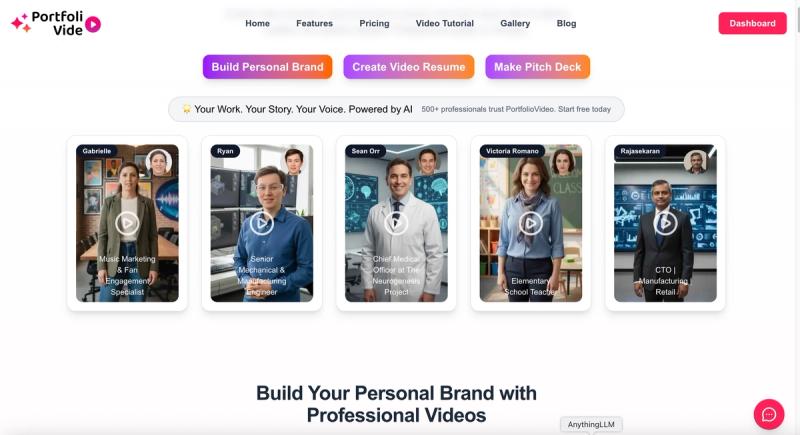
PortfolioVideo is an AI video maker that converts an uploaded document and a front-facing photo into a narrated video with AI talking avatars, built for LinkedIn portfolios, video resumes, and investor pitch decks.
What is PortfolioVideo?
PortfolioVideo is a browser-based AI video platform that takes a resume, pitch deck, PDF, or written script plus a clear front-facing photo as input, then generates a narrated video with AI talking avatars and voice-over as output. It ships three creation paths — a LinkedIn personal branding portfolio, an AI video resume builder, and an AI pitch deck generator — and exports finished videos as HD MP4 files or a shareable private link. Videos can be posted to LinkedIn, YouTube, or Twitter/X, and the platform reports more than 8,000 users.
What makes PortfolioVideo stand out?
- AI talking avatars — animated presenters narrate your content, so no camera or filming is required at any step.
- Voice cloning — record a few seconds of natural speech and the system reproduces your tone and rhythm as the narration.
- Three video types in one place — personal branding videos for LinkedIn, AI video resumes built from an existing resume, and startup pitch videos built from slides or a PDF.
- Automatic scene generation — uploaded content is broken into six polished sections, each with its own visuals, voice-over, and title.
- Presenter Mode — slides, web pages, and live embeds appear in sync with what the narration is saying, turning a flat video into an interactive presentation.
- Vibe Motion — upload a resume or business document plus a face photo and get a 5-second VFX motion video, with Professional, Casual, or Funny theme options.
- Built-in editor — change text, replace visuals, adjust timing, and fine-tune branding after generation, so one project can be re-tailored for different roles or clients.
- Export and sharing — download HD MP4 or send a secure link directly from the platform; narration is available in dozens of languages.
Who should use PortfolioVideo?
- Job seekers and students — turn an existing resume into a supporting video resume, while keeping the written version for ATS screening.
- Founders and entrepreneurs — convert an investor deck into a narrated video pitch deck to send before meetings, in follow-ups, or through a data room.
- Consultants, coaches, and product managers — build a repeatable LinkedIn video content portfolio of intros, case studies, and service explainers.
- Sales teams — produce short personalized video pitches that accompany outreach without scheduling studio time.
What can you do with PortfolioVideo?
- Founders raising a round: upload slides or a PDF and get a narrated pitch video that adds context to charts and claims, then share the original deck alongside it for detailed review.
- Career changers and job seekers: generate a professional video resume highlighting role fit and proof points, editable per application so no second take is needed.
- Consultants and creators: publish a LinkedIn video portfolio of introductions, thought leadership clips, and case studies without filming every post.
- Sales and marketing leads: rebuild a proposal or campaign pitch as a video with your own cloned voice for faster client turnaround.
How does PortfolioVideo work?
- Pick what you want to create, then upload your document and a clear front-facing photo.
- The AI breaks the file into a six-section storyline with visuals, titles, and voice-over in seconds.
- Optionally clone your voice from a few seconds of recording, or choose from the built-in AI voices.
- Generate, then download the HD MP4 or share an instant link — the page states the full process typically takes 5 to 10 minutes.
Pricing
PortfolioVideo uses a credit model with no subscription or upfront fee: you buy credits and spend them on video generation whenever you need them. The page lists $10 as enough for complete generation of multiple multi-scene professional videos or Vibe Motion videos, and new users get 100 credits (a $10 value) free on signup. Its FAQ also notes paid plans starting around five dollars.
FAQ
Do I need a camera or editing skills?
No. PortfolioVideo is built around AI talking avatars and automatic scene generation: you upload files and a photo, and the system produces scenes, scripts, and voice-over. An editor is available if you want to fine-tune text, visuals, timing, or branding afterwards, but it is optional.
What format are the finished videos?
Finished videos export as MP4 files, which the platform says work on social platforms, websites, job boards, and investor portals on both mobile and desktop. You can also share through a private link generated in the app.
Can I use my own voice?
Yes. Record a short speech sample and the system clones your tone for the narration. If you prefer, you can instead choose from the library of natural AI voices, and the platform supports voice-overs in dozens of languages for global audiences.
What is Vibe Motion and why is it only 5 seconds?
Vibe Motion turns a resume or business document plus a face photo into a 5-second VFX motion clip with Professional, Casual, or Funny themes. The company describes it as a micro-hook: a dynamic profile visual meant to make an impression before a recruiter or client reads your name.
What are the main limits of the free credits?
Signup grants 100 credits (a stated $10 value) so you can generate a video at no cost, after which generation consumes purchased credits. Videos are usually ready in 5 to 10 minutes, and Vibe Motion clips are fixed at 5 seconds rather than full length.