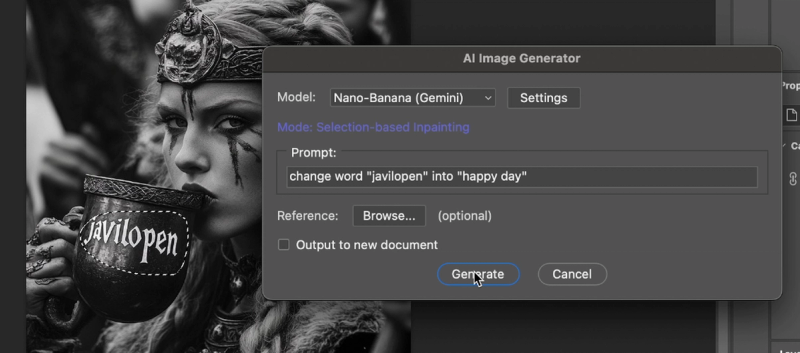
Photoshop Nano Banana is an AI-powered Photoshop plugin that lets you perform natural, context-aware photo edits by selecting an area and entering a short text prompt.
What is Photoshop Nano Banana?
Photoshop Nano Banana is a lightweight AI plugin that integrates directly into Adobe Photoshop. It takes a selection and a text prompt as input and produces a new layer with photorealistic AI-generated content that matches the lighting, shadows, and materials of the original image. The plugin is developed by John Mark and works on Windows 10/11 and macOS, including with cracked or pre-activated builds of Photoshop.
Key Features
- Inpaint and replace — Replace selected areas with photorealistic AI results; outputs a new layer.
- Object generation — Generate objects with matching lighting, shadows, and materials from a short prompt.
- Enhance or restyle — Modify parts of an image using simple prompts like "add a red ceramic mug with soft shadows."
- Sketch-to-real — Convert rough sketches into realistic objects directly in Photoshop.
- Preserve layers — All edits remain as separate layers inside the PSD file for non-destructive workflow.
- Seedream 4K support — Supports high-resolution outputs with Seedream 4 model.
- Compatibility — Works with stable Photoshop releases (no beta required) and cracked versions.
Who is it for?
- Designers and art directors who need rapid concepting — for example, iterating on compositions by generating realistic elements from rough sketches.
- Product photographers who frequently remove props or extend backdrops — the inpainting feature handles this in seconds without leaving Photoshop.
- Retouchers who need clean edge handling and natural shadows — reduces manual cleanup time.
- Freelance designers who want to speed up client work — prompt-based edits fit into existing workflows and keep everything layered.
What can you do with Photoshop Nano Banana?
- Overlay images — Effortlessly overlay one image onto another with proper blending.
- Remove backgrounds — Remove image background in under 5 seconds using AI.
- Place logos on products — Add logos or designs to T-shirts or other surfaces quickly.
- Create spotlight effects — Add realistic spotlight effects to images.
- Mockup book content — Place content into book mockups with correct perspective.
- Remove objects — Remove unwanted objects from images while maintaining realistic backgrounds.
How does Photoshop Nano Banana work?
- Set up a Replicate account and obtain an API token (requires adding at least $10 credit).
- Download the .jsxbin plugin file and copy it to Photoshop's Scripts folder.
- Restart Photoshop and open the plugin from File → Scripts → Nano-Banana-Image-Edit_v1_0.
- Make a selection, enter a short prompt (e.g., "add a red ceramic mug with soft shadows"), choose a model, and click Generate. The result appears as a new layer.
Pros and cons
Pros:
- One-time purchase ($4.9 launch price) with no subscription.
- Works with cracked/offline Photoshop installations.
- Results match existing scene lighting and shadows.
- Clear error messages and stable performance.
Cons:
- Requires Replicate API credits (pay-as-you-go; about $0.039 per image for Nano Banana model).
- Windows users may encounter API failures due to security settings; running Photoshop as administrator may help.
Pricing
Launch promo: one-time payment of $4.9 (regular price $9.9). The plugin itself is a one-time purchase, but image generation uses Replicate API credits — users add credits to their Replicate account (minimum $10) and pay per image (~$0.039 for the Nano Banana model, $0.04 for Flux Kontext Pro, $0.08 for Flux Kontext Max).
Alternatives
- Official Adobe Photoshop plugin — Requires a Creative Cloud subscription ($59.9/month) and often needs beta Photoshop; users report frequent crashes and errors.
FAQ
Does Photoshop Nano Banana work with cracked Photoshop?
Yes, it works with Jack Sparrow and other cracked builds — no Adobe subscription required.
How do I get an API key?
Create a Replicate account, add billing payment, and generate an API token from the API tokens section in Account settings.
What are the system requirements?
Windows 10/11 or macOS. Photoshop CC or later (stable releases, no beta needed). The plugin is a .jsxbin script.
Is there a free trial?
No free trial is offered, but the $4.9 launch price is low. Replicate credits are required to use the plugin beyond the initial purchase.
Can I use the plugin offline?
No, an internet connection is required because the plugin sends prompts to Replicate's cloud API for AI processing.