
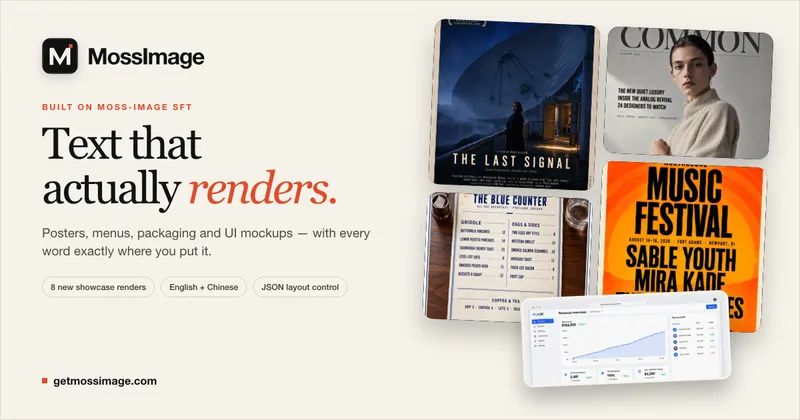
MossImage is a browser-based AI image generator built on MOSS-Image SFT, an open-source text-to-image model released by OpenMOSS on 16 October 2026 under Apache-2.0, and it is aimed specifically at images that carry real, legible type: posters, menus, signage, packaging and UI mockups.
What is MossImage?
MossImage takes a written prompt plus the exact words you want rendered, and returns a generated PNG image with that text set inside the artwork. It runs entirely in the browser with no installation, produces outputs at up to roughly 4 megapixels, and is hosted by the team behind getmossimage.com on top of the publicly released MOSS-Image SFT weights. Quoted strings and line breaks in the prompt are preserved through to the render, and both English and Chinese strings are supported in the same image.
What makes MossImage stand out?
- Long-form text rendering — the model holds long English and Chinese strings legibly, including headlines, multi-column menus, paragraph blocks and legal lines, rather than producing scrambled glyphs.
- JSON layout control — pin text and objects to exact positions with a JSON layout definition, or start from a built-in template instead of describing placement in prose.
- Four render tiers — Draft at 512 x 512 px (1 credit), Final at about 1 megapixel (3 credits), HD at about 2 megapixels (7 credits) and Max at up to 4 megapixels (12 credits).
- Five aspect ratios — 1:1, 4:3, 3:4, 16:9 and 9:16; Draft renders square only, so widescreen and vertical formats require Final or above.
- Bilingual output — English and Chinese typography render side by side, as shown in the bilingual tea-packaging and exhibition-poster samples.
- Local option — Apache-2.0 weights plus a ComfyUI workflow are downloadable for running the model on your own GPU.
- Copyable prompt library — every render in the showcase is paired with its prompt, covering film key art, magazine covers, packaging, billboards, diner menus, SaaS dashboards, festival line-ups and comic pages.
Who should use MossImage?
- Small brands and packaging designers: generate a label or pouch mockup with the product name, weight and bilingual copy already set in the artwork.
- Print and OOH designers: draft billboards, event posters and exhibition signage at 16:9 or 9:16 with legible headlines and metadata.
- Restaurants and event organizers: produce menus, price lists and line-up posters where every dish, price and artist name must be spelled correctly.
- Product marketers: build ad compositions with a headline, a price badge and a product shot in a single render.
What can you do with MossImage?
- Bilingual packaging: quote Chinese and English label copy in the prompt and get a product pouch or coffee label with both scripts set correctly.
- Menu and price-list layouts: describe a two-column diner menu and get dishes, prices and a legal line rendered as readable type.
- Editorial and key art: produce magazine covers with cover lines and a barcode, or film key art with a dense billing block.
- UI mockups: render a dashboard screen with summary cards, a chart and a table of account names.
How does MossImage work?
- Describe the scene in the prompt and paste the exact headline, menu or caption in quotation marks; line breaks survive the trip to the model.
- Choose a render tier and aspect ratio — Draft for a 512 px spelling and composition check, Final, HD or Max for delivery and print.
- Render, download the PNG, and re-render with tightened wording if a line breaks badly.
Pricing
Freemium. Signed-in accounts receive 2 free credits per day, which is two Draft renders; free-tier images carry a MossImage watermark. Monthly subscriptions are Lite at $9.99 for 50 credits, Pro at $19.99 for 120 credits (priority queue) and Studio at $39.99 for 300 credits, with yearly plans saving 20% and one-time credit packs (from $4.99 for 15 credits) that never expire. Paid output is watermark-free and includes a commercial-use license; billing is handled by Waffo.
FAQ
Is MossImage free?
Yes, with limits. Signing in grants 2 free credits per day, and a Draft render costs 1 credit, so that is two square 512 px drafts daily. Free-account renders carry a watermark; any subscription or one-time credit pack removes it. No credit card is needed to try it.
Does MossImage render Chinese text?
Yes. English and Chinese strings render in the same image, including long passages, as shown in its bilingual tea-packaging and exhibition-poster samples. Quotation marks and line breaks in the prompt are preserved so you control where lines break.
Can I run MossImage locally?
Yes. The underlying MOSS-Image SFT weights are Apache-2.0, and a ComfyUI workflow is available for download so the model can run on your own GPU instead of the hosted browser generator.
What resolution and aspect ratios are available?
Draft renders at 512 x 512 px and is 1:1 only. Final reaches about 1 megapixel, HD about 2 megapixels and Max up to 4 megapixels, and those tiers support 1:1, 4:3, 3:4, 16:9 and 9:16. Output is downloaded as a PNG.


