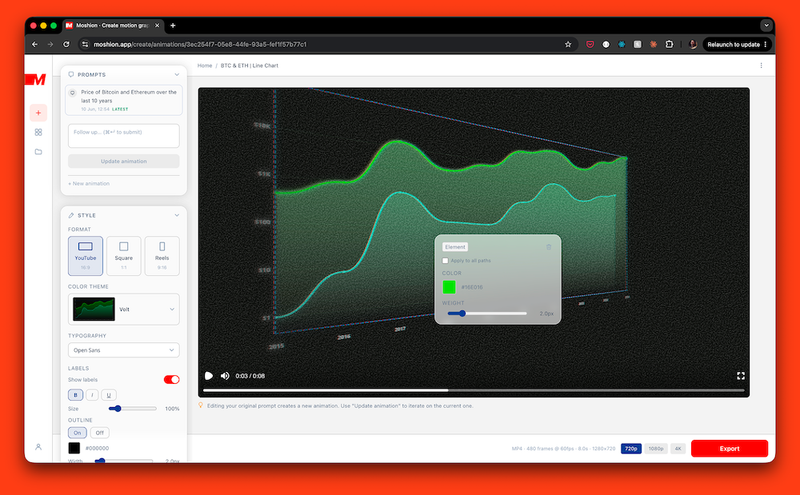
Moshion is a web-based tool that generates animated infographic videos — maps, charts, timelines, and more — from a text description, producing MP4 or MOV files ready for any video editor.
What is Moshion?
Moshion is a motion design animation generator for video creators. It takes a plain-text prompt describing a visual concept (e.g., "The Orient Express train route across Europe") and outputs a rendered MP4 or MOV clip with custom animations, colors, and typography. The entire process runs in the browser — no software installation required. The tool is built by a team of creators and is trusted by accounts with over 50,000 subscribers.
Key Features
- Animated Maps — Generate route animations, region highlights, point-to-point journeys, and country-level stat overlays. Supports globe views and automatic geo-location.
- Chart Animations — Create line charts, bar charts (including bar chart races), pie charts, and bubble charts from data described in text. Animations progress automatically (e.g., bars rising, lines tracing).
- Timelines and Stat Callouts — Build event-based timelines that build left to right, and numeric callouts with counting animations for dynamic figures (e.g., "$50,000 wire transfer").
- Text Animations — Produce channel names, lower thirds, titles, and headline animations. A free text animation tool is available on the site.
- AI Refinements — After generation, describe a change ("zoom in on Europe", "make it darker") and Moshion updates the clip without restarting. The AI retains context across iterations.
- Export Options — Export as MP4 (H.264) or MOV (ProRes 4444 for transparent overlays) up to 4K resolution. Support for 16:9, 1:1, and 9:16 aspect ratios. No watermarks and full commercial rights included.
- Customization Controls — Directly adjust colors, typography, film grain, camera effects, and preset themes (10 color themes: dark, light, editorial, neon). Changes can be made via the interface without AI conversation.
Who is it for?
- Video essayists and educational creators who need animated charts, maps, or stat callouts to illustrate complex topics (e.g., deforestation data, economic trends).
- Travel YouTubers and documentary filmmakers who want route maps, location highlights, or timeline-driven narratives for their footage.
- Social media content creators producing short-form explainers for YouTube, Instagram, TikTok, or X — Moshion exports directly to those platforms' preferences.
- Editors using Premiere Pro, Final Cut Pro, DaVinci Resolve, CapCut, or any standard NLE who need polished motion graphics without After Effects.
What can you do with Moshion?
- Animate a script into a full set of visuals — Paste a script (e.g., about Amazon deforestation) and Moshion automatically suggests animations (map, line chart, bar chart, timeline, pie chart) and generates them in batch.
- Create production title cards — Use text animation templates to generate intro cards, subscribe CTAs, and headline sequences that match your video's color scheme.
- Visualize data comparisons — Describe numbers like "Millionaire vs Billionaire" or "Browser Market Share" and get animated bar charts, pie charts, or bubble charts that encode size relationships.
How does Moshion work?
- Describe your idea in a text prompt (e.g., "Route of the Orient Express across Europe")
- Moshion renders a preview animation in seconds.
- Refine the result using AI commands ("add a route to Munich") or drag-and-drop adjustments in the interface.
- Export the final clip as MP4 or MOV, then drop it into your video editor.
Pricing
Moshion offers a 7-day free trial with full access to all features. After the trial, the subscription is $19 per month, which includes unlimited generations, unlimited refinements, and MP4/MOV exports. No credit counting or per-export fees. Cancel anytime.
FAQ
How does the free trial work?
You get 7 days of unlimited access. Enter your payment details at sign-up, but you won't be charged until day 8. Cancel before the trial ends to pay nothing.
Can I use the generated videos commercially?
Yes. Every video you create is yours — full commercial rights, no attribution required.
What video editors does Moshion work with?
Any editor that imports standard MP4 or MOV files: Premiere Pro, Final Cut Pro, DaVinci Resolve, CapCut, iMovie, and more.
Does Moshion support transparent backgrounds?
Yes. The MOV export uses ProRes 4444, which preserves alpha channels for overlays on existing footage.
Are there limits on resolution or aspect ratio?
No. You can export up to 4K resolution, and choose among 16:9, 1:1, or 9:16 aspect ratios. All resolutions are included in the subscription.