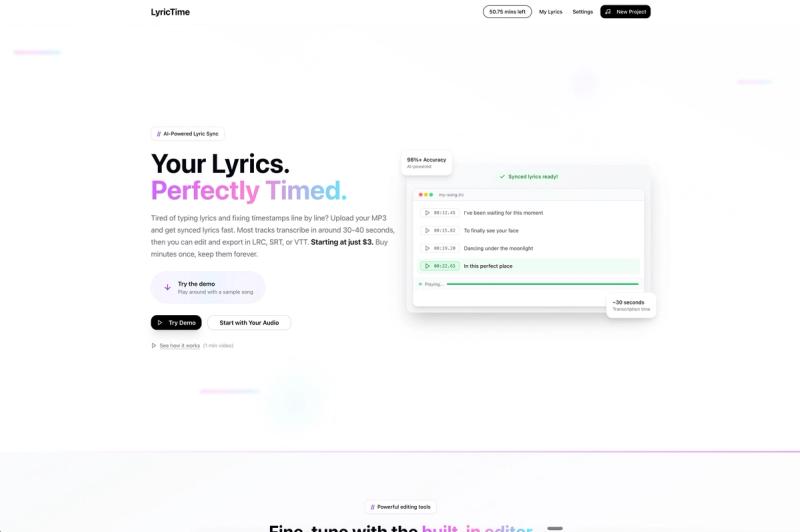
LyricTime is an automated lyrics syncing platform that generates timestamped lyrics in SRT, LRC, and VTT formats from uploaded MP3, WAV, or M4A audio files, enabling users to create lyric videos, karaoke tracks, and captions without manual timing.
What is LyricTime?
LyricTime is a web-based tool that automatically syncs lyrics to music. Users upload an audio file (MP3, WAV, or M4A) and optionally paste existing lyrics; the AI listens to the audio, transcribes or aligns the lyrics, and produces timestamped subtitle files. The platform was founded by Marcus, a musician and video creator who built it to eliminate hours of manual lyric timing work.
Key Features
- AI-Powered Sync — Upload audio only (transcription + sync in 4–5 min) or audio + lyrics (sync in 1–2 min). Supports MP3, WAV, and M4A uploads.
- Visual Timeline Editor — Drag lyric blocks against the waveform, adjust start and end points directly, move groups of lines together, and switch between Vocal Focus and Full Mix views for easier alignment.
- Block Editor Tools — Split or merge lines, find and replace misheard words across the entire project, fine-tune timing with +/- buttons (0.1 or 1 s increments), and add or delete lines.
- Playback Controls — Focus Mode dims everything except the current line; auto-scroll keeps the current line centered; slow down playback to 0.5x or 0.75x; quick rewind or forward by 1, 5, or 10 seconds.
- Export Formats — Download synced lyrics as LRC (music players and karaoke), SRT (video editors and captions), or VTT (web video).
- Free Trial — Sign up for 5 free minutes to test sync on your own song; export unlocks only after purchasing more minutes.
Who is it for?
- Musicians and songwriters — Add timestamps to original songs for lyric videos, karaoke, or music player integration without manual editing.
- Suno and Udio creators — Paste generated lyrics, upload the MP3, and export SRT or VTT for captions or lyric videos.
- Lyric video makers and CapCut editors — Speed up production by avoiding frame-by-frame timing; export directly usable subtitle files.
- Artist managers and labels — Batch sync multiple songs per month with consistent accuracy using the visual editor for final polish.
What can you do with LyricTime?
- Create karaoke videos — Export LRC files for use in karaoke players or video editors to display scrolling lyrics in sync with the music.
- Generate captions for social media — Produce SRT or VTT files for YouTube, TikTok, or Instagram lyric clips.
- Sync lyrics for existing songs — Upload an MP3 and paste lyrics (e.g., from Suno) to get frame-accurate timestamps ready for video editing.
- Polish AI-generated syncing — Use the built-in timeline and block editors to fix mishearings, adjust timing, or split/merge lines.
How does LyricTime work?
- Upload your audio file (MP3, WAV, or M4A) — optionally paste existing lyrics to speed up the process.
- AI automatically transcribes (if no lyrics provided) and aligns every syllable to the audio, typically within 1–2 minutes with lyrics or 4–5 minutes without.
- Review the result in the visual timeline editor: drag lyric blocks, split/merge lines, adjust timing, and listen in context.
- Export as LRC, SRT, or VTT — ready for use in video editors, music players, or web video.
Pricing
LyricTime uses a freemium model: sign up provides 5 free minutes to test the sync on your own song. After the trial, pay per song or purchase bundles. Bundles start at $2 per song for higher volumes; you only pay when you download the result.
FAQ
Is LyricTime free?
You get 5 free minutes after signup to test sync on your own song. Export requires purchasing minutes or a bundle.
What file formats are supported for upload?
MP3, WAV, and M4A audio files are accepted.
What export formats are available?
LRC (for music players and karaoke), SRT (for video editors and captions), and VTT (for web video).
Can I use LyricTime with Suno or Udio songs?
Yes — copy the lyrics from Suno or Udio, upload the MP3, paste the lyrics, and export SRT, LRC, or VTT for captions or lyric videos.
Does LyricTime work with Spotify or Apple Music?
LyricTime helps prepare synced lyrics files, but each platform controls its own upload and display process.