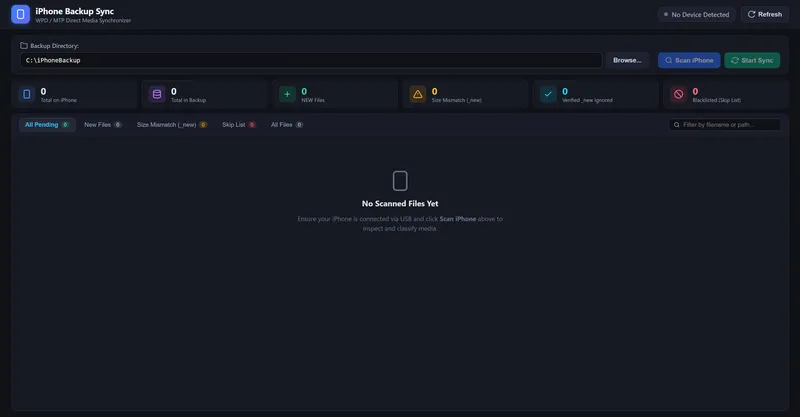
iPhone Backup Sync is a free, open-source Windows 10 and Windows 11 utility that copies DCIM photos and videos from a USB-connected iPhone straight to a local disk, external SSD, or network drive, skipping files that are already backed up.
What is iPhone Backup Sync?
iPhone Backup Sync is a native Windows desktop application built with Tauri v2 and Rust that reads the camera roll from a USB-connected iPhone and writes standard JPG, HEIC, MP4, and MOV files into a folder you choose. It takes a destination directory as input, indexes what already exists there, and produces an incremental copy plus a per-file classification of NEW, MISMATCH, or VERIFIED IGNORED. The tool is distributed under the MIT license by an independent developer; version 0.4.2 ships as a 1.6 MB installer hosted on GitHub, with source code and build instructions available in the same repository.
What makes iPhone Backup Sync stand out?
- Incremental smart sync — the destination drive is scanned and compared against DCIM files by exact byte size and path, so only new or modified media is transferred.
- Non-destructive conflict handling — a file that matches an existing name but not its size is preserved, and the incoming copy is saved with a
_newsuffix such asIMG_1234_new.HEIC. - Direct WPD and Rust engine — the app calls the Windows Portable Devices COM subsystem (
IPortableDevice,IStream) from native Rust rather than through Explorer, avoiding shell locks and "Device unreachable" stalls. - Atomic streaming with crash recovery — media streams in 64 KB to 256 KB chunks into temporary
.partfiles and is renamed only after verification; fragments left by a pulled cable are cleaned up on restart. - Instant skip key — pressing
Sbypasses an unreadable or damaged asset, deletes its fragment, and keeps the rest of the queue running; rows can be right-clicked to sync a single file. - Fully offline and telemetry-free — direct USB transfer only, with no Apple ID, no cloud calls, and no subscription.
- Small resource footprint — under 60 MB of RAM during active transfers.
- Live progress reporting — exact stages, file counts, and throughput in MB/s instead of an indeterminate spinner.
Who should use iPhone Backup Sync?
- Windows users with large camera rolls: archive the full DCIM library to an external SSD without paying for a recurring 2 TB iCloud plan.
- Photographers and videographers: pull HEIC stills and MP4/MOV clips as ordinary files that open in any editor, instead of an opaque iTunes backup image.
- Anyone archiving to removable media: point the app at an external drive weekly and let byte-size comparison skip everything already copied.
- Users whose Explorer copies hang: press
Spast a corrupted asset instead of unplugging the phone and restarting the transfer.
What can you do with iPhone Backup Sync?
- Weekly library archival: connect the iPhone, select an external drive, scan, and copy only the new photos taken since the last run.
- Rescuing a stalled transfer: Windows Explorer freezes on a bad file, but this app classifies it as MISMATCH and skips it so the remaining files still copy.
- Building a local master library: keep original HEIC and ProRes files as standard folders on disk, readable without Apple software.
How does iPhone Backup Sync work?
- Connect the iPhone over a Lightning or USB-C cable, unlock it, and tap Trust This Computer if prompted; the app detects the device automatically.
- Click Browse to pick a destination folder on internal storage, an external SSD, or a network drive, and the app indexes previously backed-up files.
- Click Scan iPhone to see NEW, MISMATCH, and VERIFIED IGNORED assets, then Start Sync to copy pending files.
The developer also recommends setting iPhone Settings > Photos > Transfer to Mac or PC to Keep Originals, which prevents on-the-fly HEIC-to-JPEG or ProRes-to-H.264 transcoding that causes USB timeouts.
Pricing
iPhone Backup Sync is free and open source under the MIT license, with no subscription, no Apple ID requirement, and no paid tier. The developer notes that no EV code-signing certificate is purchased, so the installer may trigger a Windows SmartScreen "Unknown Publisher" prompt that requires clicking More info and then Run anyway.
Alternatives
- Windows File Explorer — offline USB copying, but manual drag-and-drop with no incremental comparison and frequent MTP stalls.
- iTunes / iCloud for Windows — produces an opaque backup database, and full camera roll access requires an iCloud storage plan.
FAQ
Is iPhone Backup Sync free?
Yes. The application is released under the MIT license at no cost, with no subscription, account, or Apple ID needed. Binaries are built from the public source through GitHub Actions, and the only distribution cost mentioned is an optional EV code-signing certificate the project does not pay for.
Does it work without an internet connection?
Yes. All transfers run over a direct USB connection to a drive you own, and the app makes no background network calls or telemetry requests. Photos and videos are never uploaded to a cloud service or shared with a third party.
Will it overwrite files already in my backup folder?
No. Existing files are left untouched; when a file with the same name but a different byte size is found, the incoming copy is saved with a _new suffix so both versions survive.
Why does Windows SmartScreen warn about the installer?
Windows Defender SmartScreen may show an "Unknown Publisher" dialog because the project does not hold an EV code-signing certificate. Click More info, then Run anyway to proceed with the version 0.4.2 installer.
What does iPhone Backup Sync require on Windows?
It needs Windows 10 or Windows 11 in 64-bit, a Lightning or USB-C cable, and Apple Mobile Device Support, which is installed by iTunes, the Apple Devices app, or Windows Update. It does not run on macOS or Linux.