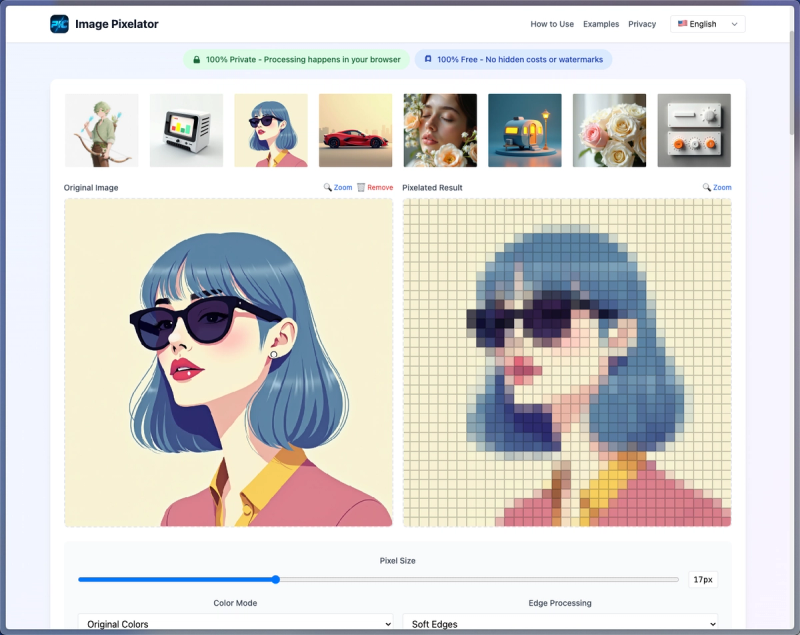
Image Pixelator is a free, browser-based online tool that converts regular images into pixel art instantly, with privacy-focused local processing.
What is Image Pixelator?
Image Pixelator is a web application that turns standard digital images into pixel art. It accepts JPG, PNG, and WebP files up to 20MB as input and produces a pixelated version of the image. All processing occurs locally in your browser — no files are uploaded to any server. The tool is free to use with no account required and no watermarks.
Key Features
- Browser-based processing — All conversions happen locally in your browser, ensuring complete privacy (no image uploads).
- Multiple presets — Choose from 6 built-in styles including 8-bit Game, Minecraft, and Vintage effects.
- Customizable settings — Adjust pixel size from 1 to 50 pixels, select color modes (Original, Retro 8-bit, Grayscale, Sepia, Vibrant), and control edge processing.
- Multi-format support — Works with JPG, PNG, and WebP files up to 20 MB.
- Real-time preview — See changes instantly as you adjust settings.
- Multi-language interface — Available in English, Chinese, and Spanish.
- Free and watermark-free — No hidden costs, no watermarks, no account required.
Who is it for?
Image Pixelator is designed for indie game developers creating sprite sheets and pixel art assets for retro‑styled games. Digital artists can use it to quickly apply pixel effects to illustrations or photos. Hobbyists and social media users can add nostalgic pixel filters to their images without any technical expertise.
What can you do with Image Pixelator?
- Game development: Convert concept art or photos into 8‑bit or 16‑bit style sprites for use in game engines like Unity or Godot.
- Digital art: Apply retro effects (e.g., Minecraft, Vintage) to existing images to create unique pixel‑style pieces.
- Social media content: Pixelate profile pictures, memes, or backgrounds to stand out with an old‑school aesthetic.
How does Image Pixelator work?
No installation is needed. Simply open the website in your browser, upload an image from your device, and the tool immediately displays a pixelated preview. You can adjust pixel size, color mode, and preset style in real time. Once satisfied, download the result as a PNG image. All processing stays on your device — nothing is sent to a server.
Pricing
Image Pixelator is completely free. There are no paid tiers, no watermarks, and no hidden charges. All features are accessible without registration or payment.
FAQ
Is Image Pixelator free?
Yes, the tool is entirely free with no watermarks or hidden fees.
Are my images uploaded to a server?
No. All processing happens locally in your browser, so your images never leave your device.
What image formats are supported?
Image Pixelator supports JPG, PNG, and WebP files with a maximum size of 20 MB.
Can I control the pixel size?
Yes, you can adjust the pixel size from 1 to 50 pixels, giving you fine control over the level of pixelation.