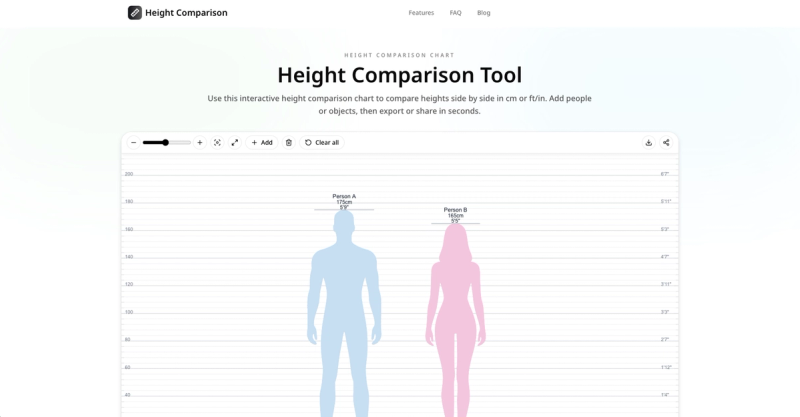
The Height Comparison Tool is a free web-based application that lets you visually compare the heights of people and objects side by side using an interactive chart with proportional silhouettes. Input heights in centimeters or feet/inches, add multiple entities with customizable labels and colors, and export the result as a PNG image or share a link that preserves the exact scene state.
What is the Height Comparison Tool?
It is an interactive visual chart to compare heights of people or objects in real scale. Users enter heights in cm or ft/in, add silhouettes that are rendered proportionally on a shared ruler, and can then export or share the comparison. The tool runs entirely in a web browser and is built by the team at height-comparison.online.
Key Features
- Dual unit input — Switch between centimeters and feet/inches at any time without changing the scene.
- Proportional scaling — Each silhouette is drawn on the same vertical scale, ensuring consistent relative differences between entities.
- Multi-entity support — Add up to 24 people or objects per shared link; each can be color-coded and labeled (labels trimmed to 40 characters in share URLs).
- Export as PNG — Download the chart at 2x-3x pixel ratio, with a watermark footer included.
- Shareable links — Generate a URL that recreates the exact same scene, including all entities, heights, colors, and labels.
- Auto-fit camera — The view starts at a baseline around 0-220 cm and automatically adds at least 10 cm headroom above the tallest entity; manual zoom range is 0.1x to 2.0x.
- Clear dual-scale ruler — Displays both cm and ft/in markings alongside the silhouettes for immediate reference.
Who is it for?
- Content creators — Generate visual height comparisons for articles, videos, or social media posts.
- Parents — Track children's growth by adding height measurements over time in a single chart.
- Sports analysts — Compare athlete heights side by side for game analysis or trivia.
- Interior designers — Visualize how furniture, doors, or vehicles compare to human height for space planning.
- Writers and game developers — Maintain consistent character proportions in storyboarding, role-playing games, or fan content.
What can you do with it?
- Compare celebrities or athletes — Build a chart of known heights and see relative differences instantly.
- Compare people with objects — Place a person silhouette next to a door, car, or piece of furniture to get context-aware sizing.
- Compare fictional characters — Use for fan art, gaming, or character design to ensure scale consistency across scenes.
How does it work?
- Enter a height in centimeters or feet/inches. 2. Click "Add" to place a silhouette on the chart; repeat for each entity and edit labels, colors, or heights as needed. 3. Use the toolbar to zoom, fit, export a PNG, or copy a share link. The tool normalizes all inputs into a single internal unit, draws each entity proportionally on a shared ruler, and auto-fits the camera to show the tallest entity with headroom. For a deeper dive into the visual accuracy pipeline, read the full visual height comparison guide.
Pros and Cons
- Pros: Accurate proportional scaling; dual units; free to use; easy sharing via link; supports up to 24 entities.
- Cons: Exported PNG includes a watermark; real-world factors like camera angle, posture, or footwear can make gaps look different in photos; entity labels limited to 40 characters in share links.
FAQ
How many people can I compare at once?
You can add up to 24 entities per share link. The tool itself allows unlimited additions, but the share payload is capped at 24 for stable URL length.
Can I use both centimeters and feet/inches?
Yes, you can switch between metric and imperial units at any time without resetting the scene. All input and ruler display toggle accordingly.
How accurate is the visual height comparison?
The tool uses a consistent scale pipeline: inputs are normalized, then drawn proportionally on a shared ruler. It avoids perspective distortion, but real photos can differ due to camera angle, footwear, and posture.
What export format does the tool provide?
The only export format is PNG, which is rendered at 2x-3x pixel ratio and includes a watermark footer. There is no SVG or PDF export.