
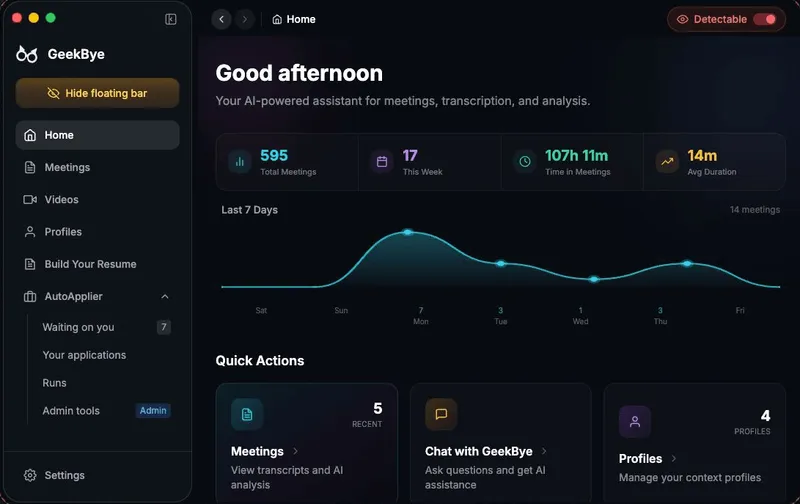
GeekBye is a macOS and Windows desktop app that listens to live interviews and sales calls, transcribes them as they happen, and streams suggested answers onto the screen in an overlay built to stay out of screen shares and recordings.
What is GeekBye?
GeekBye is a real-time AI interview copilot that runs natively on macOS 14 Sonoma or later (Apple Silicon M1 and newer only) and on Windows 10/11 x64 or ARM64. It captures microphone audio plus system audio from the meeting platform, transcribes both sides of the conversation live, and streams generated answers, talking points, and code solutions within 2-3 seconds of a keyboard shortcut. Output includes live suggestion tabs during the call plus a post-session report with key points, action items, and a performance score across six communication metrics.
What makes GeekBye stand out?
- Screen-capture concealment — the translucent window relies on native OS-level content protection on both macOS and Windows; GeekBye states results depend on the meeting app and sharing mode and ships a "Detectable" control plus a test-the-recipient-view step.
- No bot participant — GeekBye never joins the call as a guest, so no extra attendee appears in the participant list; audio comes from local mic and system capture without extra drivers.
- Instant answer shortcut — pressing Cmd+Enter (macOS) or Ctrl+Enter (Windows) sends current screen and conversation context to the model and starts a reply.
- Live suggestion tabs — follow-ups, recaps, and action items surface as clickable talking points while the conversation continues.
- Coding support — generates algorithm, debugging, and system-design answers and works with any coding environment or online assessment platform.
- 33 languages — transcription language can be set independently of the AI output language, aimed at non-native English speakers interviewing in English.
- Platform coverage — Google Meet, Zoom, Microsoft Teams, Slack, Webex, and browser-based platforms; for Zoom, version 6.1.6 or earlier, or Advanced capture with window filtering.
- Meeting reports — after a session, GeekBye produces summaries with key points, action items, improvement areas, and six-metric scoring with transcript-backed feedback.
Who should use GeekBye?
- Software engineers in technical rounds: get algorithm, system-design, and debugging answers while the interviewer is still asking, in any coding environment or online assessment platform.
- Sales and customer-facing reps: get real-time objection handling and negotiation talking points during client calls on any meeting platform.
- Non-native English speakers: transcribe in one of 33 supported languages while receiving AI answers in a different output language.
- Candidates in behavioral interviews: receive structured STAR-method response suggestions and follow-up answers built from the conversation context.
What can you do with GeekBye?
- Technical interview prep in the moment: capture the shared problem on screen, press the shortcut, and read a generated solution or hint rather than stalling on a tree traversal or dynamic programming question.
- Behavioral and screening rounds: get STAR-structured answers and follow-up talking points for questions about past experience, delivered without long pauses.
- Sales objection handling: receive counter-arguments and negotiation lines live during a client call, then pull a recap with action items for follow-up.
- Post-interview review: open the meeting report to see key points, action items, and scores across six communication metrics to target the next round.
How does GeekBye work?
- Install the Mac or Windows app; setup takes about 3 minutes and offers three preset shortcut schemes to avoid conflicts with your code editor.
- Start a Listen session — GeekBye captures mic and system audio simultaneously and transcribes both sides in real time.
- Press Cmd+Enter or Ctrl+Enter to send screen plus conversation context and receive a streamed answer; press Cmd+Shift+. to open the meeting report.
- After the call, GeekBye generates the summary, action items, and performance scoring.
Pricing
GeekBye is freemium. Starter is free with 30 minutes of Listen per calendar month, limited AI responses, basic code generation, and English only. Pro is $74.99/month (an annual option is listed at 67% off) with unlimited Listen, enhanced coding, and multi-language transcription and responses. Pro Lifetime is a one-time $750 purchase capped at 100 paying customers. Monthly refunds are offered within 48 hours if Listen dropped, lagged, or showed on screen share; annual and lifetime plans refund fully within 14 days if no 20-minute session was run.
FAQ
Is GeekBye free?
There is a free Starter tier with 30 minutes of Listen per calendar month, limited AI responses, basic code generation, and English-only support. Once the allowance is used, new sessions will not start until the next month, though an active session is never cut off midway.
Can an interviewer detect GeekBye?
GeekBye does not join calls as a bot or participant, but the company does not guarantee invisibility in every setup. Visibility depends on your operating system, meeting app, and sharing mode, so GeekBye recommends testing the recipient view before relying on it.
Does GeekBye run on Intel Macs?
No. GeekBye requires macOS 14 Sonoma or later on Apple Silicon (M1 or newer); Intel Macs are not supported. Windows 10 or 11 on x64 or ARM64 PCs is supported.
Which meeting platforms are supported?
Zoom, Microsoft Teams, Google Meet, Slack, Webex, and any browser-based platform, plus coding platforms such as HackerRank. For Zoom, GeekBye recommends version 6.1.6 or earlier, or enabling Advanced capture with window filtering.
Does GeekBye store recordings of my sessions?
GeekBye can keep screenshots and transcripts locally while AI requests pass through the authenticated GeekBye backend. Newly saved non-video assets are encrypted, but video files are not encrypted, so privacy settings should be reviewed before sharing sensitive material.


