The conversion problem
Most GPA calculators assume one grading scale — almost always the US 4.0 — and quietly break the moment you are on anything else. Indian universities run 10.0. Much of Europe uses 20-point or percentage. Australia has its own 7.0. Students end up converting by hand before they can even start, and a conversion error at that step poisons every number downstream.
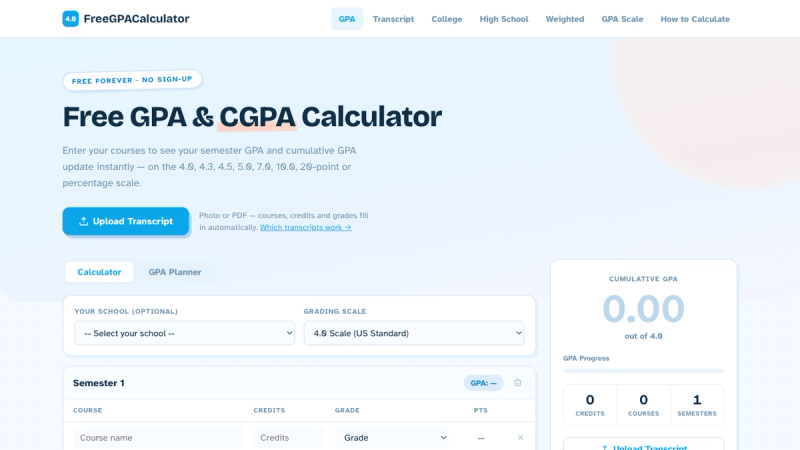
FreeGPACalculator handles eight grading scales plus percentage natively: 4.0, 4.3, 4.5, 5.0, 7.0, 10.0, 20-point and percent. You pick your scale once and the arithmetic is correct for your system, not approximated from someone else's.
What it does
Live semester and cumulative GPA. Numbers update as you type. You do not submit a form and wait for a result page — you watch the cumulative number move as you add or change a course, which makes "what grade do I need in this one" answerable by just trying it.
Transcript import. Photograph a transcript or upload the PDF and the courses, credits and grades are parsed in for you. For anyone with six semesters of history to enter, this is the difference between using the tool and abandoning it.
Weighted GPA. Honors and AP weighting is supported for high school students, where an unweighted-only calculator gives the wrong answer for the thing people actually care about.
College and high school modes. The two have different conventions; the tool does not pretend they are the same.
Per-semester tracking. Keep each term separate and see how a single bad semester moves the cumulative figure — and how much it takes to pull it back.
No account, nothing uploaded
It runs in the browser. There is no signup wall, no email capture before you see your number, and transcript images are processed without becoming someone's training data. Free, and free in the sense that matters: you are not the product.