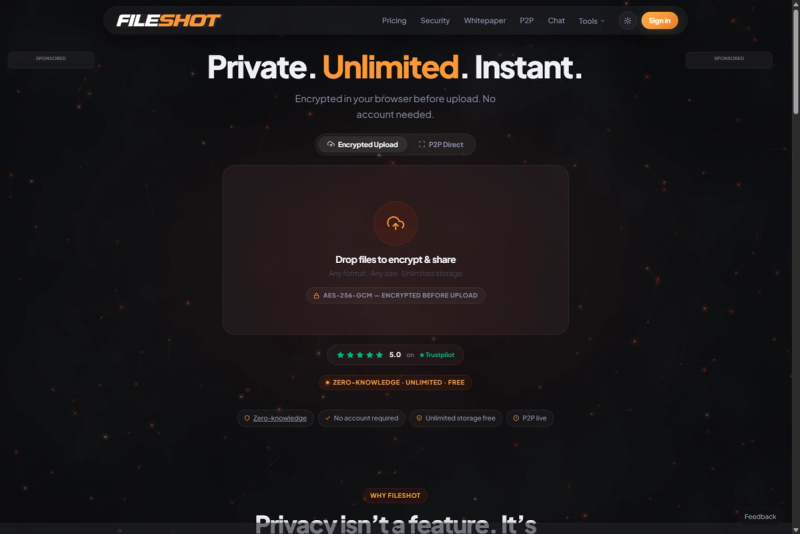
FileShot.io is a privacy-focused file sharing platform that encrypts files in your browser before upload using AES-256-GCM encryption, offering unlimited storage options, P2P transfers, and a Tor hidden service for anonymous access.
What is FileShot.io?
FileShot.io is a zero-knowledge file sharing and transfer service that encrypts files entirely in the browser before any data reaches its servers. Users upload files of any format (documents, images, videos, etc.) and receive a secure, shareable link with the decryption key embedded in the URL fragment. The platform runs as a web application and also offers desktop apps for Windows, macOS, and Linux, a browser extension, and a Tor onion service. It is developed by FileShot, a company focused on privacy-first file handling.
Key Features
- Zero-knowledge encryption — AES-256-GCM encryption run entirely in the browser via WebCrypto; the server never receives the decryption key.
- P2P direct transfers — WebRTC-based device-to-device file sharing that bypasses server storage entirely.
- Expiry & burn-after-read — Set time limits (up to 1 year on Pro, unlimited on Creator+) or download count limits; files are cryptographically deleted when limits are hit.
- Receive Inbox — Pro plan includes a permanent personalized link (yourname.fileshot.io) where anyone can send you files without signing up.
- Portfolio page — Creator+ plans offer a public gallery at fileshot.io/u/yourname for showcasing files with client-side decryption.
- Archive builder — Bundle multiple files into one encrypted link client-side, without zipping.
- Desktop app — Native applications for Windows, macOS, and Linux with drag-and-drop uploads and system tray integration.
- Tor hidden service — Access FileShot anonymously via
.onion address without JavaScript required.
Who is it for?
- Professionals handling sensitive documents — Lawyers, accountants, and HR teams can share contracts and confidential files with password protection and expiration controls.
- Journalists and whistleblowers — Use the Tor hidden service and zero-knowledge architecture to share sources and documents anonymously.
- Healthcare providers — HIPAA-compliant workflows with the Professional plan, including audit logging and BAA.
- Creators and developers — Sell digital products via the marketplace (91% revenue share) or use the REST API and webhooks for automated file handling.
What can you do with FileShot.io?
- Secure file sharing: Upload any file up to 100 GB (Pro) or 300 GB (Creator), set a password and expiration, and share the encrypted link.
- Peer-to-peer transfer: Send files directly device-to-device with WebRTC — no server storage, both parties must be online.
- Receive files via inbox: Provide your permanent inbox link (e.g., yourname.fileshot.io) in your email signature or bio; senders drop files without an account.
- Sell digital products: Creators can list templates, code, music, or eBooks on the marketplace with instant encrypted delivery.
- Automate uploads: Developers can upload and manage files programmatically using the API with
fsk_ keys and webhooks.
How does FileShot.io work?
- Select files — Drag and drop or click to choose files of any format.
- Encrypt in browser — A 256-bit AES key is generated locally, derived via Argon2id (64 MB memory-hard KDF), and files are encrypted chunk-by-chunk (512 KB) before any data is uploaded.
- Share the link — The decryption key is placed in the URL fragment (never sent to the server); anyone with the link can decrypt and download in their browser.
Pricing
FileShot offers a free plan and three paid tiers: Pro at $10/month ($2.50/week), Creator at $24/month ($6.00/week), and Professional at $38/month ($9.50/week). All paid plans include a free trial and unlimited storage. The free plan provides 50 GB total storage, 10 GB per-file limit, and 90-day expiry.
Pros and cons
Pros:
- End-to-end zero-knowledge encryption with verifiable open-source cryptographic details.
- Generous free tier (50 GB storage, 10 GB per file, unlimited downloads).
- Unique features like P2P transfers, Tor hidden service, and a creator marketplace.
- Competitive pricing with unlimited storage on paid plans.
Cons:
- Free plan file expiry is capped at 90 days.
- Free plan per-file limit of 10 GB may be restrictive for larger media files.
- Some advanced features (inbox, custom slugs, API) require paid plans.
Alternatives
- WeTransfer — Free plan limited to 2 GB per file and 7-day expiry; no zero-knowledge encryption.
- Dropbox Transfer — Free plan limited to 2 GB and 30-day expiry; no client-side encryption.
- MediaFire — Free plan offers 10 GB storage and no file expiry, but lacks zero-knowledge encryption.
- Google Drive — Free plan offers 15 GB storage and 5 GB per-file limit, but files are not zero-knowledge encrypted by default.
FAQ
How does FileShot encrypt my files?
FileShot uses AES-256-GCM encryption in your browser before any data leaves your device. The encryption key is derived from your password using Argon2id (64 MB memory-hard KDF) combined with a random 32-byte salt. The server receives only ciphertext and cannot decrypt files under any circumstances.
Do I need an account to upload files?
No account is required to upload and share files. You can drag and drop a file, set optional password and expiry, and get a shareable link immediately. Creating a free account adds file management, download analytics, and advanced features.
What is the maximum file size?
Free users can upload files up to 10 GB each. Pro users can upload up to 100 GB, Creator users up to 300 GB, and all paid plans include unlimited total storage.
How long are files kept?
Free files are kept for up to 90 days. Pro files can be kept for up to 1 year. Creator and Professional plans support unlimited expiry. Files can be manually deleted at any time.
Is FileShot suitable for sensitive business or medical files?
Yes. The zero-knowledge architecture ensures the server never holds the decryption key, making it suitable for legal, financial, and medical documents. The Professional plan includes HIPAA compliance documentation, BAA, and audit logging for regulatory requirements.