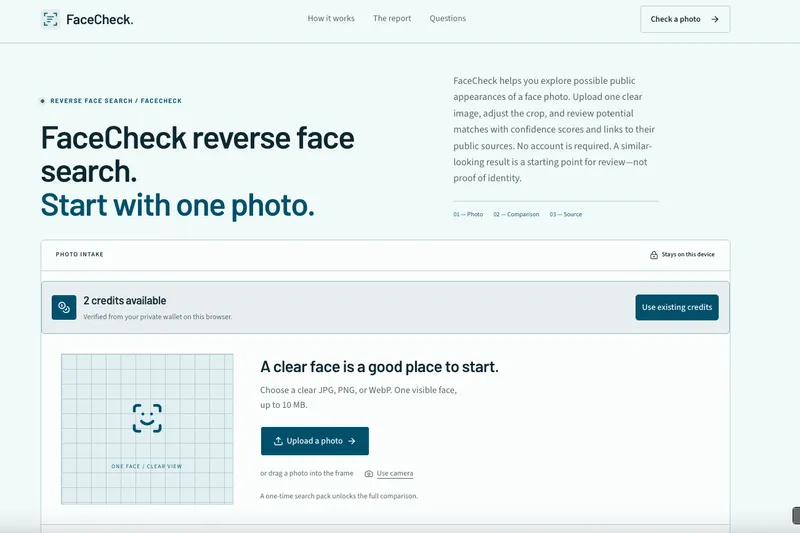
FaceCheck is a browser-based reverse face search service that takes one uploaded photo of a face and returns possible public appearances of that face, each ranked into a similarity band and linked to the public page where the image was found.
What is FaceCheck?
FaceCheck is a no-account reverse face search tool: you upload a single photo containing one clearly visible adult face, adjust the crop, and run a comparison against publicly available web images. The output is a report of candidate matches, each carrying a similarity band and a link to the public source page — the site states plainly that this is a starting point for review, not proof of identity, a background check, or an identity verification service. It runs in a web browser at face-check.net and accepts JPG, PNG, and WebP files up to 10 MB. Photo intake stays on the user's device until a paid search is confirmed.
What makes FaceCheck stand out?
- No account required — there is no signup or login; a private wallet reference is remembered by the browser while the server verifies the remaining credit balance.
- One-time search packs — you buy a pack of 3 or 10 searches through Stripe Checkout; there is no subscription, and one credit runs one search.
- Similarity bands instead of a single verdict — results are grouped as Strong Match, Likely Match, or Unlikely Match, described as similarity bands rather than a percentage probability that two photos show the same person.
- Linked public sources — every candidate links to the public page it came from, with icons illustrating possible source categories including X (Twitter), Instagram, TikTok, YouTube, Facebook, Threads, Pinterest, LinkedIn, Telegram, OnlyFans, Tinder, and Hinge.
- 24-hour media window — search media and the report are accessible for up to 24 hours, which is separate from any remaining search balance.
- Browser-side photo intake — JPG, PNG, and WebP, one face per image, up to 10 MB, with drag-and-pinch crop and zoom controls before the search starts.
- Video frame guidance — the site publishes a guide on picking a clearer frame from a video when a still photo is not available.
- Credit reuse — previously purchased searches can be spent from an existing balance instead of buying another pack.
Who should use FaceCheck?
People vetting a dating profile: someone who wants to know whether a profile photo appears elsewhere on the public web before meeting a match, using the check-dating-profile-picture flow.
People handling suspected photo theft: someone whose own photo may have been copied, who needs to find public copies and record the source URL and context before reporting through the platform's own process.
People auditing their own footprint: someone searching a photo of themselves to find public pages they may want to inspect, correct, or request removal of.
Use cases
Dating profile review: run a profile photo to see whether it appears on other public pages, then open each linked source to compare the name, caption, and publication date before drawing conclusions.
Impersonation triage: search a suspected copied photo, save the page URL, confidence band, and date checked as a review note, and use that record when contacting the hosting platform.
Self-audit: search your own photo to surface public appearances you may want to follow up on, accepting that the report is not a complete inventory of your online presence.
How does FaceCheck work?
- Choose and frame a photo: one clearly visible adult face in JPG, PNG, or WebP, drag to position and scroll or pinch to zoom without cropping away facial features.
- Prepare the request and pick a pack: a 22-second preparation sequence leads to one-time purchase options, and payment is handled in Stripe Checkout.
- After payment is verified, confirm the final photo, spend one search credit, and review the returned candidates, confidence bands, and linked public pages.
Pricing
FaceCheck uses a paid one-time credit model rather than a subscription. Packs of 3 or 10 searches are sold through Stripe Checkout, one credit covers one search, and existing credits can be used instead of buying a new pack. No dollar amounts are listed on the page.
FAQ
Do I need an account or subscription to use FaceCheck?
No. FaceCheck requires no account and sells one-time packs of 3 or 10 searches with no recurring subscription. Stripe Checkout collects an email for the receipt and a private recovery link, which is how you return to your purchase if you change devices or clear browser storage.
Does FaceCheck search every social platform?
No. Coverage depends on which public pages and images are available to the search provider, so private profiles, deleted posts, blocked pages, and unindexed content may never appear in a report. The platform icons illustrate possible source categories and do not mean each platform is searched directly or that private accounts can be accessed.
What do the confidence bands actually mean?
Strong Match, Likely Match, and Unlikely Match describe visual similarity, not a percentage probability that two photos show the same person. Lighting, pose, image quality, or a similar-looking person can alter a result, so the site advises opening the linked source and comparing names, captions, and dates before acting.
How long can I access my photo and report?
Search media has an access window of up to 24 hours. You need to review the report inside that window and keep the private access link secure; the media-access window is separate from any remaining search balance.
What happens if no useful match appears?
No useful matches does not prove a person has no online presence. The photo may have little public exposure, the relevant page may be private, removed, blocked, or unindexed, and blur, filters, an obstructed face, or unusual angles can weaken the comparison, so a clearer photo is worth trying before spending another credit.