
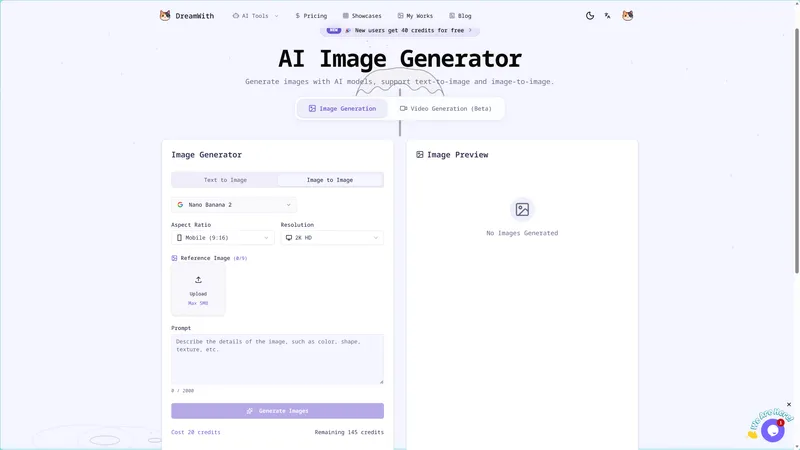
DreamWith is a web-based AI creation platform that generates images, videos, and precise mask edits using a suite of 30+ top models including GPT Image, Nano Banana Pro, Veo, and Kling.
What is DreamWith?
DreamWith is a one-stop creative workspace at dreamwith.art where users turn text prompts, uploaded images, reference videos, or first/last frames into new AI-generated images, videos, and high-precision edits. It runs entirely in the browser, aggregates more than 30 AI models, and uses a credit-based pay-as-you-go system.
The platform has three main tabs: Image Generator, Video Generator, and Image Mask Editor. The image generator supports text-to-image and image-to-image, with aspect ratio presets like Mobile (9:16) and resolution up to 2K HD. The video generator accepts text, image, reference video, or first/last frame inputs and uses models such as Veo 3.1 Fast. The mask editor lets users upload PNG/JPG/WEBP images, paint over the region to change, describe the new content, and have the model repaint only that area.
Key Features
- Text-to-Image Generation — Describe a scene in a prompt (up to 10,000 characters) and get a 2K HD image in a chosen aspect ratio (e.g. Mobile 9:16) using models like Nano Banana Pro; each generation costs 18 credits.
- Image-to-Image Generation — Upload an existing image and use text prompts to modify, restyle, or enhance it with the same image-generation models.
- Video Generation from Text or Image — Generate videos from a text description, an image, a reference video, or first/last frames using Veo 3.1 Fast and other video models; a 16:9 video generation costs 50 credits.
- Mask-Based Image Editing — Upload a PNG/JPG/WEBP image, paint over the region to change, describe the edit, and the platform repaints only that area while keeping the rest intact; each edit costs 10 credits.
- Built-in Prompt Templates — Nine creative visual templates (e.g. product selling poster, Xiaohongshu cover set, data story infographic, campaign key visual) and 30+ style templates (3D Avatar, Anime, Blueprint, Tarot, etc.) that auto-fill prompts for one-click generation.
- Credit System with Free Sign-Up Bonus — New users receive 40 free credits, and all features are metered per job (18 credits per image, 50 per video, 10 per edit) with a pay-as-you-go model—no subscription required.
Who is it for?
- Digital artists and designers — Use text-to-image and image-to-image to quickly iterate on concept art, style boards, and product mockups.
- Content creators and marketers — Generate social media visuals, ad posters, infographics, and short video clips for platforms like Xiaohongshu.
- AI enthusiasts and hobbyists — Experiment with 30+ AI models and templates (from Tarot card art to 8-bit sprites) without needing a dedicated GPU.
- E-commerce sellers — Create product selling posters, campaign key visuals, and tutorial step graphics from simple text descriptions.
What can you do with DreamWith?
- Media kits: Turn a product description into a Chinese or English promotional poster, or a set of Xiaohongshu cover images, using the provided Creative Visual prompts.
- Video ads: Generate a 16:9 video from a first and last frame storyboard, or from an image reference, for social media ad campaigns.
- Photo retouching: Remove a logo or watermark, swap a piece of clothing, or repair damaged details with the mask editor—which keeps non-masked areas stable.
- Brand style exploration: Build a brand style board or a campaign key visual across multiple template styles to compare directions.
How does DreamWith work?
- Sign up at dreamwith.art (existing accounts were reset after a system upgrade) and receive 40 free credits.
- Choose the Image Generator, Video Generator, or Image Editor tab.
- For text-to-image: enter a prompt, select a model like Nano Banana Pro, pick aspect ratio and resolution (2K HD), and click Generate.
- For image editing: upload an image, paint a precise mask over the area to change, describe the new content, and submit—the model repaints only the masked region.
- For video: enter a text prompt, supply an image/reference video/first & last frame, and generate a clip with Veo 3.1 Fast or other video models.
Pricing
DreamWith is freemium with pay-as-you-go credits. New users get 40 free credits for new users on sign-up, and each generation deducts a fixed credit cost (18 per image, 50 per video, 10 per edit). No subscription is required; additional credits are purchased on the pricing page.
Alternatives
- Midjourney, which focuses primarily on text-to-image generation and lacks video and mask-editing tools.
- Runway, which offers AI video generation and editing but does not aggregate as many third-party image models under one interface.
- Canva, which leans toward template-driven design rather than AI generation from scratch.
FAQ
Is DreamWith free?
DreamWith offers a freemium model: new users receive 40 free credits upon sign-up, and all features are metered per job. After the bonus is used, you pay for additional credits on a pay-as-you-go basis.
What models does DreamWith use?
The platform integrates 30+ AI models, including GPT Image, Nano Banana Pro, Flux Kontext, Veo, Kling, and Seedance 2.0. The specific model used depends on the task (e.g., Nano Banana Pro for image generation, Veo 3.1 Fast for video).
How many credits does each generation cost?
Image generation costs 18 credits, video generation costs 50 credits, and mask-based image editing costs 10 credits. The current credit balance is shown in the editor.
Can I edit specific parts of an image?
Yes—the Image Editor lets you upload a PNG/JPG/WEBP, brush over the area to change, describe the edit, and submit. Only the masked area is repainted; the rest of the image stays stable.
What kinds of images can I create?
You can generate virtually any style: from photorealistic product posters and data infographics to anime, 8-bit pixel art, tarot cards, and 3D avatars. The platform also includes 30+ one-click style templates.


