LogoTurbo0

Unblur Image AI

Unblur Image AI is an advanced AI-powered online tool that instantly removes blur from photos and enhances image clarity in seconds, requiring no registration and supporting multiple image formats for professional-quality results.

Introduction

Unblur Image AI is an AI-powered online tool that instantly removes blur from photos, enhancing clarity in seconds without requiring registration or sign-up.

What is Unblur Image AI?

Unblur Image AI is a web-based tool that uses advanced deep learning algorithms to analyze and reconstruct blurry photos, restoring sharpness and detail lost due to motion blur, camera shake, poor focus, or low resolution. Users upload an image in JPG, PNG, WEBP, or HEIC format, and the AI automatically processes it to produce a clear, high-quality output in seconds. The tool is developed by an unnamed team and operates entirely online with no software installation.

Key Features
  • AI-Powered Unblurring — Uses deep learning to identify blur patterns and reconstruct lost detail, supporting both motion and out-of-focus blur.
  • Intelligent Noise Reduction — Eliminates high ISO noise, compression artifacts, and scan noise while preserving image details.
  • One-Click Sharpening — Enhances edges, texture clarity, and color vibrancy automatically without manual adjustments.
  • Free & No Registration — Full functionality available at no cost with no account creation required.
  • Multiple Format Support — Accepts JPG, PNG, WEBP, and HEIC uploads.
  • Instant Processing — Produces results in under 10 seconds for typical images.
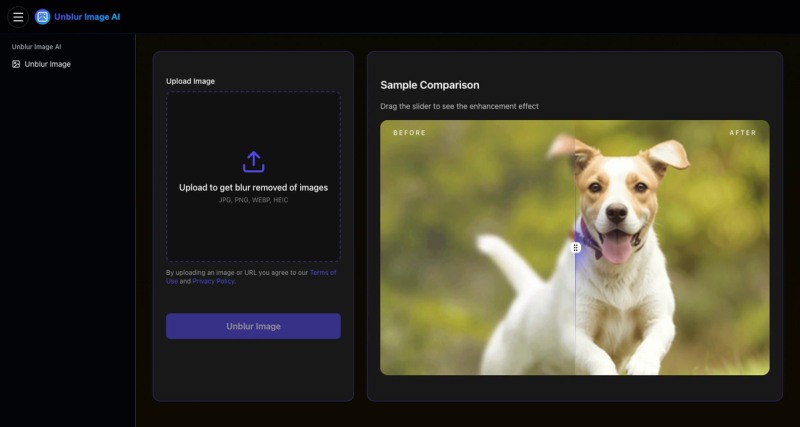
  • Before/After Comparison — Built-in slider lets users see the enhancement effect side by side.
  • Privacy Focused — No permanent storage of uploaded images; processing is secure and private.
Who is it for?
  • Photographers and content creators who need to rescue blurry shots from photo shoots or events without manual editing.
  • E-commerce sellers who want to sharpen product photos to increase conversion rates and reduce returns.

  • Social media influencers looking to polish images for higher engagement on platforms like Instagram and TikTok.
  • Real estate agents fixing blurry property photos to create compelling listings that attract buyers.
  • Family users restoring precious memories from blurry vacation photos or old scanned prints.
What can you do with Unblur Image AI?
  • Rescue motion-blurred photos taken at concerts or sporting events — upload the image, click unblur, and get a sharper version ready for sharing.
  • Fix out-of-focus product shots for an online store — enhance clarity to show every texture and detail, improving customer trust.
  • Sharpen low-light images with high ISO noise — the noise reduction feature cleans up grain while preserving important details.
  • Prepare images for print — improve resolution and clarity before sending files to a print shop for brochures or posters.
How does it work?
  1. Upload your blurry image by clicking the upload button and selecting a file from your device (JPG, PNG, WEBP, or HEIC supported).
  2. Click 'Unblur Image' to activate the AI enhancement — no manual settings are needed.
  3. Download the result in seconds, with an option to compare before and after using a slider.
FAQ
Is Unblur Image AI really free?

Yes, the tool is completely free with no hidden costs. All features, including AI unblurring, noise reduction, and sharpening, are available without payment. No registration is required.

What image formats are supported?

The tool supports JPG, PNG, WEBP, and HEIC files. Users can also paste a URL to an image, but the site primarily emphasizes file upload.

Do I need to register to use the tool?

No registration or sign-up is needed. Simply upload an image and start using the AI unblurring features immediately.

How long does it take to unblur an image?

Processing typically takes a few seconds. The exact time depends on image size and complexity, but it is designed to be fast.

Can I use the enhanced images commercially?

Yes, the tool imposes no restrictions on commercial use. Users own the rights to their original images and the enhanced outputs.

Is my photo data safe?

Uploaded images are processed temporarily and are not stored permanently. The site follows its Privacy Policy to protect user data. By uploading, you agree to the Terms of Use.

Information

Performance Insights

Traffic, search & AI signals for unblurimageai.com.

Monthly visits
150-80.6%
Domain Rating
7
Global rank
--
AI traffic share
0.0%

Monthly traffic trend

Domain Rating trend

Third-party traffic estimate · Updated Aug 9, 2026

Launch on turbo0

Submit your own product to reach creators and founders looking for the next tool to try.

Submit your product

Newsletter

Join the Community

Subscribe to our newsletter for the latest news and updates