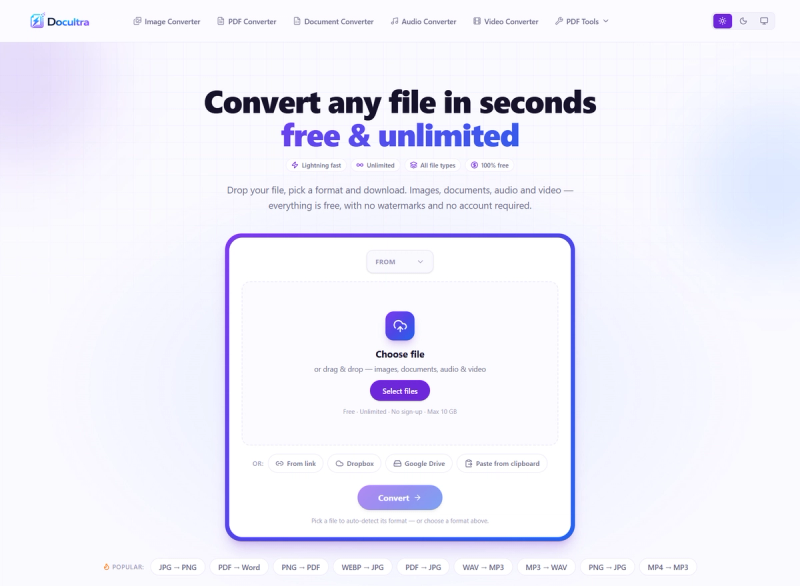
Docultra is a browser-based file converter for PDFs, images, audio, and video that converts files between formats for free with no sign-up, no watermarks, and no daily limits.
What is Docultra?
Docultra is a free online file conversion service that handles images, documents, audio, and video. You drop a file, choose an output format, and download the converted result; it runs in any modern browser on phone, tablet, or desktop. The platform also includes PDF tools such as merge, compress, sign, redact, OCR, and translation. Files can be added by drag-and-drop, file picker, link, Dropbox, Google Drive, or clipboard paste, with a maximum file size of 5.00 GB.
Key Features
- Multi-format conversion — Convert images between JPG, PNG, WebP, GIF, TIFF, BMP, SVG, and AVIF; PDFs to Word, JPG, PNG, or plain text; audio among MP3, WAV, FLAC, AAC, Opus, and M4A; and video among MP4, WebM, MOV, MKV, and AVI.
- PDF toolset — Merge, compress, sign, and redact PDFs, run OCR to turn images into text, and translate files without leaving the browser.
- Image-to-PDF batch processing — Combine multiple images into a single PDF, with batch processing built into the image converter.
- Audio extraction and editing — Pull audio from video files and trim, normalize, or compress audio tracks as part of conversion.
- Video soundtrack extraction — Export the audio from a video as MP3, WAV, or FLAC while converting the video itself to another format.
- No account or watermark — Every tool is free for personal and commercial use, with no sign-up, no watermarks, no daily limits, and no hidden fees.
- Browser-first privacy — Image and PDF conversions run locally in the browser; most conversions never leave your device. Audio jobs that require a server are deleted the moment conversion finishes.
- Broad input methods and large files — Add files by drag-and-drop, file picker, link, Dropbox, Google Drive, or clipboard paste, up to 5.00 GB per file.
Who should use Docultra?
- Office and administrative workers: Convert PDFs to Word or JPG for editing and sharing, or turn Word documents and images into PDFs for final distribution.
- Content creators and social media managers: Change image formats (JPG, PNG, WebP, AVIF) and convert video to MP3 or other formats for posts, thumbnails, and platform requirements.
- Students and researchers: Extract text from scanned images with OCR, translate files, and merge or compress PDFs for assignments and applications.
- Audio and video editors: Convert between MP3, WAV, FLAC, AAC, Opus, M4A, MP4, WebM, MOV, MKV, and AVI, and pull soundtracks from video for editing.
What can you do with Docultra?
- Convert a PDF to an editable document: Upload a PDF and convert it to Word (DOCX), JPG, PNG, or plain text, then download the result without installing software.
- Prepare images for the web: Convert JPG to PNG, WEBP to JPG, or PNG to JPG, and combine several images into a single PDF for a portfolio or report.
- Extract audio from video: Convert MP4 to MP3, or pull the soundtrack from a video as WAV or FLAC for podcasts, transcription, or remixing.
- Clean up and secure documents: Merge multiple PDFs, compress large files, add a signature, or redact sensitive content before sending.
How does Docultra work?
- Open a converter or PDF tool.
- Add a file by dragging and dropping it, choosing it from your device, pasting a link, connecting Dropbox or Google Drive, or pasting from the clipboard.
- Pick the output format (or let Docultra auto-detect it), then run the conversion.
- Download the converted file. Image and PDF conversions run in the browser; audio conversions may use a server and the file is deleted when finished.
Pricing
Docultra is free to use. The page states no sign-up, no watermarks, no daily limits, and no hidden fees, and all tools are free for personal and commercial use. There are no paid tiers listed.
FAQ
Is Docultra free?
Yes, Docultra is free. The site says every tool is free for personal and commercial use, with no sign-up, no watermarks, no daily limits, and no hidden fees. There is no paid plan mentioned on the page.
Do I need an account to use Docultra?
No account is required. You can drop a file, pick a format, and download the converted result without signing up or logging in. Input options include drag-and-drop, file picker, link, Dropbox, Google Drive, and clipboard paste.
What file formats does Docultra support?
Docultra supports 20+ formats across images, documents, audio, and video. Examples include JPG, PNG, WebP, GIF, TIFF, BMP, SVG, AVIF, PDF, DOCX, MP3, WAV, FLAC, AAC, Opus, M4A, MP4, WebM, MOV, MKV, and AVI. It also converts PDF to Word and Word to PDF.
What is the maximum file size?
The page states a maximum file size of 5.00 GB. Files can be added from your device, a link, Dropbox, Google Drive, or the clipboard. Image and PDF conversions run in the browser; audio conversions that need a server are deleted after conversion.
Are my files private on Docultra?
Docultra says most conversions never leave your device, because image and PDF conversions run in the browser. When a server job is needed for audio, the file is deleted the moment conversion finishes. The site also reports 0 files stored.