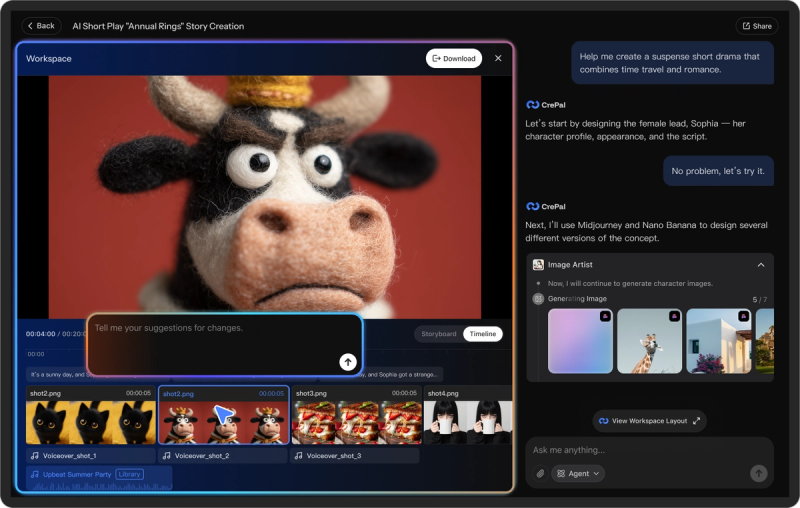
CrePal is an AI video creation agent that begins with your idea and returns a finished, multi-scene video. It combines 40+ tools, 20+ state-of-the-art models, and 3 specialized sub-agents to automate scriptwriting, storyboarding, and final editing, all through a chat interface.
What is CrePal?
CrePal is a web-based AI Director Agent developed by CrePal.ai. It accepts natural-language prompts, uploaded PDFs, or product images as input, then plans a script, storyboard, and scene list; selects the best AI models for each step; and generates a complete video with voiceover, subtitles, and music. The output is exported as an HD video file. It runs entirely in the browser, and the Free plan gives you access to standard models.
Key Features
- AI Director Agent — Automates the full video production pipeline: scriptwriting, scene planning, model selection, generation, and editing. You can preview its work in real time and change anything by chatting.
- Multi-model orchestration — Integrates top video and image models including Runway, Google Veo/Imagen, OpenAI GPT Image, Recraft, Hailuo, Suno, PixVerse, Vidu, and Kling; it picks the most suitable model per task.
- Mini Apps — Prebuilt tools for specific jobs: Ad Remix (mimic a reference video's style with your product image), AI Talking Avatar Generation (produce avatar videos from lines or a topic), and PDF to AI Video (turn any PDF into a video).
- AI Video Templates — Trending templates for TikTok and YouTube across tags like sports, outfit, fashion, face, hands, and football; the agent customizes one in minutes.
- Voice and chat editing — Control the edit with natural language or directly with your voice, e.g. “shorter intro, punchier cuts, warmer palette.”
- Character and style consistency — Maintains consistent characters, faces, outfits, visual style, color tone, and pacing across scenes.
- Export options — Outputs HD video files with subtitles, voiceover, and background music; paid plans remove the watermark.
- Coding Mode (beta) — Generate videos programmatically with the Coding Agent, which writes production logic, builds motion graphics, and renders polished videos for product demos, financial news, and explainers.
Who is it for?
- Small business owners and e-commerce sellers: Create product videos and ads from product images and reference clips; the highlight picker emphasizes details buyers care about, and subtitles make them accessible to international customers.
- Social media influencers and creators: Turn short scripts into AI-generated movie shorts, anime episodes, or ASMR clips with visuals, voice, and subtitles, published at high frequency on YouTube or TikTok.
- Marketing managers: Produce platform-ready cuts with crisp subtitles across languages, reducing production time and improving click-throughs on social campaigns.
- Indie filmmakers and video editors: Use CrePal as an assistant to edit raw footage according to mood (“romantic but grounded”) without manually combing through hours of footage.
- AI enthusiasts and software engineers: Experiment with technical controls like queuing tasks, switching between models (e.g. Kling vs. Hailuo), and adjusting generation parameters.
What can you do with CrePal?
- AI Story Generation: Write a short script or a one-sentence idea; the agent expands it into a full story with scenes, characters, and subtitles.
- AI Music Videos: Generate music videos with audio and visuals from text or images, using music-capable models like Suno.
- Lip Sync and Talking Avatars: Produce talking-avatar videos with accurate lip sync for product promotion or short-form content.
- Explainer Videos and PDF-to-Video: Convert reports, pitch decks, or presentations into polished explainer videos.
- Ad Remix: Upload your product image and a video you want to mimic; CrePal replicates the style to generate a high-end commercial starring your product.
- Viral Video Templates: Use trending templates to quickly create TikTok- or YouTube-style AI videos.
How does CrePal work?
CrePal’s workflow is chat-driven. You describe your idea or upload a starting file (script, PDF, product image). The AI Director builds a production plan—script, storyboard, and scene list—then selects the appropriate models for text-to-image, text-to-video, and music generation. It generates the video in real time, so you can watch its progress and give feedback. When you re-request changes using natural language, the agent revises the edit until you’re satisfied, then you export an HD video file.
Pricing
CrePal is freemium. The Free plan includes standard models and limited credits; paid plans are named Plus, Pro, and Max. Paid tiers add 3,000, 8,000, or 20,000 credits per month, respectively, plus priority task queue, access to all image and video models, multiple concurrent tasks (3, 10, or unlimited), watermark-free export, flexible credit top-up, and early beta access. Annual billing saves 17%. Add-on credit packs are available for members, and a Team plan is available through sales.
Alternatives
Other AI video generation platforms include Runway and Pika Labs, both prompt-based AI video generators.
FAQ
Can I use CrePal for free?
Yes. The Free plan lets you create with standard models and a limited credit allowance. Upgrading to a paid plan unlocks premium models, more credits, additional concurrent tasks, and watermark-free exports.
What is an AI Video Agent?
An AI Video Agent produces videos end-to-end: it supports scriptwriting, scene planning, model selection, soundtrack, and editing. CrePal’s agent also handles character consistency and style continuity across scenes.
How can I get more credits if I run out?
Paid members can buy credit packages anytime from the dashboard. Free users need to upgrade first or can earn free credits by inviting others (up to 5 invites).
Can I use what I create commercially?
Yes, on every plan including Free. You retain rights to the output and can use, edit, or publish it anywhere without restrictions.
Does CrePal support character and style consistency?
Yes. CrePal ensures consistent characters, faces, outfits, visual style, color tone, and pacing throughout the entire video, which is important for multi-scene storytelling.