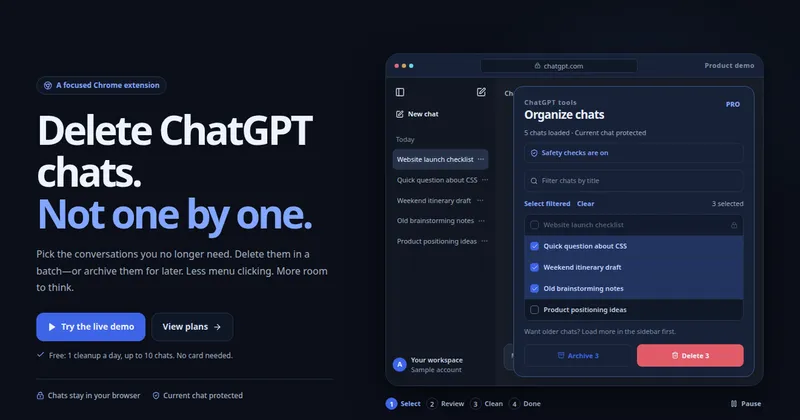
ChatSweep (ChatGPT Bulk Delete) is a Chrome extension for desktop that adds checkboxes to the ChatGPT sidebar so you can select loaded conversations and delete or archive them in one confirmed batch instead of opening each chat's menu individually.
What is ChatSweep?
ChatSweep is a ChatGPT Bulk Delete extension that runs in Chrome on desktop and operates on the conversation list already loaded in ChatGPT's sidebar. It takes your sidebar selections as input and produces batched Delete or Archive actions against those conversations. The tool is made by ChatSweep, an independent developer, and states on the page that it is not affiliated with or endorsed by OpenAI. Chat data is processed in the browser; only account, billing, activation and entitlement checks reach the vendor's server.
What makes ChatSweep stand out?
- Sidebar checkboxes — renders a selection box beside each chat already loaded in the ChatGPT sidebar, plus a filtered selection count and a Clear action.
- Batch delete with confirmation — nothing runs until you review and confirm the batch; deleted chats cannot be restored afterwards.
- Bulk archive — moves conversations out of the sidebar without deleting their contents; this feature is limited to the Pro and Lifetime plans.
- Current-chat protection — the conversation you have open is excluded from selection, and if you switch into a selected chat mid-run the task pauses.
- Verification-gated runs — if a page control cannot be verified the run stops rather than guessing; the page also warns that ChatGPT interface changes may still require an extension update.
- Run-in-place requirement — cleanup continues only while you stay on the ChatGPT page; switching tabs or apps pauses the task, and after a long absence you may need to start again.
- 25 interface languages — the extension UI is localized into 25 languages.
- Account-synced licensing — buy on the website, then sign in from the extension with the same Google account or verified email; no activation code, and connected browsers can be managed or revoked from the account page.
Who should use ChatSweep?
- Heavy ChatGPT users with hundreds of sidebar entries: clear finished one-off questions without clicking through each chat's menu.
- Writers and researchers keeping a working thread: archive finished drafts and tests out of the sidebar while preserving the message history behind them.
- Privacy-conscious users: remove outdated conversations entirely, since chat titles and contents are read and acted on locally rather than uploaded.
- Users on temporary or shared machines: run a single confirmed cleanup (the free tier covers one cleanup a day of up to 10 chats) before signing out.
Use cases
- Draft cleanup: select old drafts and quick tests shown in the demo — for example a launch checklist, a CSS question, and a weekend itinerary — and delete all three in one batch.
- Sidebar thinning without data loss: archive a batch of finished projects so the sidebar shows only active work, then restore them from ChatGPT's archive later.
- Post-project reset: after shipping a project, bulk-delete the exploratory chats whose contents you no longer need.
How does ChatSweep work?
Open the extension to show checkboxes in the ChatGPT sidebar, then select chats and choose Delete or Archive; closing the extension window keeps your selection. A review-and-confirm step precedes any action, and the extension then works through the batch one chat at a time with built-in pauses. You must remain on the ChatGPT page for the run to continue.
Pricing
ChatSweep uses a freemium model with three tiers shown on the site: a free tier (1 bulk delete per day, up to 10 chats per run, current-chat protection, confirmation before deletion, no card), Pro at $19.99 per year (unlimited bulk delete, no per-run chat limit, bulk archive), and a Lifetime option at $39.90 as a one-time payment covering everything in Pro plus future updates. Yearly billing displays as a 67% saving versus monthly. Card details are handled by Stripe.
FAQ
Is ChatSweep free?
There is a free tier: one bulk delete per day covering up to 10 chats per run, with current-chat protection and confirmation before deletion, and no card required. Unlimited deletes, no per-run chat cap, and bulk archive require the Pro yearly or Lifetime plan.
Which chats can ChatSweep select?
Only conversations already loaded in ChatGPT's sidebar. To include older history, scroll the sidebar to load more chats and then refresh the extension's selector — the extension does not fetch your entire chat history automatically.
Can ChatSweep delete the conversation I'm currently using?
No. The open conversation is excluded from selection. If you switch into a selected chat while a cleanup is running, the extension pauses to protect it, and you can resume afterward.
What is the difference between delete and archive in ChatSweep?
Delete removes conversations and usually cannot be undone. Archive removes them from the sidebar while keeping their contents, so they can be retrieved later — bulk archive is available on the Pro and Lifetime plans only.
Does ChatSweep read or upload my conversations?
It reads loaded sidebar titles to display your selection, but does not read message contents or upload chat titles. Only account and sign-in details, plan and payment status, and extension activation and access checks are sent to the vendor's server.