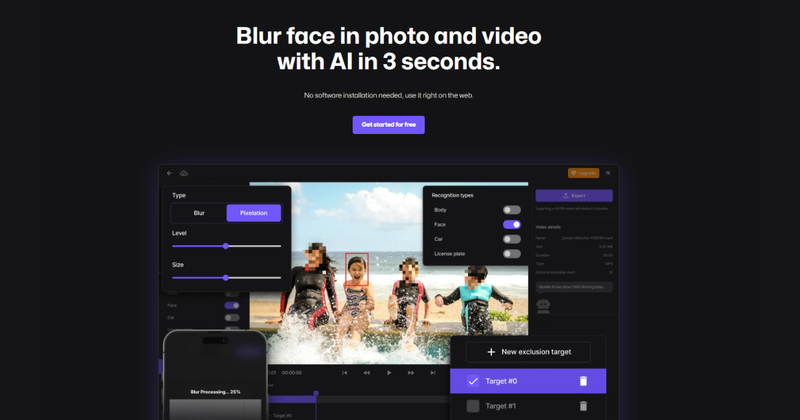
BlurMe is an AI-powered online tool that automatically detects and blurs faces, text, and sensitive information in videos and photos to protect privacy.
What is BlurMe?
BlurMe is a web-based application that uses artificial intelligence to automatically identify and blur faces, text, license plates, and other sensitive objects in both videos and still images. Users upload media files (supporting formats like PNG, JPG, JPEG, and common video formats) and receive a version with targeted blurring applied. The tool runs entirely in the browser, requiring no software installation or account creation for basic use. It is developed by the team behind BlurMe, a company focused on privacy-enhancing media tools.
Key Features
- Automatic face detection and blurring — AI scans videos and photos to detect all faces, including those in motion, and applies blur without manual masking.
- Multiple blur effects — Offers mosaic blur, box blur, pixelation, and custom blur intensity for creative or censorship purposes.
- Text blurring — Automatically blur text in screenshots and images to hide confidential information like names, addresses, or financial data.
- Video support — Process entire videos with automatic tracking of faces across frames, supporting common video codecs.
- Censorship tools — Censor license plates, specific objects, or arbitrary regions with a few clicks.
- Free online access — No download or installation; works directly in the browser on desktop and mobile.
- Multi-language interface — Available in English, Chinese, and other languages.
Who is it for?
- Content creators — Anonymize subjects in vlogs, tutorials, or user-generated content before publishing to avoid privacy issues.
- Journalists — Protect the identities of sources by blurring faces in documentary footage or news interviews.
- Businesses — Process CCTV or surveillance footage to comply with privacy regulations like GDPR without manual redaction.
- Social media users — Quickly blur faces, license plates, or private details in photos and videos before sharing online.
What can you do with BlurMe?
- Blur faces in videos: Upload a video with multiple people and let AI automatically blur every face, ensuring privacy without manual masking.
- Censor images online: Quickly blur license plates, addresses, or sensitive text in screenshots before sharing on social media or in reports.
- Create mosaic effects: Apply pixelation or mosaic blur to specific areas for artistic purposes or to obscure identities.
- Blur Instagram Stories: Prepare photos for Instagram Stories by blurring backgrounds or faces directly online, using the tool's mobile-friendly interface.
How does BlurMe work?
Users upload a video or image to the BlurMe website. The AI automatically detects faces, text, or other objects based on the selected mode. After processing, users can preview the result, adjust blur intensity if needed, and download the final file. No technical skills are required.
FAQ
Is BlurMe free?
BlurMe offers a freemium model. The free tier allows basic blurring with limitations on file size or processing time. Paid plans remove these limits and may support higher resolutions.
Does BlurMe support video blurring?
Yes, BlurMe supports video files. It can automatically blur faces in motion and track them across frames.
Can I blur only specific parts of an image?
Yes, BlurMe allows selecting regions to blur manually, in addition to automatic detection. You can apply box blur, mosaic, or pixelation to chosen areas.
What file formats are supported?
BlurMe supports common image formats (PNG, JPG, JPEG) and video formats like MP4, MOV, and AVI. The exact list may vary by tier.
Is there a watermark on free exports?
The free version may add a small watermark to exported files. Paid plans remove the watermark.