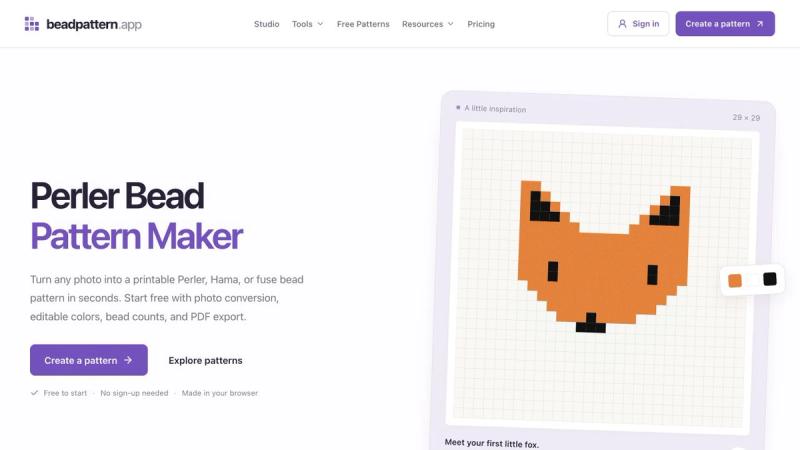
Turning an image into a physical craft project requires more than shrinking the picture: the maker needs a clear grid, a manageable palette and an idea of how many beads to prepare. BeadPattern connects those steps in a browser studio for Perler, Hama and other fuse bead projects. Upload a photo to create an image-based starting point, begin with a blank canvas, or open a starter pattern when you want an easier first project. The grid can be edited before the design reaches the pegboard, so crafters can refine small details and adjust the colors to suit the materials they have. Painting, erasing and filling areas let the maker work with individual squares rather than treating the converted image as a finished design. Color codes and bead counts make the result more practical to prepare, helping connect the digital pattern to the beads on the table. The free studio can be explored without an account. A free account adds saving and reopening projects as well as printable exports and bead lists, making it easier to return to a design or follow it away from the screen. The site also offers one free AI image generation after Google sign-in for someone who starts with an idea instead of a photograph. AI generation is an optional starting point rather than a requirement for photo conversion or manual drawing. This makes the tool useful for both a quick experiment and a more deliberate craft plan: create a draft, inspect the grid, refine the palette, then export the pattern when it is ready to make.
BeadPattern
Convert photos into editable fuse bead grids with color codes, bead counts and printable exports.
Information
- Publisher李靖
- Websitebeadpattern.app
- Published date2026/10/04
- Views0 views
Launch on turbo0
Submit your own product to reach creators and founders looking for the next tool to try.