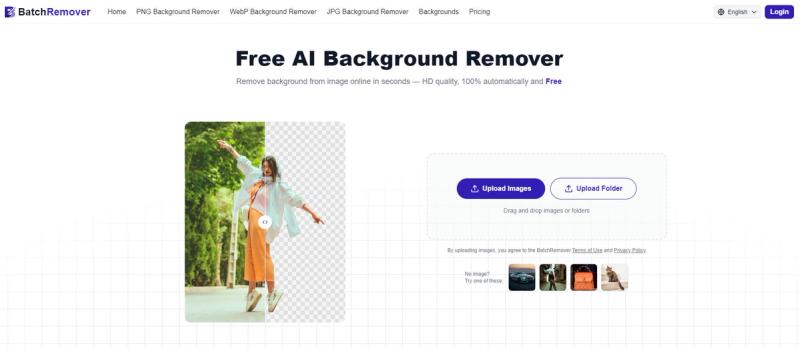
BatchRemover is a free, AI-powered background remover that instantly removes backgrounds from images without watermarks or resolution limits, and supports batch processing for bulk workflows.
What is BatchRemover?
BatchRemover is a web-based AI tool that removes backgrounds from images with precision edge detection, handling hair, fur, transparent objects, and complex shapes. It accepts JPG, PNG, and WebP inputs and outputs transparent PNGs, compressed JPGs, or WebP at the original resolution—no downscaling. The service is developed by BatchRemover and requires no account for single-image use.
Key Features
- Full-resolution downloads — Upload a 4K image and download the result at 4K; no resolution limits or watermarks, even on the free tier.
- Background replacement & resizing — After removal, replace the background with a solid color or custom image, or resize the canvas to match platform dimensions like Amazon, Instagram, or eBay.
- Multi-format export — Download as transparent PNG, compressed JPG, or modern WebP; all formats retain the original image resolution.
- Batch processing — Upload up to 60 images per batch (on paid plans) and process an entire folder at once; download results as a single ZIP file.
- No account required — Single-image background removal is completely free without sign-up, credit card, or watermark.
- AI edge detection — Automatically detects fine details like hair, fur, and product edges for clean cutouts.
Who is it for?
- E-commerce sellers — Create white-background product photos for Amazon, eBay, and Shopify listings without manual editing.
- Photographers — Batch process portraits, headshots, or event photos, removing studio backdrops or outdoor backgrounds in seconds.
- Graphic designers — Export transparent PNGs for compositing, mockups, and multi-layer design projects.
- Social media creators — Make scroll-stopping posts with clean cutouts and custom branded backgrounds.
What can you do with BatchRemover?
- E-commerce product photography: Remove cluttered backgrounds from 50 product images and replace with a consistent white or color background, then download all as JPGs optimized for listing platforms.
- Passport & ID photos: Remove any background and replace with official white or blue backdrop required for travel documents.
- Design mockups: Isolate logos, graphics, or product silhouettes as transparent PNGs for use in presentations, ads, or print-on-demand merchandise.
How does BatchRemover work?
- Upload your image (drag, drop, or select a file) — single or multiple if using batch mode.
- The AI automatically detects edges and removes the background in seconds.
- Optionally replace the background, resize the canvas, or choose an export format (PNG, JPG, WebP), then download at full original resolution.
Pricing
BatchRemover offers a free tier for single-image processing with no watermarks or resolution limits. Paid plans for batch processing are available as Lifetime (credits that never expire, starting at $19.9 for 100 credits at $0.181/image) and Yearly (subscription with credits, starting at $59.9/year for 600 credits at $0.077/image). New users get 20 free credits to try batch removal.
FAQ
Is BatchRemover really free?
Yes. Single-image background removal is completely free with no account, no watermarks, and no resolution limits. Paid plans are only for batch processing multiple images at once.
What formats are supported?
Input: JPG, PNG, WebP. Output: transparent PNG, compressed JPG, or modern WebP — all at the original upload resolution.
Can I change the background after removal?
Yes, entirely free. After the AI removes the background, you can replace it with any solid color or upload a custom background image, and resize the canvas to fit platform dimensions.
How is BatchRemover different from other background removers?
Most free tools downscale your output or add watermarks. BatchRemover gives you the full original resolution and no watermarks. It also includes background replacement, resizing, and multi-format export at no cost.
Are my images safe?
Images are processed securely and not stored permanently. They are automatically deleted after a short period and are not used for training or shared with third parties.