Newsletter
Join the Community
Subscribe to our newsletter for the latest news and updates
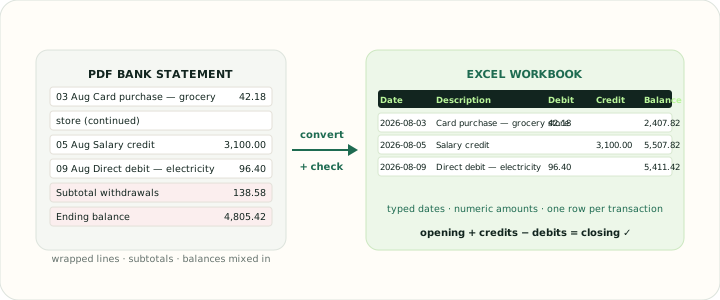
Converts bank statement PDFs into typed Excel workbooks with real date and number cells, checked against the bank's printed balances.
Submit your own product to reach creators and founders looking for the next tool to try.
Bank Statement PDF to Excel Converter is a browser-based tool from BankStatement2PDF that reads PDF bank statements and exports a typed XLSX workbook with one row per transaction, verified against the balances the bank printed.
It takes PDF bank statements as input — up to 20 files per job at 25 MB each — and returns a typed XLSX workbook, with CSV, QuickBooks (QBO, QFX, OFX), Quicken (QIF), QuickBooks Desktop (IIF), Google Sheets and Tally voucher exports available from the same extraction. The whole flow runs in a web browser: upload, review the extracted rows on screen, then download. It is published by BankStatement2PDF, which also maintains per-bank converters such as the Bank of America statement to Excel page and an annotated bank statement example library.
Yes. Image-only statements go through OCR, and the review screen highlights digits the recogniser was unsure about so they can be checked against the page before export. Native PDFs downloaded from online banking are more reliable than scans, so scans should be reviewed more closely.
No. Each upload is validated for file type and size, a SHA-256 checksum is recorded against the job, and the temporary file is deleted from the server once the job has been created. Browser downloads land in your own download folder.
A single job accepts up to 20 PDFs of 25 MB each, processes them in date order and writes them into one worksheet with a filename column, so a full year of statements can be filtered by month in one workbook.
Opening balance plus credits minus debits must equal the closing balance, and consecutive statements must chain from one closing balance to the next opening balance. If either check fails, a page or line was missed or an amount direction was misread.
Yes. The same extraction feeds the other tools listed under the site's converters page; the upload box works the same way and only the instructions and output format change.