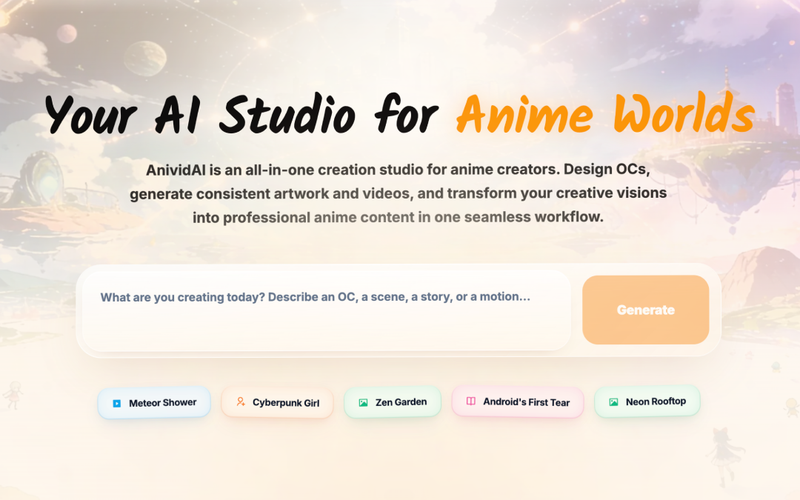
AnividAI is an all-in-one AI anime studio that enables creators to design consistent original characters (OCs), generate anime-style artwork and cinematic videos, and build interactive stories—all within a single platform.
What is AnividAI?
AnividAI is a web-based platform that combines AI-powered tools for anime character creation, image and video generation, and world-building. It takes text prompts and user-defined character profiles as input and outputs professional-quality anime art, videos, and illustrated stories. The service is developed and maintained by the AnividAI team, and it operates entirely in the browser with no software installation required.
Key Features
- AI Anime OC Maker — Design original characters with persistent visual identity, including gender, species, role, personality traits, and soul frequency stats. Each OC is stored in a profile that can be reused across all tools.
- AI Art & Video Generation — Transform text descriptions into anime-style images and cinematic video clips. The video generator offers camera control and multi-shot modes for consistent motion sequences.
- Character Consistency Lock — Automatically enforces the same appearance (face, outfit, color palette) across generated images, videos, and story illustrations without manual re-prompting.
- Interactive Character Chat — Converse with your OCs to refine their personality and backstory. Chat logs can feed into world development and narrative generation.
- AI Story Generator — Create illustrated multi-chapter visual novels and stories by defining a premise, genre, language, and characters. Outputs are presented in a book-spread workbench with optional video clips.
- Template Gallery — Access pre-designed workflows (e.g., “Dragon in the Cafe”, “Mecha Pilot”) with adjustable variables to quickly produce pro-level results without prompt engineering.
- Worlds & Lore System — Define unified settings, rules, and lore that keep all generated content aligned inside one universe. Supports character relationships and plot continuity.
- Studio Apps — Generate production-ready assets like 3D action figure renders, sticker packs, and card art directly from your OC profiles.
- Voice (Coming Soon) — Planned feature for AI voice cloning and lip-syncing to give characters vocal performances.
Who is it for?
- Anime artists and content creators who want to rapidly prototype character designs, generate consistent artwork, and produce short animated clips without manual drawing.
- Writers and storytellers developing anime-style narratives who need to visualize scenes and characters while maintaining visual consistency across chapters.
- Game developers and indie studios looking to create character assets, key art, and promotional materials for their projects without hiring a full art team.
- Fans and hobbyists who enjoy bringing original characters to life, sharing them on the platform’s community gallery, and interacting with other creators’ OCs.
What can you do with AnividAI?
- Bring a character concept to life: Start by designing an OC in the OC Maker, define their appearance, personality, and backstory, then generate images and videos of them in any scene or scenario.
- Produce a full visual novel: Use the AI Story Generator to write and illustrate a multi-chapter story using your OC profiles, with the option to embed animated video clips.
- Create consistent promotional assets: Generate a series of images, a promotional trailer video, and sticker pack variants—all featuring the same OC—for a crowdfunding campaign or social media launch.
- Develop a shared universe: Define worlds and lore rules to ensure that characters, locations, and storylines remain coherent across multiple projects and reuse the same OC in different narratives.
- Engage with the community: Submit your creations to the “Community Picks” gallery, browse other users’ works, and use the Remake feature to adapt popular prompts for your own OCs.
How does AnividAI work?
- Create your OC: Use the AI Anime OC Maker to define name, gender, species, role, personality traits, and visual reference. The system stores a “Soul Frequency” profile that anchors future generations.
- Generate content: In any module (Art, Video, Story, Studio Apps), select your OC as the character. Input a text prompt or choose a template. The AI ensures the output matches the OC’s locked appearance.
- Iterate and refine: Adjust prompts, camera angles, or scene settings. The chat feature allows you to dialog with your OC to deepen their personality.
- Publish and share: Export images up to 4K resolution and video clips. Post to the community gallery or download for commercial use (as permitted by license).
- Build your world: Use the Worlds & Lore system to connect multiple OCs, define rules, and maintain consistency across stories and projects.
Pricing
AnividAI operates on a freemium model. Free users receive welcome credits to try all studio features without a credit card. Additional credits (called “MC” on the platform) can be purchased to continue generating content. Specific credit bundles and pricing tiers are not publicly listed on the landing page.
FAQ
Can I keep character consistency across anime images and videos?
Yes. The OC profile acts as a persistent anchor—every generation tool reads your character’s visual identity and automatically applies it, eliminating the need to re-describe appearance in prompts.
What file formats and resolutions are supported?
Images can be generated in standard web formats (PNG/JPG) at resolutions up to 4K. Videos are delivered in MP4 format. Specific size limits are not stated on the landing page.
Is there a free trial?
Yes, new users get a welcome credit balance to test all features, including OC creation, art generation, video generation, and story creation—no credit card required.
Can I use the generated content commercially?
The platform indicates that commercial use is permitted, but users should review the terms of service for exact licensing details. The landing page mentions that content can be used for “production-ready” outputs and IP expansion.
What types of anime styles are supported?
The platform offers a curated ACGN (Anime, Comic, Game, Novel) library with specialized styles ranging from Ghibli-esque aesthetics to stylized 3D, as well as hand-drawn sketch and oil painting effects seen in community examples.