
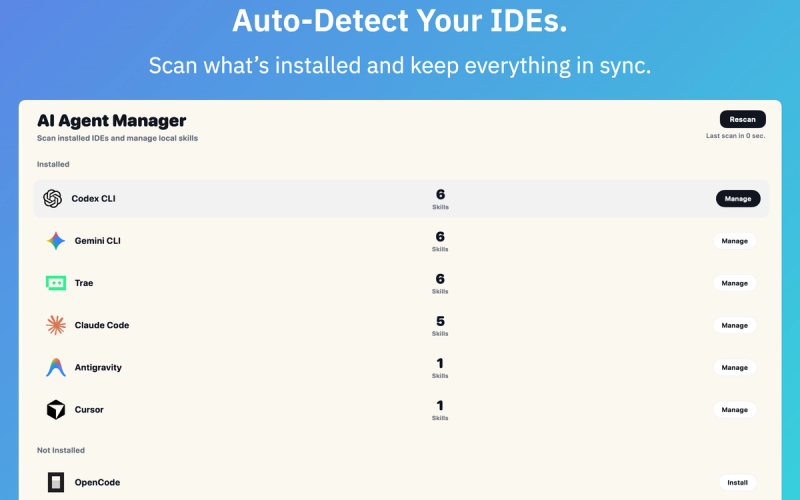
SkillMap is a desktop application that bridges web-based AI skill marketplaces with local development environments like Cursor, Claude, and VS Code, enabling one-click installation and automatic updates.
What is SkillMap?
SkillMap (v2.0.1 for macOS) is a client-side control plane that syncs AI skills from online repositories directly into supported IDEs and tools. It takes skill definitions from the web and outputs locally installed, runnable skills in environments such as Cursor, Trae, Claude, Antigravity, Codex CLI, Open Code, and Gemini CLI. The app is developed by SkillMap and is currently available for macOS, with a Windows waitlist open.
Key Features
- One-click installation — Install skills from the web to your local IDE without manual file copying or configuration. The app automatically handles the setup.
- Automatic updates — Skills update silently in the background; version control allows rollback if a new version breaks your workflow.
- Security sandbox — Skills run in a secure local environment; code hash verification ensures integrity before execution.
- Version control — Roll back to previous skill versions instantly if an update causes issues.
- RAG-powered skill matching — Search skills using retrieval-augmented generation to find the most relevant tools for your task.
- Cross-tool compatibility — Works with Cursor, Trae, Claude, Antigravity, Codex CLI, Open Code, and Gemini CLI.
Who is it for?
- AI developers — Quickly enhance their workflow by installing verified skills directly from the web into their preferred IDE.
- Development teams — Maintain consistent skill sets across multiple team members and environments without manual syncing.
- Security-conscious professionals — Benefit from sandboxed execution and code verification before any skill runs on their machine.







