
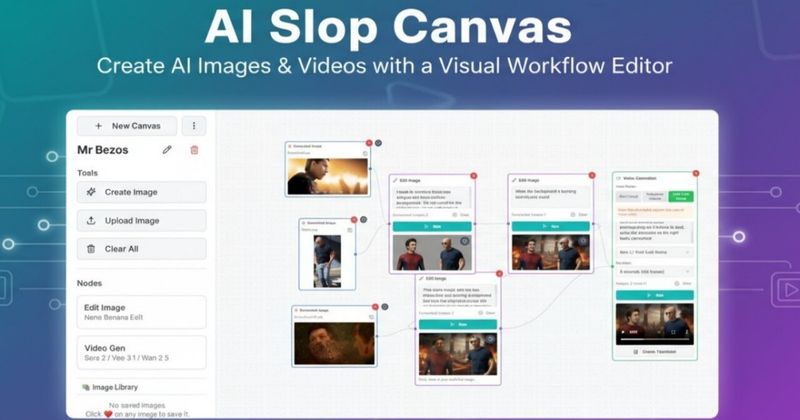
AI Slop Canvas is a free Chrome extension that lets you visually chain AI image and video models together directly in your browser, using your own Fal.ai API key.
What is AI Slop Canvas?
AI Slop Canvas is a visual workflow editor that runs as a Chrome extension. It takes any image from the web (via right-click) or your local files and lets you apply AI operations—like generating a video from that image, editing it with different models, or creating new images from text prompts. The output is saved to a local library in your browser. The extension was built by an independent developer (no company name advertised) and is free to use with your own API key from Fal.ai.
Key Features
- Visual Workflow Editor — Connect nodes (image, text, video) visually to chain multiple AI operations. Right-click any web image to send it to the canvas, then link it to a video generation node using models like Sora 2 or Veo 3.1.
- Multiple AI Models — Access Nano Banana for image generation, Sora 2 and Sora 2 Pro for video, Veo 3.1, Wan 2.5, and Reve Edit—all through a single interface that talks to Fal.ai.
- Privacy First — All data, including images and API keys, is stored locally in your browser with AES-256 encryption. No data is sent to the extension's own servers; no tracking or analytics.
- Right-click Integration — Right-click any image on the web and choose "Send to AI Slop Canvas" to start editing immediately.
- Free to Use — The extension itself is free. You only pay for Fal.ai API usage (Fal.ai offers free credits to start).
Who is it for?
- Meme creators — Quickly generate or edit images and turn them into short videos for viral content.
- Social media managers — Create eye-catching visuals and videos directly from browser without leaving your workflow.
- Content creators — Transform static images into video clips using state-of-the-art models like Sora 2 Pro or Veo 3.1.







