AI Motion Control is a cloud-based platform that transfers motion and facial expressions from reference videos to static images, producing animated videos with 99% anatomical accuracy.
What is AI Motion Control?
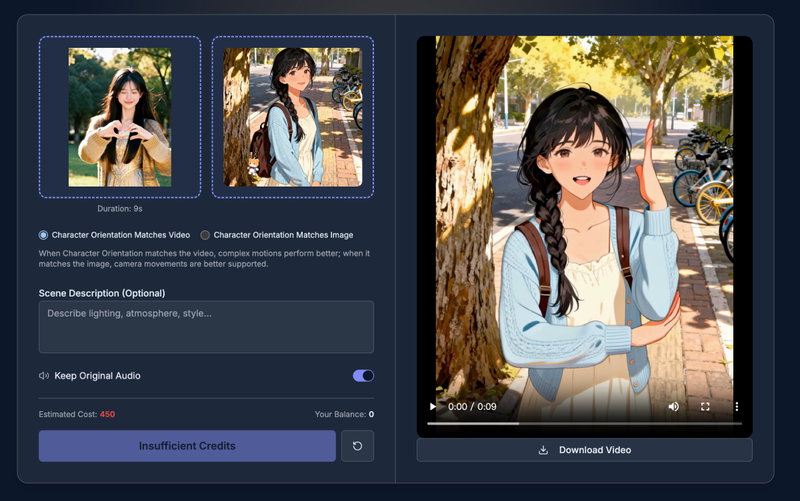
AI Motion Control is an online tool that takes a character image (PNG, JPEG) and a reference motion video, processes them in roughly 5 seconds, and outputs a video where the character moves and expresses like the reference. It runs entirely in the browser via high-performance cloud rendering, requiring no local GPU or software installation. The platform is developed and maintained by aimotioncontrol.net.
Key Features
- Dynamic Reference Motion — Transfers skeletal movement from any source video to a target character with 99% anatomical accuracy, preserving physics and nuances like weight shifts and spins. Supports full-body synchronization and motion retargeting to stylized characters (anime, 3D renders, claymation).
- Precise Expression Sync — Clones facial expressions including micro-expressions, lip sync for dialogue, and gaze tracking. Distinguishes between subtle emotional cues (e.g., smirk vs. grin) with pixel-perfect precision.
- Integrated Action Library — Provides a curated collection of pre-set motions (walking, martial arts, dance) that can be applied instantly without a reference video. Users can also upload custom videos to build private motion libraries.
- Advanced Temporal Consistency — Eliminates the "boiling" artifact common in generative video through optical flow analysis. Maintains character identity and structural integrity for up to 60 seconds of continuous video at up to 60 fps.
- Style Transfer Persistence — Decouples motion from style, keeping the artistic style (oil painting, cyberpunk, sketch) and lighting consistent as the character moves. Background remains stable without warping.
- High-Performance Cloud Rendering — Processes videos on enterprise GPU clusters, enabling parallel generation of multiple experiments. No hardware constraints; works on tablets and laptops. Always up-to-date with the latest models.
Who is it for?
- Social media content creators — Produce viral marketing videos with eye-popping character animations for TikTok, Instagram, and YouTube.
- Film pre-visualization teams — Rapidly storyboard scenes with animated characters in actual environments before production, saving costs.
- Virtual influencer developers — Generate lifelike movements and expressions for digital avatars, enabling authentic audience engagement without motion capture suits.
- Game developers — Create sprite sheet animations or cutscene videos from simple references, reducing animation workload for indie teams.
- E-commerce and fashion brands — Showcase clothing on moving models without a photoshoot by applying a walking video to a flat garment image.
What can you do with AI Motion Control?
- Transfer complex dance routines — Upload a video of a dancer and a static character image, and the AI generates a video of that character performing the exact choreography.
- Sync lip movements to audio — Input an audio track and the AI aligns mouth shapes frame-by-frame for believable speech, ideal for virtual news anchors or storytelling.
- Create long-form animations — Generate up to 60 seconds of coherent video with flicker-free motion, suitable for short films or product demonstrations.
- Mix and match motions — Combine different actions (walk, stop, look around, run) with smooth transitions for continuous takes.
How does it work?
- Upload a character image (PNG/JPEG) and a reference motion video (MP4, AVI, etc.).
- Optionally choose character orientation (match video for complex motion, match image for camera movement) and add a scene description.
- Decide whether to keep original audio from the reference video.
- Sign in (required) and click generate. Credits are consumed based on video length (estimated 250 credits per generation).
- Download the resulting video directly from the browser.
Pricing
AI Motion Control operates on a credit-based subscription model with monthly or annual billing. Three tiers are offered: Starter ($50/month, 5000 credits, 100 seconds of video), Pro ($100/month, 10000 credits, 200 seconds), and Ultimate ($200/month, 20000 credits, 400 seconds). Annual plans save 20%. All tiers include high-quality generation, no watermark, commercial use rights, and access to all AI models.
FAQ
How long does it take to generate a video?
Typical generation takes about 5 seconds for a short clip, though longer videos (up to 60 seconds) may take slightly more time due to temporal processing.
Can I use my own reference videos?
Yes, you can upload any motion video as a reference. The system analyzes the footage and transfers the movement to your character. Custom uploads also allow you to build a private motion library.
Do I need powerful hardware?
No. All processing happens on cloud GPU clusters; you only need a modern web browser. This makes it accessible from low-end laptops and tablets.
Is there a free trial?
The page does not mention a free trial. All tiers are paid subscriptions starting at $50/month. However, you can sign in to see the interface and potentially test with your own files (credits required).
What file formats are supported?
Character images should be standard image formats (PNG, JPEG). Reference videos can be common video formats (MP4, AVI, etc.). The output video is downloadable in MP4 format.