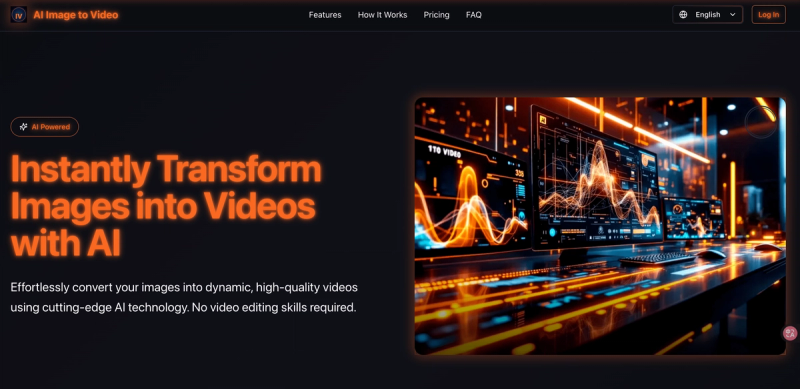
AI Image to Video is an AI-powered web platform that converts static images into short, customizable videos using advanced generation models. It operates as a multilingual online tool at aiimagetovideo.online, taking user-uploaded images (JPG, PNG, WebP, GIF up to 5MB) and optional text prompts (max 500 characters) to produce downloadable 720p MP4 videos of up to 4 seconds. The platform routes requests to models like Sora 2 and Seedance via Replicate, offering parameter tuning and credit-based billing.
What is AI Image to Video?
AI Image to Video is a web application that transforms still images into short animated clips using AI. It accepts a single image (with optional reference image and prompt) and outputs a 4-second 720p MP4 video. The service is accessed entirely through a browser, with no software download required, and is developed by an independent team (no company name stated on site).
Key Features
- Instant Video Creation — Generates a video in seconds from an uploaded image and prompt.
- Professional Video Quality — Outputs 720p resolution with good clarity and detail.
- Customizable Video Styles — Choice of aspect ratios (16:9, 9:16, 1:1) and duration (4 seconds); model selection (currently Sora 2 fixed).
- Efficient Batch Processing — Can generate multiple video variations simultaneously (as claimed on site).
- Credit-Based Billing — Users purchase credits via monthly or yearly plans; each generation costs 27 credits for 4-second videos.
- Multilingual UI — Interface available in multiple languages (from existing tags).
- Prompt Length Limit — Text prompts up to 500 characters to guide motion.
- Image Format Support — Accepts JPG, PNG, WebP, and GIF files under 5MB.
Who is it for?
- Graphic designers creating motion assets for presentations or social media.
- Digital artists turning static artwork into animated clips.
- Content creators generating short videos for platforms like Instagram and YouTube Shorts.
- Marketers producing quick product demos without video editing skills.
What can you do with AI Image to Video?
- Social media content: Create landscape or portrait videos for Instagram Reels, TikTok, or YouTube Shorts.
- Product demos: Animate product images into short promotional clips.
- Creative storytelling: Bring photographs to life with text-guided motion (e.g., "a serene mountain landscape at sunset with golden light reflecting off a crystal clear lake").
How does AI Image to Video work?
Use works in three steps: 1) Upload an image (JPG/PNG/WebP/GIF, ≤5MB) and optionally provide a text prompt (≤500 characters) and a reference image. 2) Select aspect ratio (16:9, 9:16, or 1:1) and duration (currently 4 seconds). 3) Click "Create Video" to start generation; the result is delivered as a downloadable 720p MP4 video within seconds.
Pricing
AI Image to Video uses a freemium credit model. Three tiers are available: Starter ($4.99/month, 100 credits), Pro ($9.99/month, 200 credits), and Premium ($19.99/month, 500 credits). Yearly billing offers 20% savings. Each 4-second video generation costs 27 credits. The Pro and Premium plans include a commercial use license and priority processing.
FAQ
How long does it take to generate a video?
Typically a few seconds, though it may take up to a minute during high traffic. Priority processing is available on Pro and Premium plans.
What video quality and format are exported?
Videos are exported as 720p MP4 files with the selected aspect ratio. Higher resolutions are not available (only 720p is mentioned).
Can I use the generated videos commercially?
Yes, but only on the Pro and Premium plans that include a commercial use license. The Starter plan is for personal use only.
What image formats are supported?
JPG, PNG, WebP, and GIF, with a maximum file size of 5 MB.
Is there a limit on video duration?
Yes, the maximum duration is 4 seconds per video. Longer durations are not available in the current interface.
Pros and cons
Pros: Fast generation; no video editing skills needed; flexible credit-based pricing; multiple aspect ratios; multilingual UI. Cons: Maximum video length is 4 seconds; only 720p output; image upload limited to 5MB; free tier not available (credits required).