AI Image Editor is a free all-in-one web platform offering 12 AI-powered image editing tools for tasks like enhancement, watermark removal, and background editing, without requiring professional skills.
What is AI Image Editor?
AI Image Editor is a free web-based suite of 12 AI tools that processes images (JPG, PNG, WEBP up to 10MB) and outputs enhanced or modified images. It runs entirely in the browser on any device, developed by an unnamed team available at aiimageeditor.me.
Key Features
- AI Image Enhancement – improves clarity and resolution, making blurry photos sharper and more detailed.
- Watermark Remover – intelligently identifies and removes watermarks, logos, and unwanted text while restoring the underlying image.
- Background Remover – automatically detects and removes backgrounds, outputting transparent subject images ideal for product display.
- Style Transfer – transforms photos into artistic styles like oil painting, watercolor, or sketch.
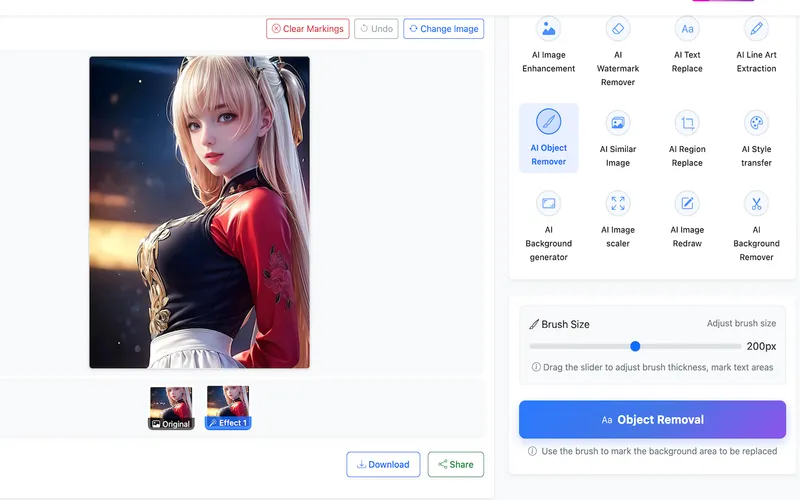
- Object Remover – precisely removes unwanted objects or people with AI-powered background filling for seamless results.
- Text Replacement – identifies and replaces text in images to make them more vivid.
- Line Art Extraction – extracts clear line contours from photos for illustration or comic creation.
- Similar Image Search – finds images similar in style or content to provide creative inspiration.
- Region Replace – selects specific areas and replaces with new content while maintaining natural light, shadow, and texture.
- Background Generator – identifies foreground subjects and changes backgrounds with multiple scene options or custom images.
- Image Scaler – expands image boundaries adding content while maintaining style and consistency.
- Image Redraw – uses text descriptions to guide AI in redrawing parts or all of an image.
Who is it for?
- Photographers – restore old photos or enhance image quality.
- E-commerce sellers – remove backgrounds for product images quickly and professionally.
- Designers – utilize line art extraction, style transfer, and object removal for creative projects.
- Casual users – improve personal photos, remove watermarks, or create artistic effects.
What can you do with it?
- Restore old family photos by enhancing clarity and removing scratches or defects.
- Create product images for online stores by removing backgrounds and replacing with clean white or custom backgrounds.
- Generate artistic renditions of photographs using style transfer to mimic oil painting or watercolor.
- Remove unwanted objects or people from vacation photos seamlessly.
How does it work?
Simple three-step process: upload image (JPG, PNG, WEBP up to 10MB), select tool and adjust parameters if needed, then download processed image. Processing takes seconds per image.
Pricing
All tools are completely free. No paid tiers or hidden charges.
FAQ
Is AI Image Editor free?
Yes, all tools are free to use with no limits on usage.
What image formats are supported?
Supports JPG, PNG, WEBP, BMP, and TIFF. Upload size limit is less than 10 MB.
Is my image safe?
The website states images are not saved; all processing occurs on your device to ensure privacy.
Can I use processed images for commercial purposes?
Yes, you are free to use them commercially.
Can I use it on mobile?
Yes, the website is fully responsive, and iOS and Android apps are available.