
Newsletter
Join the Community
Subscribe to our newsletter for the latest news and updates
Web-based AI tool that adds a person from a separate portrait into an existing group photo.
Submit your own product to reach creators and founders looking for the next tool to try.

AI image translator that converts text in photos and scans into 60+ languages while preserving layout.

Sherlock Search is a reverse face search that compares your photo to images linked to public web pages and returns possible matches with source links for review.

A date-safety scan for TeaOnHer that finds posts about you and delivers a verified report in 24 hours.

Compare cheap flights from 500+ airlines and agencies, book on the provider’s site, and earn cashback you can withdraw after your trip.

Free word art generator that turns text into shapes and fills them with your own words. 390+ templates or your own image, three fill styles, palettes, gradients, and exports up to 4K PNG, cut-ready SVG, or animated MP4/GIF. Free, no account, in-browser.

Free fullscreen color screen tool. 12 colors, in-browser monitor/dead-pixel tests, 4K/8K wallpaper downloads, white-background editor, 11 languages, PWA, no ads and no sign-up. Great for cleaning monitors, lighting video calls, tracing art, and focus work.
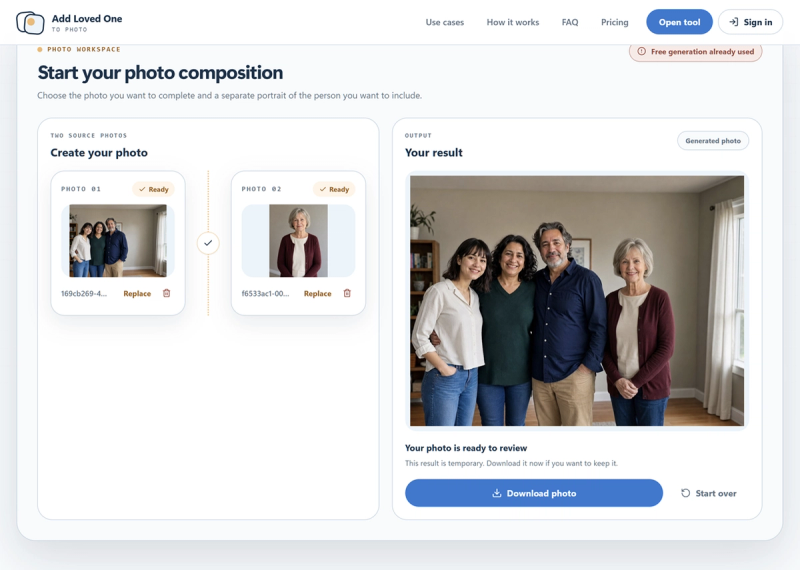
Add Loved One to Photo Online is a web-based AI photo tool that merges a separate portrait into an existing group or event photo to create a single natural-looking composite. You upload one main photo (family, wedding, graduation, or event) and one clear portrait of the person you want to add, optionally specify where they should appear, and the tool generates a new image with the person integrated. The service runs entirely in the browser and requires no manual cutting, masking, or layer editing.
Add Loved One to Photo Online is a web application that uses AI to combine two source photos: a group or event photo and a separate portrait of a person. It accepts JPG, PNG, or WebP files up to 10 MB each. After generation, it outputs a single composite photo that you can review, view full-screen, and download. The tool is accessible via any modern web browser, and no maker is named on the site.
Two-source photo workspace — Upload both a main photo and a portrait in the same workspace, with each file limited to 10 MB and formats JPG, PNG, or WebP.
Optional placement note — Add up to 500 characters describing where the person should appear (e.g., "beside the bride") to guide the AI composition.
One free generation — The first provider-accepted generation is free; subsequent generations cost one credit each, and the credit is restored only if the provider rejects the task.
Three-step workflow — Choose the group photo, guide placement if needed, and review/download the result; all steps are shown on a single page.
Full-screen review — After generation, you can zoom and inspect details before downloading; result links and job records are temporary.
AI-generated examples — The site shows three real workflow examples (at home, wedding day, three generations) using the same two-photo workflow.

Families with missing members — People who want to add a deceased or absent relative to a family photo without using Photoshop.
Wedding parties — Couples who want to include a family member who was not in the original wedding group photo.
Casual users — Anyone with no photo-editing experience who needs a simple way to merge two photos into one.
Add a deceased loved one to a family photo — Upload a recent family photo and an older portrait of a deceased parent or grandparent to create a new keepsake image.
Complete a wedding group photo — Use a wedding photo that was taken without someone important and add their formal portrait to the scene.
Create a family portrait from separate photos — Combine a group shot with an individual portrait to make a single cohesive family picture.
Three steps are shown on the page: first, choose the group photo and the separate portrait; second, optionally write a placement note (under 500 characters) describing where the person should appear; third, the AI generates a composite image that you review and download. The tool sends both photos and any note to third-party image-analysis and generation providers only after you start generation.
The service offers one free generation. After that, each accepted generation costs one credit. A credit is restored only if our service cannot submit the task to the provider. There is no indication of credit prices or subscription plans on the page.






