
Ad Multiplier
Ad Multiplier is a paid browser-based tool for creating visual variations from an existing short video ad. It starts with your uploaded video rather than a blank script. The intended users are marketing teams, ecommerce brands and agencies preparing creative test batches. A person reviews the outputs and decides what to publish; the tool does not launch advertising campaigns or guarantee advertising performance.
Source and variation controls
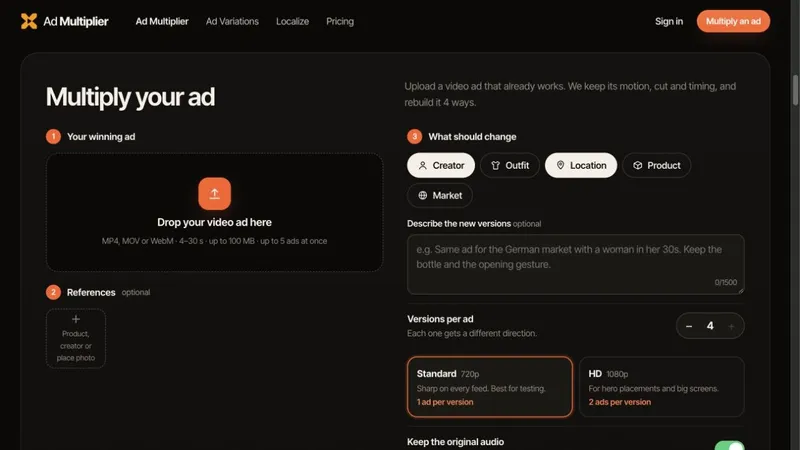
Upload MP4, MOV or WebM footage lasting 4–30 seconds, up to 100 MB per source. You can queue up to five source ads and choose up to four versions per source. Specify changes to the creator, outfit, location, product or market. Reference images and written directions can help describe the intended variation. Original audio can be retained when needed.
Downloads and review
Choose Standard 720p or HD 1080p output. Finished versions are downloadable as individual MP4 files or together in a ZIP. Publishing to an advertising platform is a manual step. Check the product appearance, visual details and source rights before releasing a generated version. Preparing several variations does not establish which version will perform best; that depends on your own testing.
Ad-balance pricing
There is no subscription or free trial. Ad-balance packs cost $9.90 for 1 ad, $44 for 5, $149 for 20 or $329 for 50. A 4–15 second output uses 1 ad in Standard or 2 in HD. A 16–30 second output uses 2 ads in Standard or 4 in HD. Failed renders return the used balance. Pack quantities therefore do not mean the same number of finished videos at every duration and resolution.
Practical workflow
Choose a source clip for which you have permission. Set the visual element you want to change, provide any useful reference, choose the number of versions and quality, and start the run. Review and download the finished files, then upload selected versions to your chosen platform yourself.


