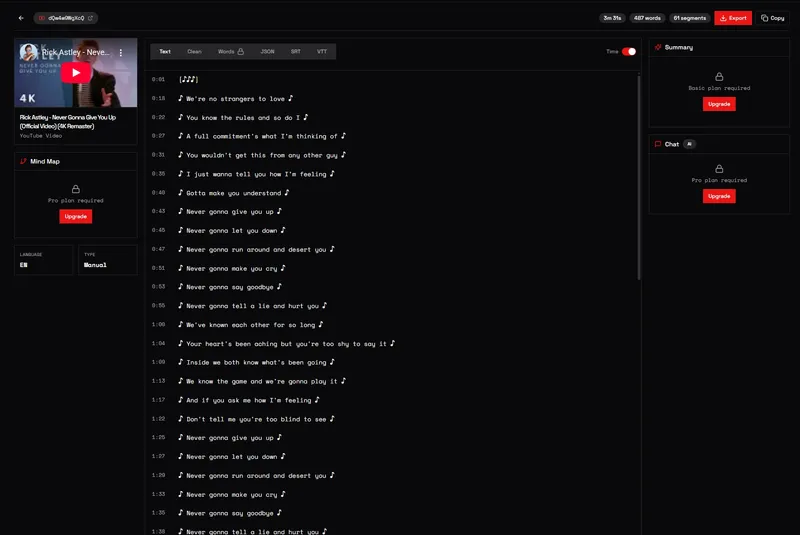
YouTubeTranscript.dev is a web-based YouTube transcript extractor that converts any YouTube video to text by pulling native captions or using AI audio transcription when captions are missing. Paste a URL, get accurate transcriptions with timestamps in seconds, and then export, translate, or repurpose the content.
What is YouTubeTranscript.dev?
YouTubeTranscript.dev is a free-to-start YouTube transcript extractor that turns video URLs into timestamped text. It accepts standard YouTube URLs, shortened youtu.be links, or raw video IDs as input, and produces transcripts in TXT, JSON, SRT, or VTT formats. The tool runs entirely in your browser and is trusted by over 10,000 users for reliable, fast transcription.
Key Features
- Direct Audio Transcription — Uses AI speech recognition to transcribe videos that have no captions, achieving up to 95% accuracy.
- Interactive Viewer — Watch videos with real-time synced subtitle overlays; customize font size, color, and position, and click any line to jump to that moment.
- Concept Map Generation — Auto-generates visual diagrams of key concepts from the transcript, helpful for studying and understanding complex topics.
- Chat with Transcript — Ask questions about video content and receive AI-powered answers based on the transcript.
- Smart Summaries — Generate concise AI summaries of any video, extracting key takeaways and highlights.
- Playlist & Channel Support — Extract transcripts from all videos in a playlist or channel at once, with advanced filters.
- Translation — Translate transcripts into 100+ languages with one click.
- Multiple Export Formats — Download transcripts as TXT, JSON, SRT, or VTT, all with word-level timestamps.
Who is it for?
- Marketers — Repurpose YouTube videos into blog posts, social media copy, and SEO-optimized content, and analyze competitor videos at scale.
- Students & Researchers — Extract transcripts for note-taking, create concept maps, and chat with transcripts to quickly find specific information.
- Developers — Integrate the YouTube Transcript API into apps, with support for sync and async processing, webhook callbacks, and multiple output formats.
- Content Creators — Turn video content into articles, show notes, or video descriptions to expand audience reach.
What can you do with YouTubeTranscript.dev?
- Repurpose video content: Use Smart Summaries to turn hours of video into key takeaways, then craft blog posts or social media threads directly from timestamped transcripts.
- Study and research: Generate concept maps for visual learning and chat with the transcript to pinpoint exact moments in a lecture or presentation.
- Translate for global audiences: Instantly translate transcripts into over 100 languages to make video content accessible internationally.
- Process entire playlists or channels: Paste a playlist URL to extract transcripts from all videos at once, ideal for courses or content archives.
How does YouTubeTranscript.dev work?
- Paste a YouTube URL — regular, shortened, or just the video ID.
- Extract — the tool fetches captions instantly; if none exist, it transcribes the audio using AI.
- Transform — enhance your transcript with summaries, concept maps, or chat.
- Export — download as TXT, JSON, SRT, or VTT with timestamps.
Pros and cons
Pros:
- Free tier includes 10 transcriptions with no credit card required.
- Works even when videos don't have captions via AI audio transcription.
- Exports to four standard formats with word-level timestamps.
- Fast: transcripts generated in under 2 seconds.
Cons:
- Free plan is limited to 10 transcripts; more requires upgrading to a paid plan.
Pricing
Freemium: the free plan includes 10 transcripts with no credit card required. Paid plans for additional usage and API access are available from the pricing page.
FAQ
How does YouTubeTranscript.dev extract transcripts?
It pulls from YouTube's caption data, covering both auto-generated and manually uploaded subtitles in over 80 languages. When captions aren't available, it uses AI audio transcription to generate transcripts from the video's audio track.
What if a video doesn't have subtitles?
No problem. When captions aren't available, the tool switches to AI speech recognition and transcribes directly from the audio track, giving you accurate transcripts for virtually any video.
How many transcripts can I extract with the free plan?
You can extract up to 10 transcripts completely free — no credit card required.
What formats can I download transcripts in?
You can download transcripts as TXT, JSON, SRT, or VTT. All formats include accurate timestamps, and JSON export provides word-level timing for advanced use.
Can I translate transcripts into other languages?
Yes, AI-powered translation supports over 100 languages. You can translate any transcript with one click, and the translated transcript is available in the same export formats.