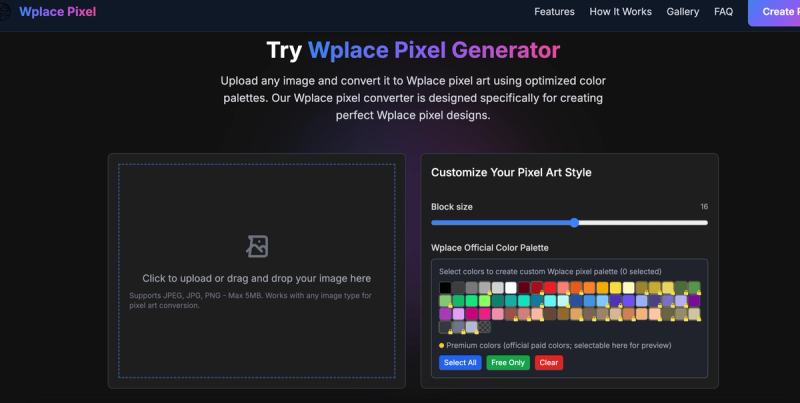
Wplace Pixel Generator is a web-based tool that converts any image (JPEG, JPG, PNG, under 5 MB) into pixel art optimized for the wplace.live collaborative canvas, providing instant grid statistics and color palette costs.
What is Wplace Pixel Generator?
Wplace Pixel Generator (also called Wplace Pixel Art Generator) turns uploaded images into crisp pixel art using the official Wplace color palette. It outputs precise block counts (horizontal, vertical, total) and distinguishes between free and premium palette colors. The tool runs entirely in the browser and is created by the team behind wplacepixel.com.
Key Features
- Real-time image to pixel art conversion – Upload an image and see it instantly transformed; preview updates automatically as you adjust settings.
- Official Wplace color palette – Uses the exact 100+ colors from wplace.live, clearly marking which are free and which are premium (paid).
- Block calculator – Displays exact horizontal, vertical, and total blocks needed for your design, plus a per-color breakdown.
- Adjustable pixel size – Slider from 1 to 32 pixels lets you balance detail and build complexity.
- Color analysis – Hover over any color in the result to see its block count.
- Easy sharing – Download your pixel art or share directly to social media; all processing happens client-side.
Who should use Wplace Pixel Generator?
- Wplace.live players – Plan and preview pixel art builds before placing a single pixel on the global canvas.
- Digital artists – Convert original artwork into pixel art while preserving detail and using the exact colors available on the platform.
- Content creators – Generate pixel art for gaming videos or social media posts about wplace.live.
What can you do with Wplace Pixel Generator?
- Plan community projects – Use block counts and color stats to estimate resources and coordinate large-scale builds.
- Test color combinations – Experiment with free vs premium colors before committing in-game.
- Export designs – Download finished pixel art or share a link to your conversion.
How does Wplace Pixel Generator work?
- Upload & Preview – Drag or click to upload an image. The tool immediately converts it and shows a preview.
- Customize & Calculate – Adjust pixel size using the slider (1–32) and toggle colors on/off from the official palette. Block counts update in real time.
- Analyze & Plan – Review horizontal, vertical, and total blocks; see which colors you’ll need and whether they’re free or premium.
FAQ
How does the pixel size setting work?
Pixel size (1–32) determines how many original image pixels are merged into one pixel-art block. Smaller sizes preserve more detail but require more blocks on the wplace.live canvas.
What do the color statistics mean?
After conversion, each used color shows its exact block count. The palette labels each swatch as free or premium (paid on wplace.live).
Are the block counts accurate?
Yes – they are calculated from the actual pixel dimensions of your converted art and the selected pixel size.
Can I save or share my conversion?
Yes. Use the Download button to save as an image, or share directly to social media from the tool.
All conversion happens in your browser – no image is uploaded to a server. This keeps your data private and makes the tool fast.