
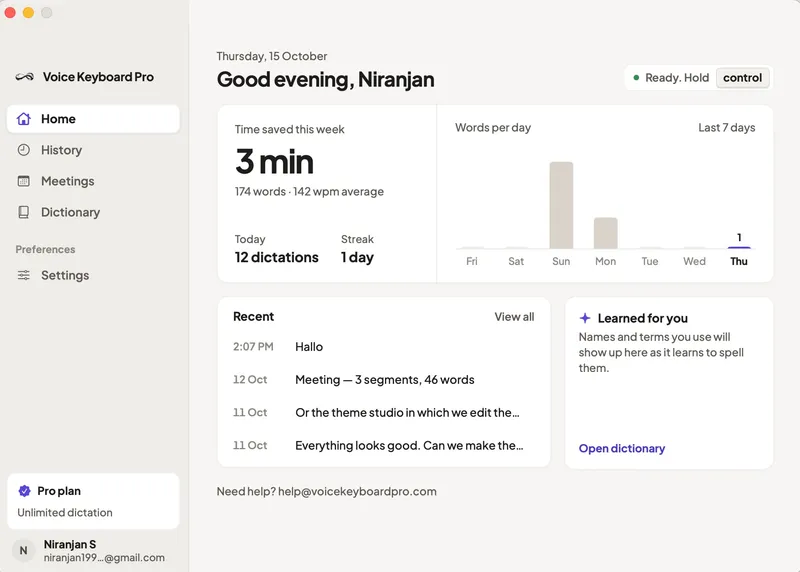
Voice Keyboard Pro is a hold-to-talk dictation app for macOS and iPhone that turns speech into text directly at the cursor of whatever app you're using, at a pace the developer puts at nearly four times faster than typing.
What is Voice Keyboard Pro?
Voice Keyboard Pro is a voice-to-text tool for Mac and iPhone: you hold a hotkey, speak, and release, and the transcribed text lands where your cursor already is — Slack, Gmail, VS Code, Terminal, a browser, or any other text field. It runs as a native menu bar app on macOS 14 (Sonoma) or later, on Apple silicon or Intel Macs, and as a system keyboard on iPhone, with a single subscription unlocking both devices. It is published alongside a family of other Mac utilities at everydaymactools.com.
How does Voice Keyboard Pro work?
The workflow is three steps and needs no app window to open or switch to. Hold the key you choose (Left Control is the default) to arm the mic, speak naturally — punctuation is handled for you and pauses become commas — then release and the text appears at the cursor. On iPhone the same idea runs through a keyboard with a built-in microphone, and a separate mode records and summarizes meetings.
What makes Voice Keyboard Pro stand out?
- Hold-to-talk anywhere — a native menu bar app with a user-chosen hotkey that types into any focused Mac app, browser tab, or terminal with nothing to copy and paste.
- Sub-second transcription — the FAQ states most dictations complete in 200 to 500 ms from key release to text on screen.
- Smart Rewrite — corrects punctuation and matches the tone of the app you're typing in while keeping your original words.
- Voice commands and snippets — say "new line", "comma", or "delete that" for formatting, and save short triggers that expand into a signature, address, or standard reply.
- Personal vocabulary — add names, jargon, and product terms, and the app also learns terms it sees on your screen.
- AI commands — select text, hold your key plus Space, and ask for it shorter, friendlier, a reply, or a subject line.
- Meeting notes — record a call or in-room meeting to get a live speaker-labeled transcript plus an AI summary, decisions, and action items you can email to yourself or your team.
- History and stats — every dictation is searchable on your Mac alongside words-per-minute and time-saved figures, and the iPhone build adds swipe typing, predictions, and Dynamic Island activity.
- 19 languages with auto-detect — English, Spanish, French, German, Hindi, Japanese, Portuguese, Catalan, Dutch, Italian, Swedish, Polish, Romanian, Turkish, Ukrainian, Russian, Arabic, Chinese, and Korean.
Who should use Voice Keyboard Pro?
The product page names specific professions: doctors dictating patient notes and referral letters between appointments, lawyers writing case notes and drafts with legal terms spelled correctly, students producing essays and study guides at speaking speed, and journalists filing notes, quotes, and copy faster. Executives use it to clear inboxes and Slack between meetings, sales teams write follow-ups and CRM notes right after a call, therapists finish session notes in minutes rather than evenings, and writers get first drafts down without the blank-page pause.
Use cases
- Chat and email triage: dictate Slack replies and email responses straight into the focused field instead of typing, since the app works inside Slack, Gmail, Outlook, Mail, Messages, and WhatsApp.
- Meeting documentation: record a call or conference-room meeting to get a labeled live transcript, an AI summary, and a list of action items you can forward to your team.
- Professional note-taking: physicians, attorneys, and therapists dictate case and patient notes with custom vocabulary so specialty terms come out spelled correctly.
- Coding and terminal work: dictate comments, commit messages, or commands into VS Code, Cursor, or Terminal without leaving the keyboard.
Pricing
Voice Keyboard Pro is a paid subscription with three tiers, and every plan includes unlimited dictation, Smart Rewrite, meeting notes and summaries, and both Mac and iPhone. Weekly costs 1.99 USD per week. Monthly costs 4.99 USD per month and starts with a 3-day free trial. Annual costs 34.99 USD per year, billed as 2.92 USD per month with a stated 41 percent saving.
Alternatives
Comparison pages on the site position Voice Keyboard Pro against Apple Dictation, Wispr Flow, Dragon NaturallySpeaking, Superwhisper, MacWhisper, Otter.ai, Google Voice Typing, and OpenAI Whisper.
FAQ
How fast is Voice Keyboard Pro?
The developer states transcription is sub-second, with most dictations finishing 200 to 500 ms after you release the key. That speed claim, along with roughly four-times-faster-than-typing, is the core pitch against built-in dictation tools.
Is my audio sent to the cloud?
By default audio is sent over an encrypted connection to a transcription provider and discarded immediately afterward; recordings are never kept, and history lives on your Mac. Enabling Offline Mode on Apple silicon runs transcription entirely on the machine with no network at all.
What do I need to run it?
macOS 14 (Sonoma) or later on either Apple silicon or Intel hardware for the Mac app; the iPhone version is a keyboard downloaded from the App Store. One subscription signs in on both devices with the same account to unlock Pro.
Is there a free trial?
Only the monthly plan includes one: a 3-day free trial that you can cancel before it ends. The weekly and annual plans are billed immediately without a trial period.
Does it work in every app?
The app types directly into whichever app has focus. The page lists Slack, Gmail, Notion, Google Docs, ChatGPT, Claude, VS Code, Cursor, Terminal, Messages, WhatsApp, Mail, Outlook, Linear, Figma, Word, Obsidian, Notes, Zoom, Teams, Safari, and Chrome.


