
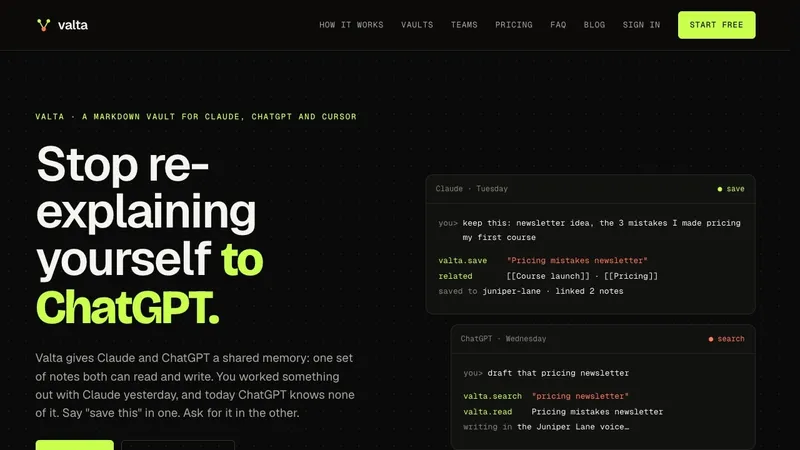
Valta is a Markdown note vault that gives Claude, ChatGPT, Cursor and other MCP-capable AI assistants one shared memory, so a note saved in one assistant can be read, searched and written back to from another.
What is Valta?
Valta is a hosted note store that connects to AI assistants over MCP (Model Context Protocol) and acts as shared memory between them. You save and retrieve notes by talking to your assistant — "save this", "what did I decide about pricing?" — and the assistant writes a Markdown note into a named vault, linked to related notes with [[wiki links]]. Valta runs as a web app for browsing notes and their graph, plus connectors for Claude (web, desktop and Claude Code), ChatGPT, Cursor and VS Code. The page does not name the company or maker behind it.
What makes Valta stand out?
- One memory across assistants — a note saved in Claude on Tuesday is searchable in ChatGPT on Wednesday, because both connect to the same vault instead of each keeping a private memory list or project.
- Plain Markdown with [[links]] — every note is Markdown in the same wikilink format Obsidian uses, and any vault exports as a zip at any time on every plan, Free included.
- Links written by the AI — when an assistant saves a note, Valta hands back the notes it relates to and the assistant adds the [[links]] itself, so you do not link by hand.
- One vault per brand — separate vaults keep brands or clients apart, each with its own profile (audience, tone, what the brand never says) that the assistant reads before writing a word.
- Version history — each edit keeps the version before it, recorded together with the AI that made the change (Pro and above).
- Inbox for stray notes — a note saved without picking a vault is flagged if it reads like one of your brands, and the AI offers to move it.
- Per-vault connectors — an optional URL opens one vault only, so a Claude Project set up for one brand cannot reach the others.
- Team vaults and seats — invites by email, owner/admin/member/viewer roles, access lists, and an activity log showing every read and write in team vaults and which AI made it.
Who should use Valta?
People paying for more than one AI — anyone who currently pastes context, tone and past decisions into a new chat in Claude, then repeats it in ChatGPT, and wants to store that context once and reach it from either. Founders, consultants and agencies running several brands — each brand gets its own vault and profile, so a line written for one account does not surface in a draft for another. Small teams split across tools — one teammate on Claude, another on ChatGPT and a developer in Cursor can read and write the same team vaults with their own logins and their own AI connections. Writers and marketers — save an angle or an idea mid-chat in one assistant, then have a different assistant draft from it later, with the note linking handled automatically.
What can you do with Valta?
Newsletter and content drafting: save notes such as pricing mistakes or a newsletter angle in one assistant, then ask a different assistant to draft the piece using those notes plus the vault's brand profile. Avoiding repeated suggestions: keep ideas you already tested and killed in the vault, so a fresh chat can check what was dropped instead of proposing it again and making you re-explain. Keeping two brand voices apart: store a separate tone profile per vault and let each assistant read the right one before writing, so copy for one brand does not drift into the other's drafts.
How does Valta work?
Connect Valta to each AI once: paste a URL into Claude and ChatGPT and sign in, or add a key plus one block to your MCP settings file for Cursor and VS Code. After that you talk normally and the assistant calls Valta by itself, saving notes and linking them to related ones. The web app shows every note, the vault it lives in and how the notes connect.
Pricing
Valta is freemium. Free covers 1 vault and up to 100 notes with graph view, MCP access to every supported AI and Markdown export. Pro costs $9 per month or $90 per year and adds unlimited notes (fair use 10,000), up to 5 separate vaults and version history. Team costs $8 per seat per month from 3 seats, or $80 per seat yearly, and adds shared team vaults, roles, invites and the activity log, billed through Stripe with prorated seat changes. A founder lifetime deal gives Pro forever for one payment of $97, stepping up to $147 and then $197 as the launch sells out, after which it closes and Pro is subscription only. Subscriptions cancel any time; the lifetime has a 14-day refund window.
FAQ
Does Valta work with AIs other than Claude and ChatGPT?
Any assistant that supports remote MCP servers connects the same way, including Cursor, VS Code and Claude Code. You can connect as many as you use — they all see the same notes, and none of them see the others' chat history.
Is there an AI running on Valta's side?
No. Valta stores your notes and finds them when asked; the thinking and writing happen in your own assistant. According to the site, nothing you save is sent to another model by Valta.
Can brands or clients be kept apart?
Yes. Pro includes up to 5 vaults, each with its own notes, graph and profile, and each vault can have its own connector, so a Claude Project for one brand never reaches the others. On Free, only one vault is available.
Are my notes locked into Valta?
No. Notes are Markdown with [[links]], the format Obsidian uses, and any vault can be exported as a zip whenever you want, on every plan including Free.
Can I try it before paying?
Yes. The Free plan uses the same tools as Pro for one vault and up to 100 notes, requires no card, and lets you connect it to the AIs you already use before upgrading.
Alternatives
Obsidian and Notion, plus the built-in memory features ChatGPT and Claude already ship — Valta's stated difference is that it holds one memory that every connected assistant can read and write.


