
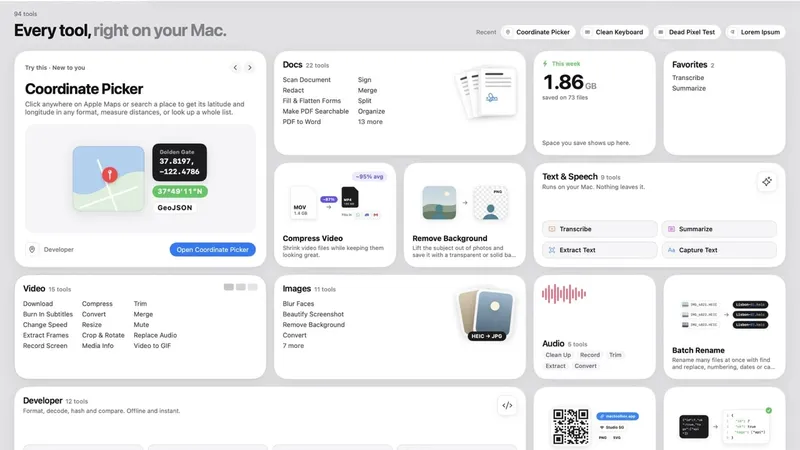
Toolbox for Mac is a paid macOS utility suite that bundles 96 native video, audio, image, PDF, text, file, developer and system tools into a single app bought with a one-time payment.
What is Toolbox for Mac?
Toolbox for Mac is a Mac application that puts 96 small utilities — video compressors and converters, PDF editors, image tools, on-device transcription, developer helpers and system utilities — behind one window and one licence. It takes local files (video, audio, images, PDFs, documents and text) as input and writes new files into its own dated folder inside Downloads rather than modifying the originals. It requires macOS 15 Sequoia or later, is distributed directly from mactoolbox.app and is signed with an Apple Developer ID and notarized by Apple.
What makes Toolbox for Mac stand out?
- 96 tools across eight categories — Video 15, Audio 5, Images 11, Docs 23, Text and Speech 9, Files 5, Mac 16 and Developer 12, all unlocked by a single purchase with free updates for life.
- Local processing — compression, OCR, transcription, background removal and translation run on the Mac; the app carries no analytics or tracking SDKs and needs no account or login.
- Global launcher — pressing Control Option Space opens a search field from any app, where typing a few letters and hitting Return jumps straight to a tool.
- Apple frameworks underneath — the Vision framework finds subjects for background removal and recognizes text, Apple Intelligence powers Summarize, networkQuality drives the speed test, and Apple Maps supplies coordinates for Coordinate Picker.
- Permissions explained before the system prompt — Screen Recording is requested only while recording, Microphone only for Record Audio and voice-over, Speech Recognition only for on-device Transcribe and automatic subtitles.
- Broad format coverage — video to MP4, MOV, WebM or M4V; audio to MP3, M4A, WAV, FLAC or AIFF; images to JPEG, PNG, HEIC, TIFF or WebP; transcripts export as plain text, timestamped text or SRT subtitles.
- Works offline after activation — the only network calls are Download Video, FFmpeg installation through Homebrew, the speed test, Apple Maps lookups, license activation and a weekly license check against Dodo Payments.
Who should use Toolbox for Mac?
- Podcasters and interviewers: clean background noise and hum out of voice recordings, then transcribe the file on device and export a timestamped transcript or SRT subtitles.
- Screencast and social media creators: record a display or window with sound, shrink the result (one example on the page takes a 1.42 GB screen recording down to 186 MB, an 87 percent cut) and frame screenshots at 16:9 for X or 4:5 for Instagram.
- Anyone handling paperwork: flatten a redacted PDF so the hidden text is genuinely removed, fill and flatten PDF forms, convert PDFs to editable Word documents or make scanned PDFs searchable.
- Developers and Mac tinkerers: format and validate JSON, decode JWTs, test regex, generate MD5/SHA hashes, diff files, clear Xcode caches with Storage Explorer or check battery cycle count.
What can you do with Toolbox for Mac?
- Save online video: paste a link from YouTube, X, TikTok, Instagram or Vimeo, pick Best Quality, 1080p, 720p or audio only, and the original file lands in Downloads.
- Publish clean screenshots: place a capture on a gradient, solid color or your own image, adjust padding, corner radius and shadow, and export a full-resolution PNG.
- De-identify files: blur, pixelate or black out faces in photos, strip EXIF location and camera data, or redact regions and every match of a word in a PDF.
- Recover disk space: Storage Explorer flags Xcode caches, iOS simulators, iPhone backups, app caches and old Downloads, sending anything you remove to the Trash.
How does Toolbox for Mac work?
Buying sends a license key by email, and the app is then downloaded and activated once; after that it works offline. Inside the app you either pick a tile from the home grid or press Control Option Space to search, drop in a file, choose output options, and the result is saved to a new dated folder in Downloads. Tools ask for macOS permissions only when a specific feature needs them.
Pricing
Toolbox for Mac is a paid, one-time purchase rather than a subscription. A single-Mac license costs $19, with 3-Mac, 5-Mac and Team options at checkout through Dodo Payments, which calculates taxes at checkout. The license includes every tool, free updates for life, and a 7-day refund window; buyers needing more than 50 Macs are asked to email for a company invoice.
FAQ
Is Toolbox for Mac a subscription?
No. It is sold as a one-time purchase starting at $19 for one Mac, with 3-Mac, 5-Mac and Team options. The license covers all 96 tools and future updates, and the page states a 7-day refund window.
Do my files get uploaded to a server?
No. Compression, OCR, transcription, background removal, translation and every Mac utility run locally on the machine. The app goes online only for Download Video, FFmpeg installation via Homebrew, the network speed test, Apple Maps lookups and license activation plus a weekly license check.
What macOS version does Toolbox require?
Toolbox for Mac requires macOS 15 Sequoia or later. It is signed with an Apple Developer ID and notarized by Apple, and the developer notes you can verify this in Terminal with the spctl command, which should report a Notarized Developer ID.
Does Toolbox need an account or internet connection?
No account or login is required, and the app has no analytics or tracking SDKs. After activation it works offline, so file processing continues without a connection.
How is Toolbox different from Preview, QuickTime Player and Finder?
Toolbox covers the everyday jobs those built-in apps handle and adds operations they lack — redacting and compressing PDFs, converting PDFs to Word, removing image backgrounds, batch resizing and metadata stripping, compressing and merging video, burning in subtitles, and batch renaming or duplicate finding.


