Temp Mail is a free disposable email app that generates temporary addresses instantly with one tap, protecting your real inbox from spam and unwanted emails.
What is Temp Mail?
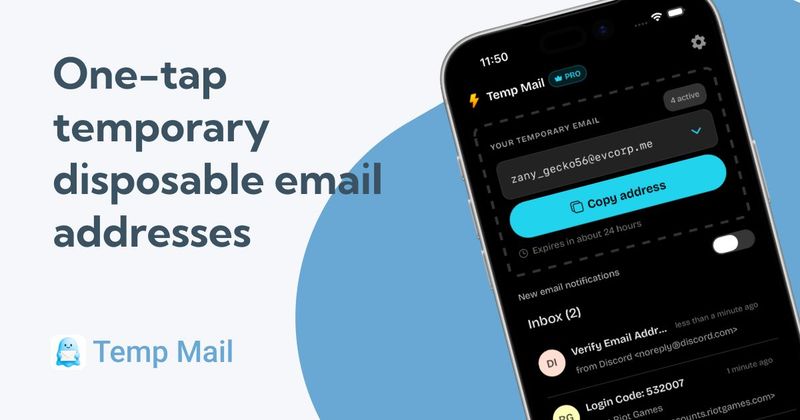
Temp Mail is a mobile app available on iOS and Android (created by jamcry) that creates disposable email addresses for receiving OTPs, verification codes, and newsletters. With a single tap, it generates a fresh inbox that automatically expires after a set period. No sign-up or personal information is required.
Key Features
- One-tap generation — Create a new email address instantly with a single tap; no signup or setup needed.
- Auto-expiring addresses — Addresses automatically expire after a few hours to a few days, reducing long-term spam.
- OTP-friendly inbox — Perfect for receiving verification codes; read them directly in the app.
- Copy & paste ready — Copy the address in one tap and paste it into any signup form or app.
- No sign-up required — Start using immediately without registration, passwords, or personal info.
- Privacy-focused — Emails are stored temporarily and deleted on expiration; no usage tracking.
- Spam shield — Keep promotional emails and newsletters away from your personal inbox.
- Free forever — Generate as many addresses as needed, no subscriptions or hidden fees.
Who is it for?
- Privacy-conscious users — Individuals who want to keep their real email out of marketing lists and data leaks.
- Developers and QA testers — Professionals testing apps or services who need multiple disposable addresses without cluttering personal inboxes.
- Online shoppers — People signing up for free trials, discounts, or newsletters that require email verification.
- One-time verification users — Anyone needing a temporary email for OTPs or account confirmation on untrusted services.
What can you do with Temp Mail?
- Receive OTPs and verification codes — Use when a service insists on email confirmation; read codes right in the app.
- Sign up for free trials and newsletters — Avoid spam by using a disposable address that expires automatically.
- Test app signups and workflows — Generate multiple addresses quickly for QA testing without affecting your main inbox.
- Protect against data leaks — Use for untrusted signups to keep your real email safe from breaches.
How does Temp Mail work?
- Open the app and tap once to generate a new temporary email address.
- Copy the address and paste it into any signup form or OTP request.
- Receive incoming emails and verification codes directly within the app. The address automatically expires after a set period, keeping your inbox clean.
Pricing
Temp Mail is completely free. No subscriptions or hidden fees. Generate as many temporary addresses as you need.
FAQ
How long do temp email addresses last?
Temporary addresses expire after a set period, typically a few hours to a few days. Once expired, the address can no longer receive emails.
Do I need to sign up or create an account?
No. Open the app, tap to generate an address, and start using it immediately. No registration or passwords required.
Can I use these addresses for important accounts?
Temp Mail recommends using disposable emails for one-time verifications, free trials, and untrusted signups. For important accounts like banking or healthcare, use your real email.
Are the emails private and secure?
Yes. Emails are stored temporarily and automatically deleted when addresses expire. The app does not store personal information or track usage patterns.
Can I reply to emails sent to a disposable address?
No. Disposable addresses are receive-only, designed for one-way communication like OTPs and verification codes.
Pros and cons
Pros:
- Free and no sign-up required.
- Instant address generation with one tap.
- Auto-expiration prevents long-term spam.
- Privacy-focused with no tracking.
Cons:
- Receive-only, no sending or replying.
- Not recommended for important accounts due to temporary nature.