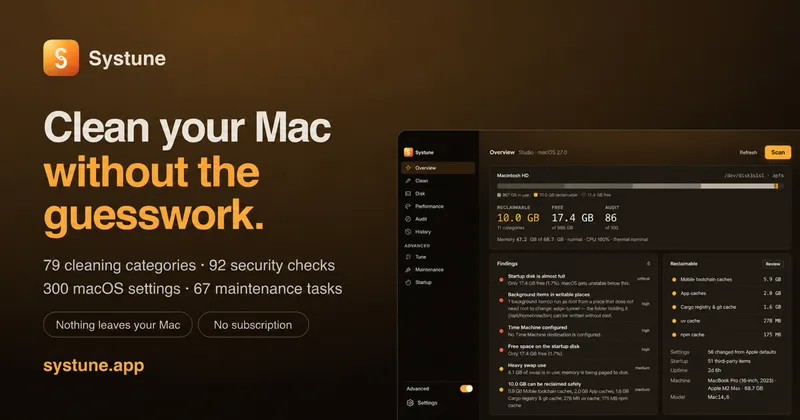
Systune is a Mac cleanup, disk-analysis, security-audit and settings utility that builds a written, reviewable plan of every change before it touches a file or a preference.
What is Systune?
Systune is a macOS utility in development that combines four tools over one shared engine: a cleaner with 103 categories, a disk analyzer with four visual views, a security and privacy audit with 92 checks, and a settings panel covering 300 macOS preferences plus 67 maintenance tasks. It takes a scan of your Mac as input and outputs a categorised findings list — each item carrying a file path, size, age and risk level — which you review and confirm before any deletion or preference change runs. It requires macOS 14 Sonoma or later and runs natively on both Apple silicon and Intel, shipping as a signed and notarised Mac app alongside a CLI and a full-screen terminal dashboard. The macOS app processes scan results locally and includes no analytics or crash reporting.
What makes Systune stand out?
- Test strip before commit — before anything is removed, a sheet states every path, file count and byte total the commit will act on, and waits for confirmation.
- Four cleanup risk levels — the 103 cleaning categories (caches, build output, package managers, browsers, virtual machines) each carry a risk badge and a plain description; careful and dangerous categories ship switched off.
- Protected-path policy — keychain data, iCloud Drive, Photos, Mail and Messages data are refused regardless of what a category requests, and caches of running apps are skipped rather than deleted.
- Honest audit scoring — a security check that cannot be read reports as unknown rather than a pass, and informational findings carry no weight in the 92-check score.
- Settings snapshots — all 300 preference toggles (Finder, Dock, keyboard, trackpad, power, security, Safari) save prior values so a change can be restored, with four profiles for applying a whole posture at once.
- Shared Rust engine across surfaces — the Mac app, command line (every command accepts
--json), full-screen TUI and an iPhone companion that pairs over your own local network all drive the same core, not shell-script wrappers. - Written run history — cleans, settings changes, maintenance runs and startup edits are recorded on disk and readable later, including interrupted work.
Who should use Systune?
- Developers on 14-inch MacBooks — reclaim build folders and toolchains (the developer's own machine showed 18.3 GB in build artefacts) while keeping running-app caches intact.
- Security-conscious users — run the 92-check audit across FileVault, SIP, firewall, sharing services, background items running as root from writable folders and SSH keys, with one-click fixes on many findings.
- Terminal-first users — script
systune auditfrom cron with JSON output, or operate the full-screen TUI dashboard one keystroke per surface. - Households of up to three Macs — one direct licence covers three machines, with a published comparison against other Mac utilities.
What can you do with Systune?
- Clean a full disk: scan 103 categories, read the risk level and description for each, then review the test strip path by path before sending user files to Trash or deleting regenerable caches in place.
- Find what is actually using space: switch between list, squarified treemap, concentric rings and file-kind breakdown views of the same folder, with hard links counted once and early-stopped walks labelled "so far".
- Audit security configuration: get a score out of 100 covering encryption, firewall, sharing, persistence, privacy and hardware, with administrator-rights depth optional.
- Apply a settings posture: flip Finder, Dock, keyboard, trackpad, power, security and Safari defaults from one panel, then restore prior values from the snapshot if a profile misbehaves.
How does Systune work?
Scan the Mac, inspect findings grouped by area, then confirm. The Clean surface lists each category with a risk badge, description, item count and size; pressing through shows the test strip listing every path, count and byte, and only a confirmation executes it. Settings and maintenance work the same way — prior values are snapshotted, tasks whose underlying tool was removed by a newer macOS say so instead of failing, and every run is written to an on-disk history.
Pricing
Systune is a paid, one-time purchase: a planned US$39 direct licence covers three Macs in one household with two years of updates, and there is no subscription and no in-app upsell. The first 100 waitlist signups get a free lifetime licence including every future version. A 14-day full trial with no account or card, and a 30-day refund on direct purchases, are planned for launch. A separate Mac App Store edition is planned but its features, pricing and date are unconfirmed, and App Sandbox limits system access.
Alternatives
- CleanMyMac, which also offers malware scanning and both subscriptions and one-time purchases
- OnyX, which is free and includes cleaning, maintenance and settings controls
- DaisyDisk, which focuses on visual disk analysis and supports remote cloud-storage scans
FAQ
Is Systune available to download now?
No. Systune is in development and not publicly downloadable; the site takes waitlist signups. The first 100 unique signups receive a free lifetime licence for three Macs, with codes reserved now and sent at release. The iPhone companion is also still in development.
Does a Systune audit replace antivirus software?
No. Systune checks security and privacy configuration such as FileVault, the firewall and sharing settings, and it has no malware-detection engine. The score summarises checks rather than guaranteeing a Mac is secure, and it does not replace macOS protections or a dedicated antivirus product.
Does Systune upload scan results?
The Mac app processes scan results locally with no analytics or crash reporting. Licence activation and manual licence checks contact the licence service but do not send scan results. The website separately uses cookie-free PageHum analytics and stores waitlist data.
Do I need Full Disk Access for Systune?
Only for parts that require it, including some Safari, Mail and Messages data and the permission database read during the audit. Systune reports unavailable checks instead of treating unreadable settings as a pass. Administrator tasks need separate authorisation, and protected paths such as the keychain are refused outright.
Which Macs does Systune support?
Systune targets macOS 14 Sonoma and later on Apple silicon and Intel, with development and testing currently on macOS 27. Release installation checks across supported systems and hardware are still part of the launch work, and the Mac App Store edition's sandbox limits its system access.