
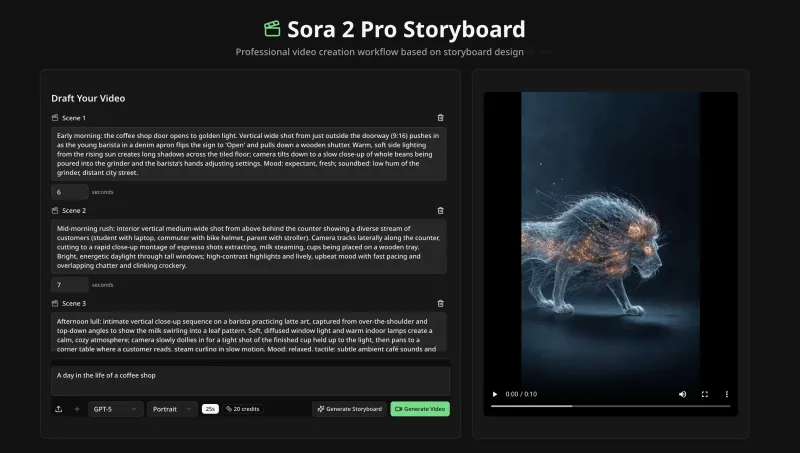
Sora 2 Pro Storyboard is an AI-powered video generation tool by NanoPhoto.AI that lets you create multi-scene storyboard videos up to 25 seconds long using a credit-based pay-as-you-go system, without requiring a $200 monthly subscription.
What is Sora 2 Pro Storyboard?
Sora 2 Pro Storyboard is a web-based AI tool that takes text descriptions and optional reference images as input and produces a 720p video storyboard with multiple scenes. It is developed by NanoPhoto.AI and operates on a credit system where each storyboard costs 50 credits.
Key Features
- Multi-scene support — Create up to 25 seconds of video across multiple scenes, each with its own duration (set via sliders) and text description.
- No monthly subscription — Pay only for what you use with credits; avoid the $200/month Sora 2 Pro subscription fee.
- Professional 720p output — Generate videos suitable for social media, presentations, and creative projects.
- Reference image upload — Guide AI generation by uploading images in formats like HEIC, AVIF, PNG, and JPG.
- Efficient generation — Typical completion in 10-20 minutes with notification when your video is ready.
- Flexible scene control — Add or remove scenes, adjust each scene's duration independently, and reorder as needed.
Who is it for?
- Content creators who need quick, professional storyboard videos for YouTube, Instagram, or TikTok.
- Social media marketers looking to produce engaging multi-scene ads or explainer videos without expensive subscriptions.
- Presentation designers who want to embed short, AI-generated video sequences into slides.
- Creative professionals prototyping narratives or pitching ideas with storyboard-style videos.
What can you do with Sora 2 Pro Storyboard?
- Design multi-scene narratives — Write descriptions for each scene, set durations, and let the AI generate a cohesive video storyboard.
- Avoid costly subscriptions — Use the credit system to pay per video instead of committing to a $200 monthly plan.
- Enhance with reference images — Upload reference photos to ensure the AI matches your desired style, characters, or settings.
How does it work?
- Open the storyboard editor on the NanoPhoto.AI website.
- Add scenes and enter a text description for each, adjusting the duration slider (total must be ≤ 25 seconds).
- Optionally upload reference images.
- Click "Generate Storyboard" (consumes 50 credits).
- Wait 10-20 minutes; you'll be notified when the video is ready to download.
Pricing
Sora 2 Pro Storyboard uses a credit system: 50 credits per video. Plans are available with monthly or annual billing (annual saves 50%):
- Basic — $15/month (150 credits, $0.050/credit)
- Pro — $39/month (800 credits, $0.024/credit)
- Max — $80/month (2,000 credits, $0.020/credit)
- Ultra — $888/month (25,000 credits, $0.018/credit)
FAQ
What video resolution do I get?
You get 720p resolution, suitable for social media and presentations.
How many scenes can I include?
There is no fixed limit on scene count, as long as the total duration does not exceed 25 seconds.
What content is not allowed?
The tool follows standard AI content policies; explicit or harmful content is prohibited.
Can I use reference images?
Yes, you can upload reference images in formats such as HEIC, AVIF, PNG, and JPG to guide the AI.


