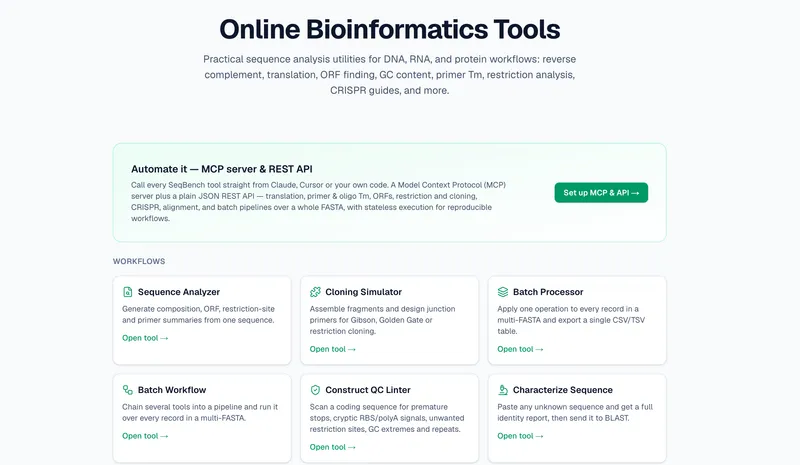
SeqBench is a browser-based workbench for DNA, RNA, and protein analysis, offering primer design, cloning simulation, CRISPR guide design, sequence alignment, and plasmid annotation with all calculations running client-side.
What is SeqBench?
SeqBench is a browser-based bioinformatics workbench for DNA, RNA, and protein sequences. It takes raw sequence text, FASTA, GenBank, or accession numbers as input and produces analysis results, designed primers, cloning plans, CRISPR guides, and annotated maps as output. All calculations run entirely in your browser, so unpublished lab data never leaves your computer. Every tool is also exposed as a REST API and an MCP server for scripting and AI-agent automation.
Key Features
- Client-side processing — All calculations run locally in your browser; sequences are never uploaded to a server.
- SeqStudio sequence editor — Type or paste DNA and edit it directly; every annotated feature remaps live as you insert, delete, or replace bases, even across a circular plasmid's origin. Includes restriction digests, a virtual gel, auto-annotation, undo/redo, and GenBank/SnapGene import & export.
- Cloning Simulator — Assemble fragments and design junction primers for Gibson, Golden Gate, or restriction cloning.
- Batch Processor and Batch Workflow — Apply one operation to every record in a multi-FASTA and export a single CSV/TSV table, or chain several tools into a pipeline and run it over every record.
- CRISPR design tools — Prime Editing Studio designs SpCas9 pegRNAs with PBS sweep, RTT, and 3' extension, plus PE3 nicking guides and twinPE dual-pegRNA design; Base Editing Designer finds CBE (C→T) or ABE (A→G) gRNAs with bystander flags.
- Protein analysis tools — Compute molecular weight, isoelectric point, extinction coefficient, hydrophobicity plots, protease digestion, and view AlphaFold structures in 3D with pLDDT confidence coloring.
- Alignment and variation tools — Align multiple DNA/protein sequences with a colored consensus, compare a query to a reference, annotate variants with ClinVar/gnomAD/CADD scores, and convert HGVS variants to genomic coordinates.
- REST API and MCP server — Every tool is available programmatically, so the same operations can be called from scripts or driven by an AI agent.
Who is it for?
- Molecular biology researchers — Design PCR primers with Tm calculation, simulate restriction digests and cloning assemblies, and annotate plasmids with features.
- Genome editing scientists — Design prime editing pegRNAs, base editing gRNAs, and siRNA/shRNA/ASO knockdown reagents, with scoring and cassette options.
- Bioinformaticians and core facilities — Batch process multi-FASTA files with a single operation or a multi-tool pipeline, and export structured tables for downstream analysis.
- Automation engineers and AI-agent developers — Use the REST API or MCP server to integrate SeqBench operations into scripts, LIMS, or AI-driven workflows.
What can you do with SeqBench?
- Plan a cloning project: Use the Cloning Simulator to assemble fragments and generate junction primers for Gibson, Golden Gate, or restriction cloning.
- Design guides for precise editing: Use Prime Editing Studio for substitutions, insertions, deletions, or small replacements, including PE3 nicking guides and twinPE dual-pegRNA design.
- Screen knockdown reagents: Use the siRNA/shRNA/ASO Designer to get Reynolds/Ui-Tei-scored siRNAs with ready shRNA cassettes or ASO gapmers screened for liabilities.
- Verify sequencing reads: Use Sanger vs Reference to align a Sanger read to a reference and receive a pass/needs-review verification report.
How does SeqBench work?
All tools are self-contained web applications that run in the browser. Paste or upload a sequence in FASTA, GenBank, or raw format, choose an operation, and the results are computed locally. For scale, upload a multi-FASTA file to the Batch Processor or Batch Workflow, select one or more tools, and download the results as a CSV/TSV table. For automation, the same operations are exposed as REST API endpoints and an MCP server, allowing programmatic access.
FAQ
Does SeqBench send my data to a server?
No. All calculations run client-side in your browser, so your sequences and analysis results never leave your computer.
What sequence formats does SeqBench support?
SeqStudio imports and exports GenBank and SnapGene formats. Other tools accept FASTA, FASTQ, and tab-separated formats, and the Format Converter translates between FASTA, GenBank, and tab-separated tables.
Can I automate SeqBench tools?
Yes. Every tool is exposed as a REST API and an MCP server, so you can call the same operations from custom scripts or from an AI agent.
Does SeqBench require registration or installation?
The tools run entirely in the browser; the site lists no registration or installation requirement.