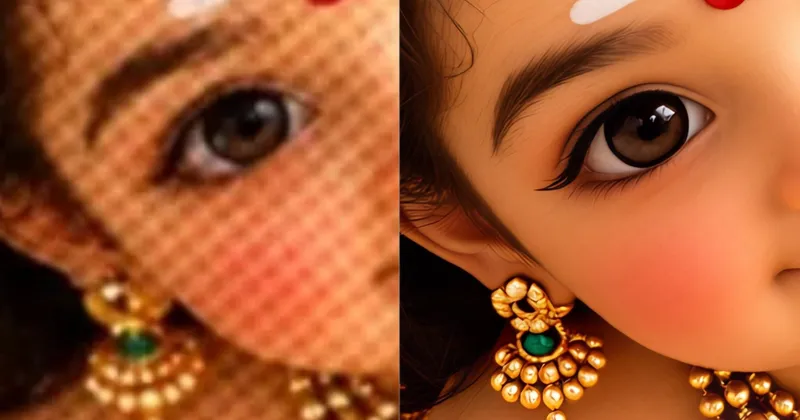
ResLeap enhances and upscales images online to 8K, keeping textures and edges looking natural. It works well on photos and AI art. Start with free credits, then Pro or Business if you need more, with no watermark and batch processing.
ResLeap is an online AI image enhancer and upscaler. You upload a photo or an AI-generated image in the browser and enlarge it, up to 8x, with output that can reach 8K. The goal is rich, natural detail: textures and edges stay convincing instead of turning plastic, which is why it works on both everyday photos and AI art.
Portrait images are a common use. The enhancer can sharpen a low-resolution face and keep skin texture and small features clear while the rest of the frame is scaled up. Illustrated and anime-style images are another fit, where clean lines and color need to stay crisp as the resolution goes up.
Getting started does not require an install. Open https://resleap.com, use the free credits to try an image, and see the before-and-after result in the browser. If you need a higher monthly allowance or 8K output more often, Pro and Business plans add more credits. Those paid plans include no watermark and batch processing, so you can run more than one image at a time.
ResLeap is aimed at people who already have a picture and want it larger and clearer: photographers, designers, and anyone finishing AI art for a post, a print, or a product page. There is nothing to download, and you can start with the free credits before you choose a plan.
Follow updates on X: https://x.com/jay1230d