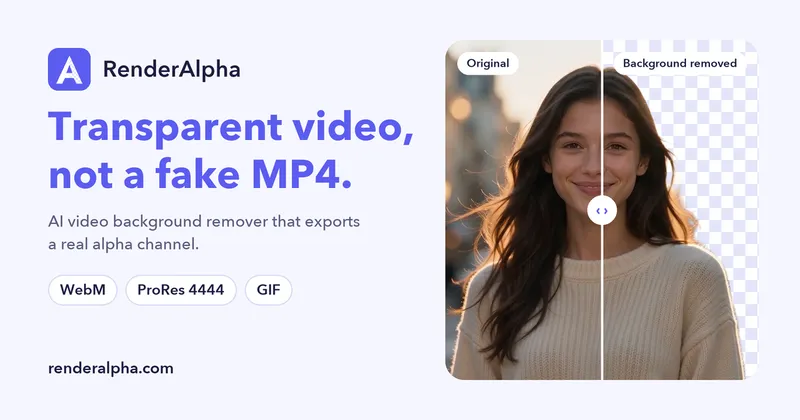
RenderAlpha is a browser-based video background remover that exports clips with a real alpha channel — transparent WebM (VP9), ProRes 4444 (.mov), or GIF with binary transparency — instead of an MP4 that turns black wherever the background was cut away.
What is RenderAlpha?
RenderAlpha is a web app that cuts the subject out of a video clip or GIF and writes the result to a format that actually stores transparency. Inputs are MP4, MOV, WebM or GIF files up to 200 MB and up to 60 seconds per run, uploaded through the browser with no app install and no camera access. Outputs are transparent WebM (VP9 with alpha), ProRes 4444 for editing apps, a GIF with binary transparency, or an MP4 with a solid color or uploaded image placed behind the subject. The page positions the tool against the common failure where a "transparent" export shows up as a black box in OBS or Safari.
What makes RenderAlpha stand out?
- Formats that keep the alpha — WebM (VP9) for Chrome, Firefox, Edge and OBS; ProRes 4444 for Premiere Pro, Final Cut Pro, After Effects and DaVinci Resolve; GIF for chats and stickers.
- Whole-clip processing — every frame of the clip is processed, not a five-second sample, with a 60-second cap per run.
- Free single-frame preview — check the cutout on one frame of your own footage before signing in (a few times a day); after signing in you can preview any frame.
- Background replacement — pick white, black, green or any other color, or upload your own image, and receive an MP4 that plays everywhere.
- No green screen required — the tool does not key on a color, so uneven lighting, wrinkles and green spill on a physical screen matter less.
- No watermark and short data retention — uploads are deleted 24 hours after upload, finished files are kept 7 days for re-download, and deleting an account removes everything.
- Per-second credit pricing — 1 credit equals 1 second of video, a GIF costs 1 credit, and failed jobs are refunded automatically.
Who should use RenderAlpha?
- Streamers on OBS: turn a wave, thumbs-up or reaction clip into a transparent WebM and layer it over gameplay as a Media Source, with no chroma key.
- Video editors: export full-body moves like a spin or a step as ProRes 4444 and stack them over footage in Premiere Pro, Final Cut Pro or After Effects without frame-by-frame masking.
- Web and landing-page designers: place a talking-head presenter next to body copy, using WebM in Chrome, Firefox and Edge plus an MP4 fallback for Safari.
- Product advertisers: lift a sneaker out of a store shot, hands and all, and reuse it across ad layouts as WebM, ProRes or MP4 on white.
What can you do with RenderAlpha?
- Stream alerts and overlays: cut yourself out of a reaction clip and drop the transparent WebM into OBS as a Media Source for alerts and stingers.
- Compositing in an NLE: export ProRes 4444 and place it above existing footage in Premiere Pro or Final Cut Pro, where transparency is read automatically; in After Effects, set alpha interpretation to Straight if edges look dark.
- Sticker and emoji GIFs: convert a video or GIF into a transparent GIF where pixels are fully transparent or fully opaque, with no soft edges.
- Product and ad cutouts: swap the removed background for white, green or a custom image and get an MP4 that plays in any player, including CapCut overlays.
How does RenderAlpha work?
Upload a clip (MP4, MOV, WebM or GIF, up to 60 seconds), and the tool cuts out one frame first so you can see the result before signing in. You then pick an export — transparent WebM, ProRes 4444, a GIF, or an MP4 on a solid color — and download the fully processed clip.
Pricing
Pricing is credit-based: 1 credit is 1 second of video, rounded to the nearest whole second with a minimum of 1, and a GIF costs 1 credit. Subscriptions (Creator, Pro, Studio) deliver 180, 420 or 900 credits per month respectively and start at roughly $15.83 per month on annual billing; unused monthly credits do not roll over. Credit packs (Quick, Starter, Plus) hold 60, 120 or 300 credits and never expire. A single-frame preview is free, and no export carries a watermark.
Alternatives
- Unscreen and remove.bg — auto background-removal services RenderAlpha's page compares itself to, noting that Unscreen closed in 2026 and that remove.bg's photo tool moves to Canva on December 1, 2026 while video and GIF cutouts are handled here.
FAQ
Can RenderAlpha export a transparent MP4?
No. MP4 (H.264) has no alpha channel, so transparent regions render black. RenderAlpha instead offers WebM (VP9 with alpha) for web and OBS, ProRes 4444 for editing apps, GIF with binary transparency, or an MP4 with a new color or image background.
Why does my transparent WebM show a black background in Safari?
Safari does not play transparent WebM files. On a website, serve the WebM to Chrome, Firefox and Edge and add an MP4 fallback for Safari. Inside editing apps, use ProRes 4444 instead, which keeps its alpha on import.
How are credits counted, and how long can a clip be?
Uploads are capped at 60 seconds and 200 MB per run. Each second costs 1 credit rounded to the nearest second: a 7.4-second clip costs 7 credits, a 7.5-second clip costs 8. You pay for the selected portion, a GIF costs 1 credit, and failed jobs are refunded automatically.
Is the free preview the finished video?
No. The free preview is one frame of your own clip, available a few times a day before signing in; after signing in you can pick any frame to check. Processing and downloading the whole clip consumes credits.
What footage does the cutout struggle with?
Glass, smoke, subjects that blend into the background, very fast motion, and limbs crossing the edge of the frame can produce soft or fringed edges. The page recommends running the free preview on the hardest frame of a clip before paying.