
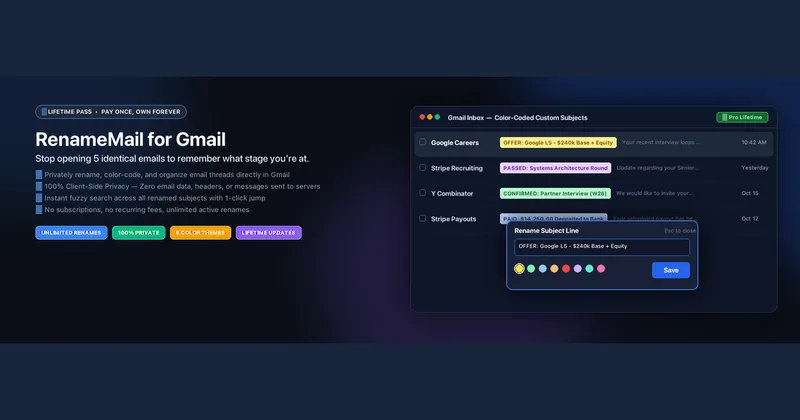
RenameMail is a Gmail browser extension that rewrites the subject lines of emails in your own inbox and tags them with colors and private notes, with every edit stored in local browser storage and invisible to senders.
What is RenameMail?
RenameMail is a browser extension that overlays custom subject lines, color markers and private notes onto Gmail threads. Hovering an inbox row reveals a pencil icon; clicking it lets you replace the subject text, apply one of nine colors and bold selected words, and the extension anchors that title to the unique Gmail thread ID so it survives replies and page reloads. It requires no account, runs on Chrome, Arc, Brave, Zen and Firefox, and was built by independent developer and designer Abhi (Abhishek Kanani). Email bodies are never read, scanned or transmitted.
What makes RenameMail stand out?
- Inline renaming — edits happen from the Gmail inbox list or inside an open thread; hovering a renamed subject shows a tooltip with the original raw subject, and a "Reset to Original" button restores it.
- Nine color markers in two display modes — choose highlighter-style background pills or colored typography, with per-word ⌘B bolding for urgent threads.
- Search operators inside Gmail — type
color:green,is:bold, or a custom tag directly into Gmail's native search bar to filter renamed mail; matching is typo-tolerant. - Private follow-up notes — attach a note to any thread (a target salary band, a callback date) that stays in local browser storage.
- Multi-browser OTP pairing — generate a 5-character one-time code valid for 10 minutes, enter it on a second browser, and renames, colors and notes auto-sync from then on.
- Window tags — label each Gmail browser window with
@Clients,@Hiring,@Personalor similar to separate work and personal accounts. - Local-first storage with JSON export — data lives in chrome.storage.local by default; 1-click JSON backup and restore means you hold the database yourself.
- Sender-invisible by design — the extension does not alter email headers on Google's servers, so recipients only ever see the original subject.
Who should use RenameMail?
- Job seekers and students: convert identical "Thank you for applying" emails into a stage-labelled pipeline — yellow for applied, sky blue for phone screen or online assessment, mint green for final round or offer.
- Freelancers and founders: rename client threads by deliverable and payment status (orange for proposal out, soft red for overdue invoice, mint green for retainer paid) so an unpaid client invoice does not vanish inside a six-month-old reply chain.
- Project and sales teams: replace vague "Following up" subjects and system notifications with sprint tags, ticket numbers and priority markers.
- People running several Gmail accounts: tag each browser window and pair browsers with a 5-character code so labels follow you between Chrome, Arc, Brave, Zen and Firefox.
What can you do with RenameMail?
- Interview tracking: rename each recruiting thread with company, role and round number so the entire application pipeline is readable from the inbox list at a glance.
- Invoice chasing: mark overdue client invoices in soft red and attach a private note with the follow-up date.
- Engineering triage: tag GitHub and system notification threads with sprint and QA status instead of cryptic automated subjects.
- Confidential context: keep salary bands or negotiation notes beside a thread without those notes ever leaving the browser.
How does RenameMail work?
Install the extension from the Chrome Web Store, hover a Gmail row, and click the pencil icon that appears in the native action bar. Pick a color, optionally select part of the text and press ⌘B, then save; the title is stored locally against the thread ID. Optionally tag your Gmail window and pair a second browser with a 5-character OTP valid for 10 minutes to switch on automatic sync.
Pricing
RenameMail uses a freemium model with three tiers. The Starter plan is free forever and covers up to 20 active renamed emails with 3 core color markers, inline editing and local-only storage, with no credit card needed. Pro Unlimited costs $1.99 per month for unlimited renamed subjects, all 9 colors, both display modes, ⌘B bolding, OTP multi-browser sync, private notes and JSON backup, with an annual option listed at $29 per year. The Pro Lifetime Pass is a one-time $19.99 payment that includes future Pro 2.0 updates, and paid tiers carry a 30-day money-back guarantee.
FAQ
Will the sender or other recipients see that I renamed the subject?
No. RenameMail draws the custom subject as an overlay inside your own browser and leaves the actual email headers on Google's servers untouched. Replies and forwards carry the original subject line unless you manually edit the outgoing subject field in Gmail.
Does RenameMail read or transmit my email content?
The extension does not read, scan or transmit email bodies, attachments or contacts, and custom subjects sit in chrome.storage.local by default. If you enable multi-browser cloud sync, only the subject mappings, color tags and notes sync between paired browsers — never message content.
Which browsers does RenameMail support?
The extension runs on Google Chrome, Arc, Brave, Zen Browser and Mozilla Firefox, and the FAQ also lists Microsoft Edge and Vivaldi. Renamed threads sync across all of them through the 5-character one-time pairing code, which expires after 10 minutes.
What happens when someone replies to a renamed thread?
Custom titles are anchored to the unique Gmail thread ID, with sender and subject fallback matching, so the renamed subject and its color marker stay in place when a new reply arrives and pushes the conversation back to the top of the inbox.
Is there a limit on the free plan?
Yes. The free Starter tier caps you at 20 active renamed emails and 3 color markers. Unlimited subjects, all 9 colors, Pill and Colored Text modes, ⌘B bolding and cross-browser sync require the $1.99 monthly Pro plan or the one-time $19.99 Lifetime Pass.


